GPT Image 2 Review: Prompt Guide and Use Cases in 2026
OpenAI released GPT Image 2 on April 21, 2026 — the successor to GPT Image 1.5 and the model now powering image generation across ChatGPT. We tested it during launch week and came back to it again in late June with a wider set of prompts, OpenAI’s own prompting guide, and its published API pricing to see how the model holds up once the initial hype settles.
Key Takeaways:
- GPT Image 2 generates images at native 2K resolution with optional 4K upscaling, and text rendering accuracy sits above 95% across Latin, Chinese, Japanese, Korean, and Arabic scripts.
- The model is best treated as a design assistant rather than a photo generator: it excels at jobs with a clear success standard — exact copy, a locked layout, a repeatable panel structure — and gets less predictable on open-ended “make it beautiful” prompts.
- Brand logo reproduction, tiny legal copy, and proprietary fonts remain weak points that still need manual review.
- OpenAI’s API bills GPT Image 2 by token across image input, cached image input, image output, text input, and cached text input — a different pricing model than the per-image tiers some competitors use.
- PixVerse includes GPT Image 2 in its text-to-image lineup alongside Nano Banana 2 and Seedream, so a generated image can go straight into an image-to-video pipeline without leaving the workspace.
What Is GPT Image 2? Key Features and Limitations
GPT Image 2 is OpenAI’s second-generation image model, replacing GPT Image 1.5 across ChatGPT and the API. It competes with Midjourney, DALL-E 3, and Stable Diffusion, but stakes its identity on two things: accurate text inside images, and a reasoning layer that interprets a prompt’s intent rather than just matching its keywords.
Core Features at a Glance
| Feature | GPT Image 2 | GPT Image 1.5 | Midjourney V8 |
|---|---|---|---|
| Native resolution | 2K (with 4K upscale) | 1K | 2K (with —hd flag) |
| Text rendering accuracy | 95%+ multilingual | ~70% (Latin only) | ~80% (Latin only) |
| Reasoning integration | Yes — interprets layered instructions | No | No |
| Aspect ratio range | 3:1 to 1:3 | 1:1, 16:9 | 1:1 to 3:2 |
| Character consistency | Pixel-level across sequential images | Limited | Moderate (—cref flag) |
| Natural language editing | Yes — edit regions by describing them | No | No |
| Pricing | Token-based via API; ChatGPT plan tiers | Same | $10–30/mo subscription |
Text rendering is the feature that gets the most attention, and for good reason. Older image models treated text as texture — ask for a poster headline and you’d get letter-shaped noise. GPT Image 2 handles multi-line English headlines, Chinese characters, and mixed-language layouts with real consistency; in our tests, roughly 19 out of 20 generations came back fully legible on the first try.
Reasoning integration means the model does more than pattern-match your wording. Ask it to “generate an infographic showing activities for tomorrow’s weather in San Francisco,” and it will pull the forecast, pick relevant activities, and build a layout around that data — a step beyond how Midjourney or Stable Diffusion process a prompt.
Natural language editing lets you revise an image by describing the change instead of masking it manually. “Move the coffee cup to the left side of the table” or “change the sky to sunset” both apply as targeted edits without regenerating the whole scene.
What Users Are Saying
Feedback since launch has been largely positive, with a consistent set of complaints. Portrait tests circulating on X and Reddit look close to studio photography, and poster designers testing long-form layouts — flyers, menus, signage — report that text accuracy finally holds up under real use. Several designers noted they could skip a Photoshop pass for basic marketing assets because the model’s own sense of composition is strong enough to make layout decisions unassisted.
The strongest praise centers on prompt adherence: ask for 15 specific elements in a scene and GPT Image 2 tends to include all of them, where older models would start dropping details as prompts got longer.
On the negative side, brand fidelity is still inconsistent. A widely shared ZDNet hands-on test showed the model failing to reproduce the ZDNET logo accurately, and other users have reported the same with specific brand marks. The model understands what a logo is conceptually, but it doesn’t reliably reproduce exact vector shapes or proprietary typefaces.
Known Limitations
- Brand logo reproduction is unreliable — composite exact logos in Photoshop or Figma after generation rather than prompting for them directly.
- Generation speed trails lighter models like FLUX or Nano Banana 2, with 30–60 seconds typical on ChatGPT Plus versus under 10 seconds elsewhere.
- Free-tier rate limits are tight — roughly two images a day for free ChatGPT users. Plus subscribers get unlimited ChatGPT generations, but API costs scale with volume.
- Style control is coarser than Midjourney’s. You can’t dial in film stock, lens type, or grain with the same precision, and the model’s own aesthetic bias takes deliberate prompt work to override.
- Content policy is stricter than open-source alternatives, so some prompts that work fine on Stable Diffusion or local models will be declined here.
None of these rule out production use, but they’re worth knowing before you build a pipeline around one model exclusively.
How to Write GPT Image 2 Prompts That Actually Work
The clearest shift in our second round of testing: the best GPT Image 2 prompts don’t just describe a picture — they describe the job the picture has to do. A social ad prompt should read differently from a product cutout, an infographic, a UI screen, or a first frame meant for video.
A reliable pattern for structuring the brief:
Create [type of image] for [use case]. Main subject: [specific subject and visible details]. Exact text, if any: “[copy that must appear]”. Composition: [framing, layout, negative space, subject placement]. Style and lighting: [visual language, medium, mood, light direction]. Constraints: [what must not change, no extra words, no watermark]. Output format: [aspect ratio, transparent background, video-ready frame].
Name the job before the style
Lead with the output type — poster, product ad, app screen, character sheet, diagram, edit, or video first frame — so the model knows what standard it’s being judged against.
Weak: A cool futuristic speaker, cinematic, high detail.
Better: Create a premium product ad for a matte black wireless speaker. The image should work as a 16:9 campaign banner, with the product on the right, a short headline on the left, clean negative space, and sharp product edges.
The second version tells the model it’s being judged on layout and usability, not just aesthetics.
Treat text like a locked asset
Put any required copy in quotation marks and say exactly how it should render — don’t ask for “a slogan” unless you want the model inventing words for you.
Headline: “SOUND YOU CAN FEEL”. Render the headline verbatim. No extra words, no duplicate text, no fake logo. Bold white sans-serif type, left side of the composition, readable from a distance.
For longer copy, split each line explicitly in the prompt. If a word comes back misspelled, regenerate with shorter copy, larger type, and a stricter “exact text only” instruction.
Give the model a camera and a layout
State camera distance, angle, subject placement, negative space, and aspect ratio directly — GPT Image 2 follows composition cues well, but only when they’re spelled out.
- Close-up for product texture, hands, faces, materials, labels.
- Wide shot for environments, story scenes, city posters, video-ready frames.
- Top-down for food, desk scenes, flat-lays, packaging kits.
- Left third / right third for ad layouts balancing text and product.
- Clean grid for UI mockups, character sheets, diagrams, infographics.
Write edits in three sentences
The strongest edit prompts separate the change from what must stay untouched and from the physical realism that ties them together:
Replace the parked car with a vintage bicycle. Preserve the house, fence, driveway, landscaping, lighting direction, camera angle, and time of day exactly. Match the bicycle scale, contact shadow, and perspective to the existing scene.
That “change, preserve, match” structure consistently outperforms a vague “make this look better” request.
Add a motion cue if the still will become video
If an image might later feed a PixVerse image-to-video pipeline, prompt for depth and motion-readiness up front: foreground, midground, background, a clean subject silhouette, and one visible cue that could move — dust, fabric, hair, rain, reflection, or a camera push path.
Instead of: An astronaut in a desert.
Use: A cinematic first frame for an image-to-video clip: a lone astronaut standing at the edge of a glowing desert crater at dawn, cape and dust ready to move in the wind, strong foreground silhouette, clear depth layers, and warm horizon light.
How We Tested GPT Image 2
Across both rounds of testing, we ran the model through portraits, text-heavy posters, product-style compositions, character sheets, UI mockups, and experimental narrative scenes. The goal wasn’t a benchmark score — it was whether a designer, marketer, or creator could ship the output with light edits instead of rebuilding the asset from scratch.
| Test area | What we checked |
|---|---|
| Portraits and cinematic stills | Lighting control, skin texture, reflections, mood, scene consistency |
| Poster and typography layouts | Headline spelling, multi-line text, hierarchy, negative space, brand-like polish |
| Character and concept sheets | Multi-view consistency, costume detail, palette alignment, label accuracy |
| UI and social mockups | Layout realism, small text, icon spacing, feed grids, screenshot believability |
| Experimental prompts | Humor, narrative reasoning, object placement, small-caption accuracy |
The pattern held across both rounds: GPT Image 2 rewards a precise brief more than a keyword chain. When a prompt names the job and defines success — exact text, a locked layout, a repeatable panel structure — the model tends to preserve structure. When a prompt only asks for a vague mood, the result can still look polished, but it’s harder to reuse without edits.
GPT Image 2 Use Cases with Prompt Examples
We stress-tested five distinct capabilities across these scenarios: lighting control, exact-text typography, multi-element composition, character consistency, and UI layout. Each prompt below is ready to copy and adapt.
Cinematic Portrait Photography
This checks the model’s grasp of lighting, atmosphere, and restrained composition — the fundamentals that separate a portfolio-ready image from a generic AI render.
Prompt:
Generate a cinematic portrait of a solitary figure standing in an intense orange-to-red gradient environment. Strong silhouette lighting from behind, deep shadow contrast, reflective glossy floor mirroring the figure. Symmetrical composition, minimal set design, no background clutter. The mood is contemplative and powerful, like a still from a science-fiction film. Aspect ratio 16:9.
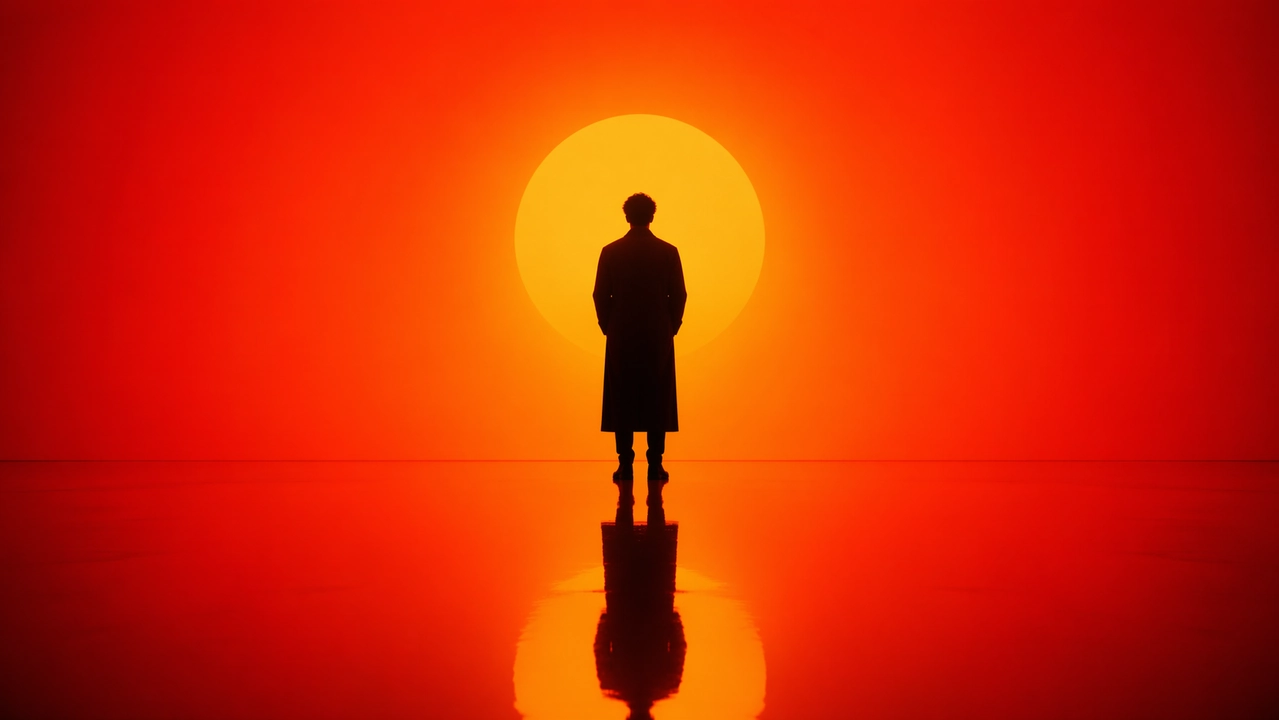
What to look for: clean silhouette edges with no halo artifacts, an accurate floor reflection with correct perspective, a smooth (not banded) gradient, and a pose that carries real weight rather than looking stiff or floating.
City Poster and Illustration Design
The hardest stress test for legible typography paired with a dense, multi-element composition — ten-plus distinct visual elements arranged along an S-curve, with English text that has to survive the render intact.
Prompt:
A striking Spring 2026 city poster for New York with a bold contemporary design and an elegant celebratory mood. Clean off-white textured background with generous negative space. A miniature kayaker paddles across a narrow ribbon of reflective water in the lower-right corner. The wake sweeps upward in a dynamic calligraphic curve, gradually transforming into the Hudson River and then into a dreamlike hand-painted panorama of Manhattan. Inside the flowing river-shaped composition: the Empire State Building, Brooklyn Bridge, Central Park canopy, One World Trade Center, brownstone rooftops, yellow cabs, harbor ferries, and the Statue of Liberty in soft distance. Soft morning fog, golden spring light, subtle accents in navy and gold. Elegant typography in the lower left reads “SPRING 2026” with a vertical slogan “NEW YORK — A CITY OF BRIDGES, DREAMS, AND REINVENTION”. Text must be sharp and beautifully composed. No extra words. Premium graphic design, aspect ratio 9:16.
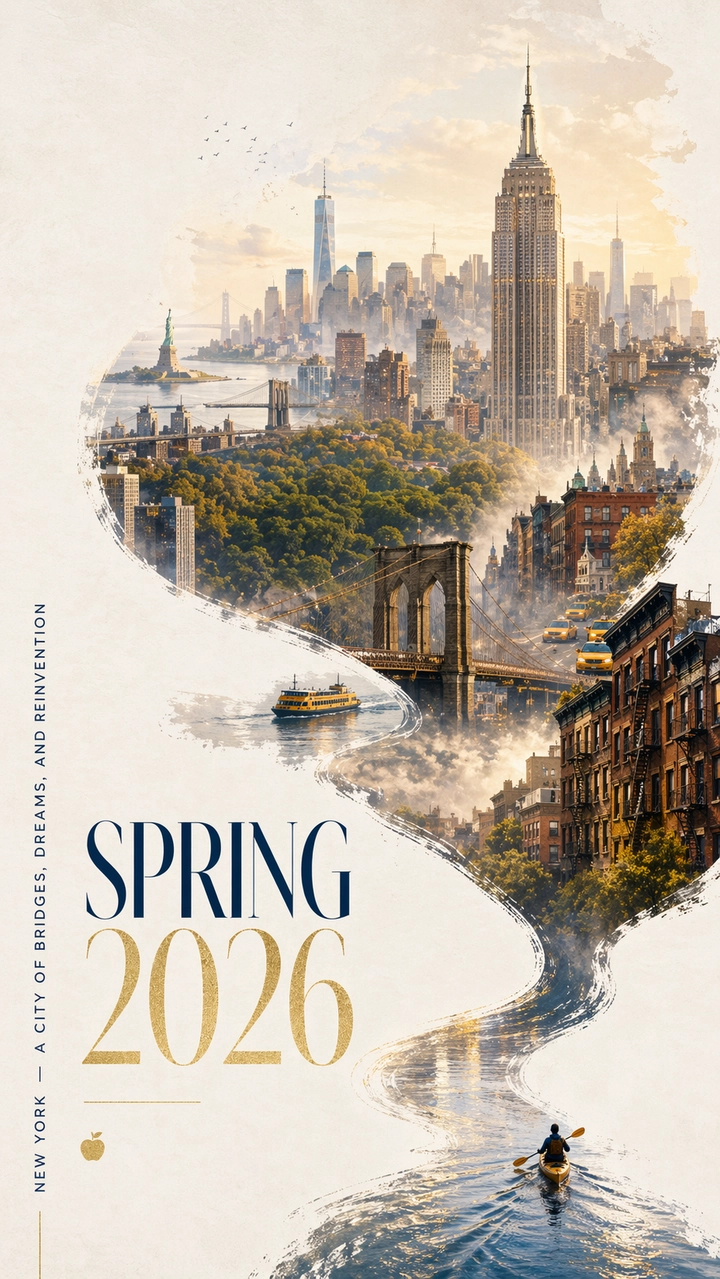
What to look for: every letter in the title and slogan should be legible and correctly spelled, the S-curve should flow naturally from kayaker to skyline, landmark buildings should read as recognizable rather than generic towers, and the negative space should feel intentional rather than empty.
Character Design and Reference Sheet
Game developers and concept artists need multi-view consistency out of a single generation. This checks whether the model can hold a character’s design steady across front, side, and back views.
Prompt:
Create a professional character reference sheet for an original fantasy RPG character: a young female mage with silver hair and violet eyes, wearing an ornate dark cloak with glowing rune patterns. Include on a clean white background: a three-view turnaround showing front, side, and back; facial expression variations showing neutral, smiling, angry, and surprised; detailed breakdowns of costume and equipment pieces; a color palette swatch row; and brief world-building notes in clean typography. Organized grid layout, concept art style, high resolution. Aspect ratio 16:9.
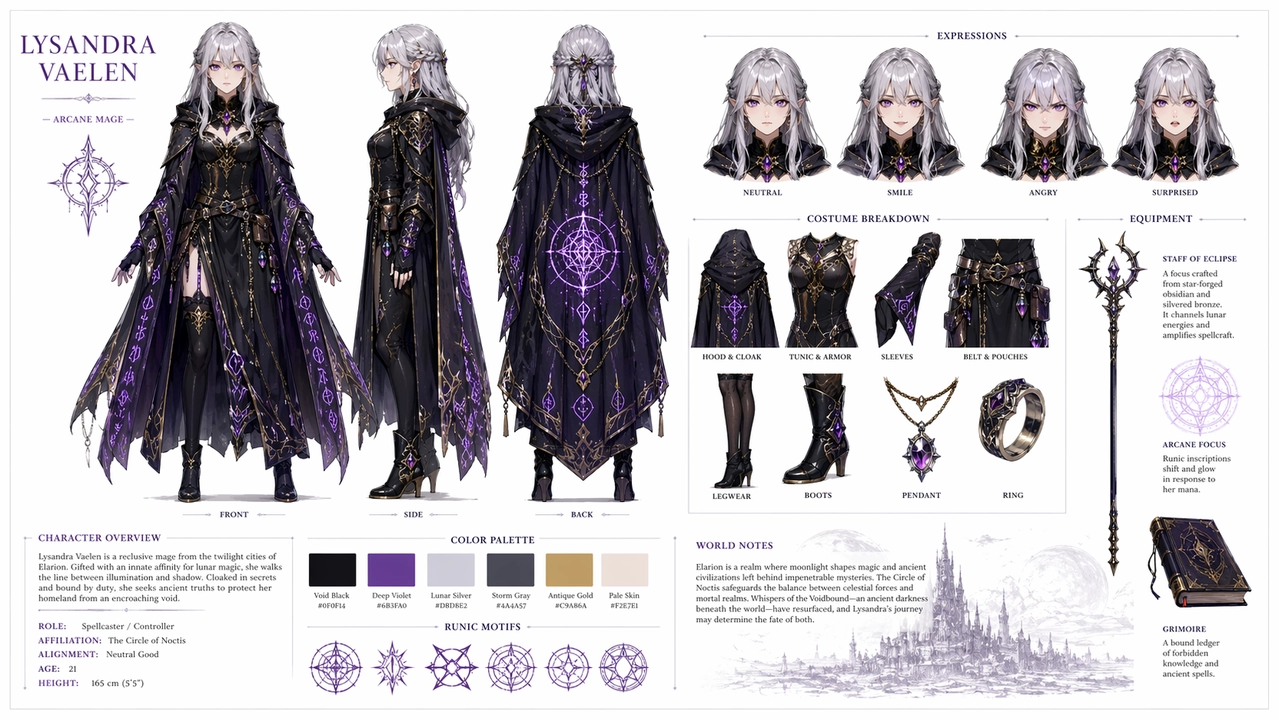
What to look for: face, hair, and outfit should stay consistent across all three views; expression variations should only change the face, not the hairstyle or clothing; the palette swatch should actually match the colors used in the art; and text labels should be spelled correctly. If a side or back view drifts, regenerate with stronger “preserve” language repeating the identity anchors.
UI and Social Media Mockup
This pushes three things at once: pixel-accurate UI layout, mixed-language text rendering, and creative concept fusion — the kind of content that also tends to perform well on social platforms.
Prompt:
A hyper-realistic iPhone screenshot of a fictional Instagram profile page for Leonardo da Vinci, username @davinci_official, as if he were a modern influencer in 2026. Profile photo is a Renaissance self-portrait in a circle crop. Bio reads: “Artist, Engineer, Inventor | Currently dissecting things | DM for commissions”. The grid shows 9 posts: the Mona Lisa reframed as a mirror selfie, a helicopter sketch captioned “just dropped my new drone design”, an anatomy study posted as a gym progress photo, The Last Supper staged as a dinner party group shot, and other creative anachronistic mashups. Follower count: 12.4M. Story highlights labeled Sketches, Inventions, and Florence Life. Complete iOS status bar with carrier text reading “Renaissance 5G”, battery icon, and current time. Dark mode UI throughout. Photorealistic screenshot quality, aspect ratio 9:16.
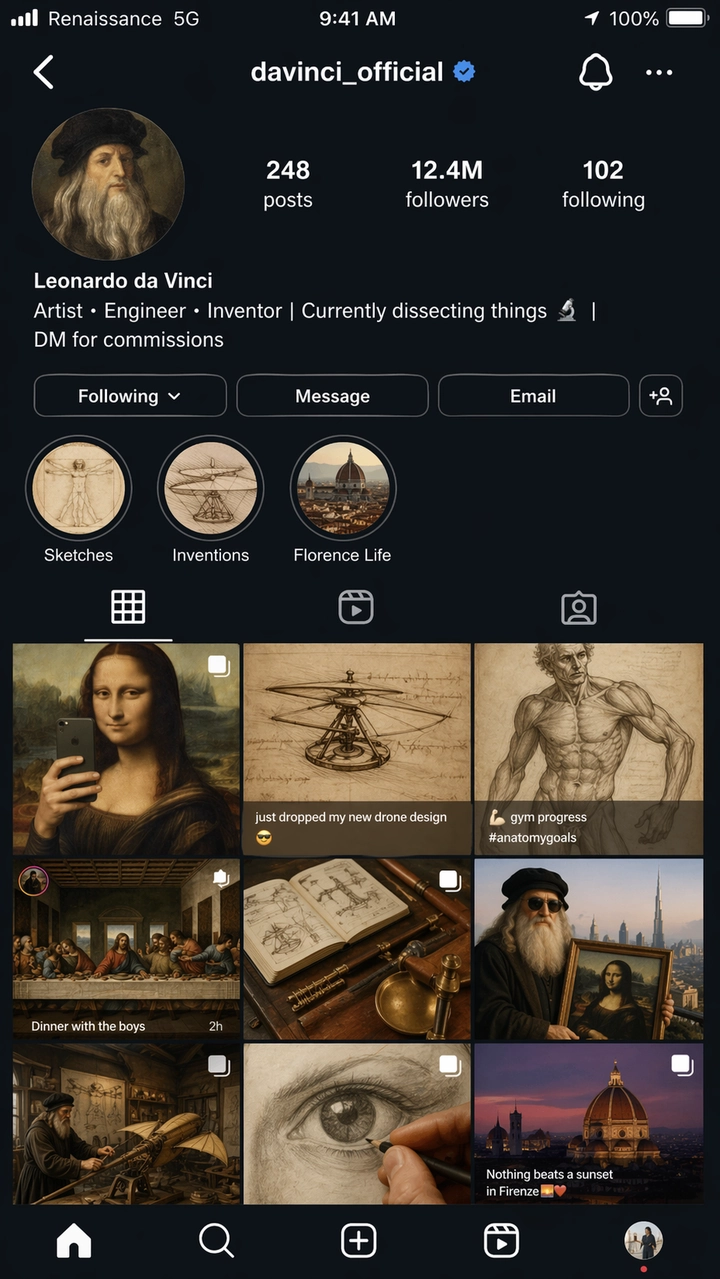
What to look for: the Instagram UI elements — grid spacing, profile layout, story circles, tab bar — should read as an actual iOS screenshot rather than a stylized approximation. All text should be readable, and the “Renaissance 5G” carrier label is a deliberate accuracy check. Treat any UI mockup output as a concept reference rather than production-ready UI; small labels and icon alignment usually need a cleanup pass.
Creative and Experimental Art
Short prompts with built-in narrative humor test whether the model fills creative gaps on its own instead of relying on exhaustive instructions.
Prompt:
Inside a museum exhibit titled “Ancient Technology: The Desktop Era”, a programmer in a glass display case is live-demonstrating coding on a CRT monitor while amazed schoolchildren press their faces against the glass. The exhibit placard reads: “Homo Developerus (c. 2005) — Primitive human using keyboard-based input devices.” A second display case nearby shows a physical book labeled “Stack Overflow — Print Edition, Vol. 1 of 4,827”. 2D cartoon illustration style, warm museum lighting, humorous and nostalgic tone. Aspect ratio 16:9.
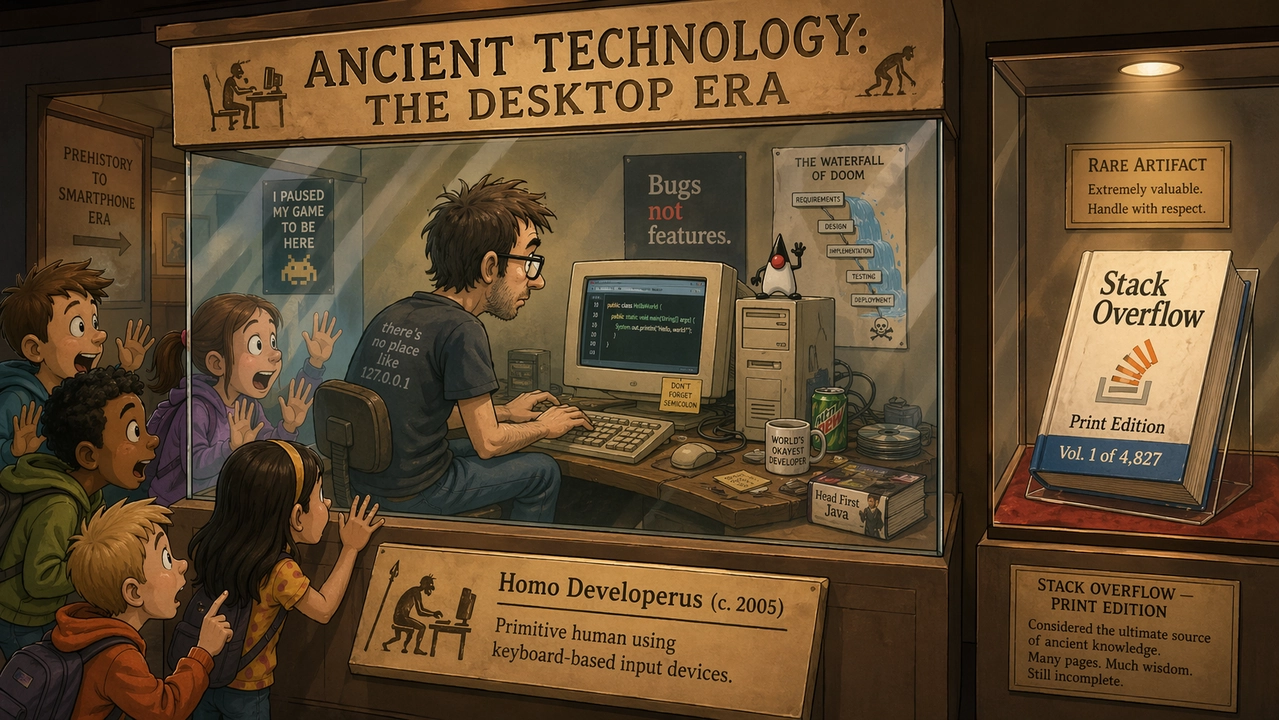
What to look for: the humor should land through visual details, not just the caption text. The placard and book title need to stay legible and correctly spelled — a genuinely hard test for multi-line text at small sizes — and the cartoon style should feel cohesive across the whole scene rather than photorealistic in patches.
Test Results by Use Case
The strongest results consistently came from prompts with an obvious production standard — something judgeable by spelling, layout, object preservation, or panel order. Vague mood-only prompts produced more variable results.
| Use case | What worked well | What still needs review |
|---|---|---|
| Text rendering | Large headlines, short labels, poster titles, and simple UI labels stayed accurate when the exact copy was quoted. | Tiny legal copy, dense paragraphs, and stylized fonts can still drift — keep copy short and check every letter. |
| Product images | Clean ad layouts, campaign negative space, and product-first compositions rendered well. | Real labels, logos, and regulated claims still need manual review or compositing from approved assets. |
| UI mockups | Mobile screens, dashboards, and app-like hierarchy looked plausible when the prompt named real interface elements. | Treat outputs as concept mockups — small labels and icon alignment usually need cleanup. |
| Character consistency | Character sheets, expression rows, and palette swatches worked well as creative references. | Faces and costume details can drift across views; repeat identity anchors and regenerate if needed. |
| Editing and compositing | The “change, preserve, match” pattern outperformed broad edit requests. | Selection boundaries and transparent-background output still need QA. |
Common GPT Image 2 Prompting Mistakes
- Asking for accurate text without providing exact copy. If text matters, write it out verbatim and say where it belongs.
- Overloading a single prompt with every possible detail. Start with the core scene, then refine one variable at a time.
- Forgetting to state invariants during edits. Spell out what must stay unchanged: identity, background, pose, lighting, product shape, label text, camera angle.
- Leaning on decorative quality words for functional jobs. “Beautiful” doesn’t make a label readable — use language like “sharp label text” or “readable from a distance” instead.
- Skipping aspect ratio. A strong square image can still fail as a vertical ad or video thumbnail.
- Treating logos like ordinary text. GPT Image 2 can design logo concepts, but exact brand marks should be composited from approved assets rather than prompted directly.
GPT Image 2 API and Pricing Notes
OpenAI’s API pricing page lists GPT Image 2 on a token basis rather than a flat per-image rate:
| Item | Listed price |
|---|---|
| Image input | $8.00 / 1M tokens |
| Cached image input | $2.00 / 1M tokens |
| Image output | $30.00 / 1M tokens |
| Text input | $5.00 / 1M tokens |
| Cached text input | $1.25 / 1M tokens |
Actual cost per image depends on prompt length, reference images, output size, caching, and quality setting. ChatGPT plan quotas are a separate track from API billing — a Plus subscription doesn’t translate directly into API credit, so budget the two independently if you’re using both.
For high-volume workflows, the number that matters is cost per accepted asset after retries, not the list price of a single attempt. A cheaper generation isn’t actually cheaper if it needs three regenerations to get spelling or layout right.
| Workflow | Practical prompting advice |
|---|---|
| Text-heavy posters or diagrams | Use fewer words per image, quote exact copy, specify hierarchy explicitly. |
| Product photos | Lock product shape, label, color, material, and camera angle; repeat the preserve list on every edit pass. |
| UI mockups | Describe the screen as a shipped interface — navigation, cards, buttons, states — not as concept art. |
| Multi-reference edits | Label each input image by role: subject, style, background, outfit, or material reference. |
| Batch generation | Track cost per accepted image, not cost per attempt. |
If you want to see how GPT Image 2 stacks up against a photorealism-first alternative on identical prompts, our GPT Image 2 vs. Nano Banana 2 comparison runs six head-to-head rounds with full API and platform pricing breakdowns.
From Image to Video: Complete Your Creative Workflow on PixVerse
Generating a strong image is one step. Turning it into motion is where most workflows break down — you finish a portrait or a product poster in GPT Image 2, then have to open a separate tool, re-upload the file, and hope the video model doesn’t warp your carefully composed image. That handoff friction is exactly what PixVerse removes.
GPT Image 2 Is Live on PixVerse
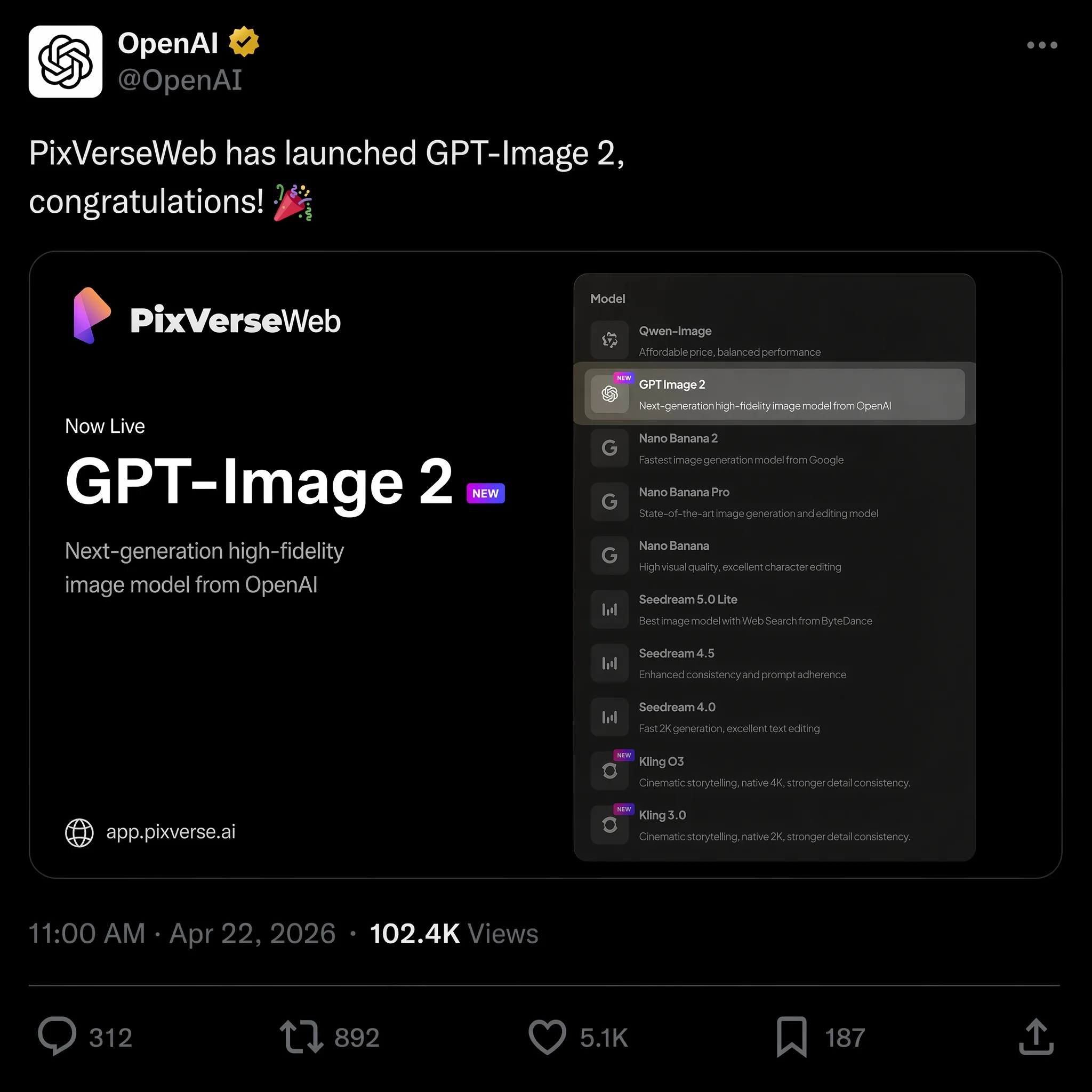
On April 22, 2026, PixVerse added GPT Image 2 as a text-to-image option, joining Nano Banana 2, Seedream, and HappyHorse 1.0 in the model lineup. You can generate an image with GPT Image 2 and convert it to video in the same workspace, with no downloading, re-uploading, or tab-switching involved.
That matters for a concrete reason: when the image feeds straight into an image-to-video pipeline on the same platform, the video model works from the full-resolution source file and its metadata directly. There’s no quality loss from compression or format conversion along the way, which means cleaner motion and fewer artifacts in the final clip.
If a still is meant to become a clip, prompt for motion-readiness from the start — ask for foreground, midground, and background depth, a clean subject silhouette, and one physical element that can plausibly move (dust, steam, fabric, a shifting light source). Review the still like a finished design file before animating it: check spelling, product geometry, and UI alignment first, since a video model won’t fix a misspelled headline or a warped label on its own. Then write a separate, shorter motion prompt describing only what should move and what must stay locked, rather than repeating the full image brief.
Why Creators Are Moving to an All-in-One Platform
If you were using OpenAI’s Sora for video generation before March 2026, you already know the risk of building a workflow around a single tool. OpenAI shut down the Sora app and API on March 24, citing unsustainable costs and a pivot toward robotics, and thousands of creators lost their video pipeline overnight. See our Sora alternatives guide for a full breakdown of what happened and which tools filled the gap.
PixVerse takes a different approach by giving you access to multiple models across the full creative pipeline instead of locking you into one:
- Text-to-image with GPT Image 2, Nano Banana 2, Seedream, and more — pick the model that fits the job
- Image-to-video that converts your generated images into motion with character consistency and camera control
- Text-to-video for clips generated directly from a written prompt using PixVerse V6 or the cinematic C1 model
- Native audio generation that syncs sound effects and dialogue to your video automatically
The practical benefit: you can go from a written concept to a finished video with synchronized audio without leaving one workspace, which removes hours of file management from every project. If you’d rather script generation from the command line, the PixVerse CLI guide covers automating both image and video generation.
PixVerse also offers 30–60 daily free credits for new users, so you can test the full pipeline — from image generation to video output — before committing to a paid plan.
Frequently Asked Questions
Is GPT Image 2 free to use?
Free ChatGPT users can generate roughly two images per day with GPT Image 2. ChatGPT Plus subscribers ($20/month) get unlimited generations with faster processing. API access is billed per token across image input, image output, and text input, so cost scales with prompt length and output size rather than a flat per-image fee.
What resolution does GPT Image 2 support?
GPT Image 2 generates images at native 2K resolution, with an optional 4K upscale through the API. Aspect ratios range from 3:1 to 1:3, so square, vertical, and ultra-wide formats are all available directly.
Can GPT Image 2 render text in images accurately?
Yes — this is one of its strongest features. In our testing, text accuracy across English, Chinese, Japanese, Korean, and Arabic exceeded 95% on the first generation attempt. Multi-line headlines, poster titles, and UI text labels are all handled reliably, though very small text at low resolutions can still misfire occasionally.
How does GPT Image 2 compare to Midjourney and Nano Banana 2?
Midjourney V8 has stronger artistic style controls and a more established community for aesthetic refinement. Nano Banana 2 is the stronger pick for photorealism, cinematic lighting, and fast iteration. GPT Image 2 has the edge for text rendering, structured layouts, and natural-language editing. For poster design and marketing materials with text, GPT Image 2 currently wins; for pure artistic exploration or photoreal hero shots, the other two are worth comparing directly — see our head-to-head test against Nano Banana 2.
What are the best alternatives to Sora for video after the shutdown?
After OpenAI shut down Sora in March 2026, the top alternatives include PixVerse V6 for character-consistent multi-shot video, Runway Gen-4 for cinematic camera control, and Kling v3.0 for action sequences. PixVerse is the only platform combining text-to-image, image-to-video, and text-to-video with native audio, all accessible with daily free credits. See our full Sora alternatives guide for a detailed comparison.
Can I turn GPT Image 2 outputs into video?
Yes. With GPT Image 2 available in PixVerse, you can generate the image in-app and convert it to video using the image-to-video pipeline in the same workspace, with no file transfers required. You can also upload a GPT Image 2 file created elsewhere and run it through the same pipeline.