Reference-to-Video Limits: Kling 4.0, Vidu Q4, Seedance 2.5
Source-based overview; facts checked Oct 19, 2026. Speed, quality and benchmark claims are vendor-reported unless stated otherwise. Prices and early-access terms change; check provider pages before budgeting.
Last updated: Oct 19, 2026
Reference-to-video planning starts with the assets you need for a shot: product angles, character portraits, motion examples and a voice line. Before preparing uploads, check whether the model accepts that combination. A generous image allowance does not tell you how many clips can accompany it, or whether a separate combined limit applies.
This guide compares Seedance 2.5, Kling 4.0, Vidu Q4 Preview and HeyGen Video 1.0 using each vendor’s own documentation as of Oct 19, 2026. The question is practical: does your asset pack fit, and what would you have to remove? These are the documented vendor surfaces. An app, API distributor or partner node may expose different limits, so check the exact surface you intend to use before organizing a batch.
Reference Limits by Model at a Glance
Per-type caps versus total caps: read both. Each row attributes its figures to the linked vendor documentation. A blank combined allowance means the source does not state a separate total; it does not mean unlimited uploads.
| Model and vendor source | Images: per-type cap | Videos: per-type cap | Audio: per-type cap or profile allowance | Explicit combined cap | Notes |
|---|---|---|---|---|---|
| Seedance 2.5 — Seed says | 30 | 10 clips | 10 clips | No separate total stated | Per-type allowances in one pass |
| Kling 4.0 — Kling says | 10 | 5; 30 seconds combined | 3 voice profiles; not a raw audio-file allowance | 15 reference assets | Includes saved subjects called elements: up to 7, including up to 3 video elements; elements and profiles consume the combined allowance |
| Vidu Q4 Preview — Vidu says | 1–15 | No video references listed | 0–3 sounds | No separate total stated | MP3 sounds, 3–12 seconds each; subject invocation unavailable as of Oct 19, 2026 |
| HeyGen Video 1.0 — HeyGen says | 9 | 3 | 3 | 12 across images, videos and audio | Reads first 5 seconds of each reference video |
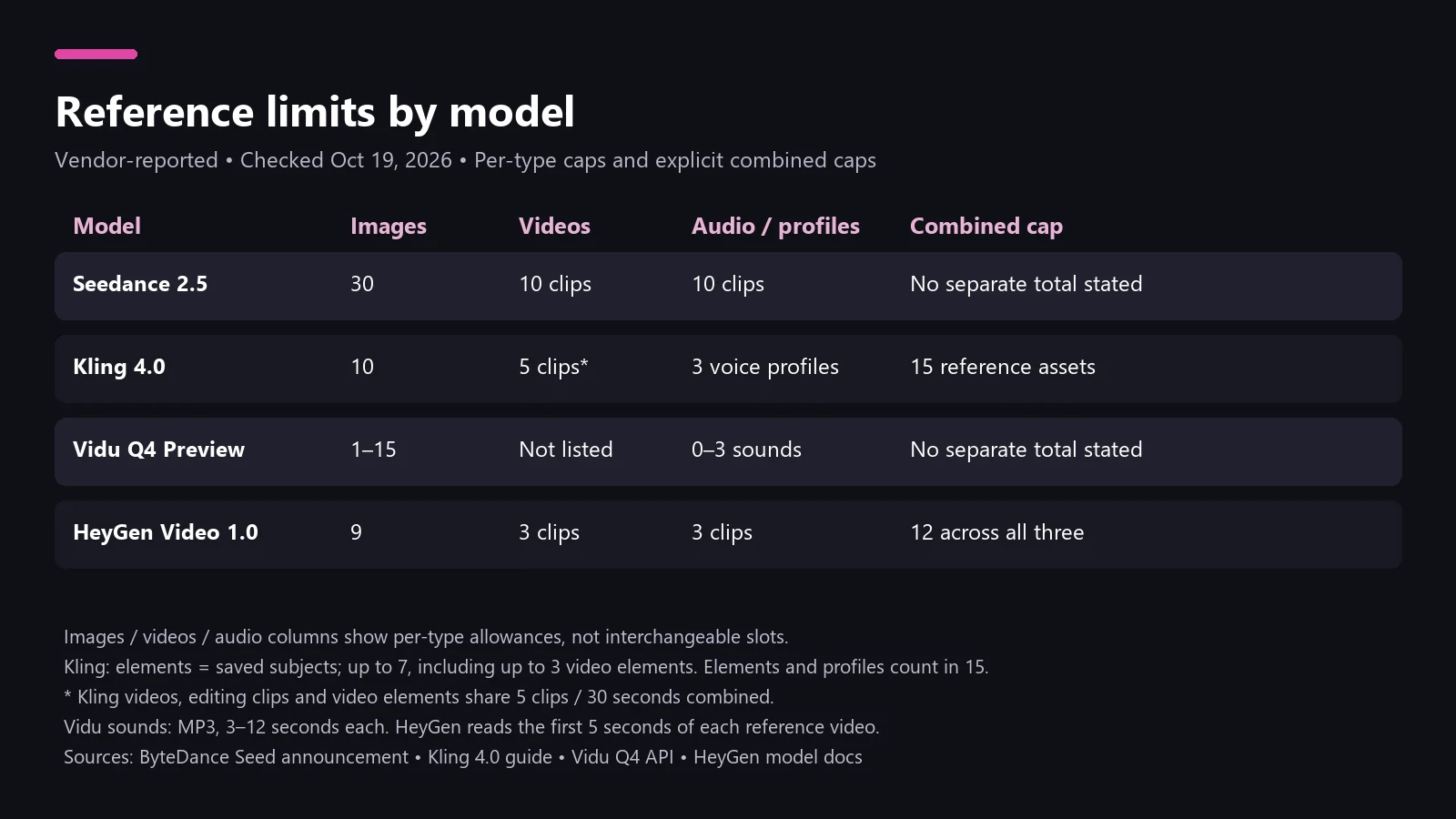 Vendor-documented limits checked Oct 19, 2026; profiles and elements are labeled separately from raw files.
Treat this table as an upload-planning checklist. First count assets by type, then apply any combined ceiling. Keep duration checks alongside counts: fitting the number of clips is only part of preparing a valid pack.
Seedance 2.5: the Largest Per-Type Caps
ByteDance Seed says Seedance 2.5 accepts up to 30 images, 10 video clips and 10 audio clips in one pass, and generates up to 30 seconds per generation. Its announcement is dated July 31, 2026. Among these four documented image allowances, Seed’s is the largest; that comparison concerns capacity alone.
What about “50 references”? Seed’s wording specifies allowances for each type. The 30 + 10 + 10 sum is 50, our tally, which matches the total fal lists for its endpoint (fal-reported). It is not a separately stated official total in Seed’s announcement, nor permission to exchange unused audio slots for extra images. Build the upload list around the three categories.
For a product shoot, we would group stills by purpose before selecting them: shape, packaging, material detail and environment. Write a short note explaining why each selected asset belongs in this particular shot. This makes the pack easier to revise when a director changes the scene. For broader context, see our Seedance 2.5 generation guide.
Kling 4.0: 15 Assets, Elements and Keyframes
Kling’s guide says Omni Reference has a 15-asset combined ceiling, alongside its per-type limits. Saved subjects, called elements, and voice profiles count toward that ceiling. Reference videos, editing videos and video elements also share the five-clip, 30-second video quota. Do not count an element’s source files as extra independent upload slots.
Kling separately documents up to 10 keyframe images and says the Keyframes entry cannot accept reference assets. Choose the entry point before assembling your pack. The official October 15, 2026 launch post says Kling 4.0 is fully available; the mode-specific guide still determines this reference workflow.
Our planning recommendation is to keep a slot ledger with separate entries for uploaded pictures, clips, selected elements and profiles. Recount after adding a saved subject. For timeline-led work, sketch the required moments first and decide whether those moments need keyframe images. Our Kling 4.0 status article covers the broader release context.
Vidu Q4 Preview: Up to 15 Images and 3 Sounds
As of Oct 19, 2026, Vidu’s API documentation identifies the model as viduq4-preview and lists 1–15 images plus 0–3 MP3 reference sounds, each 3–12 seconds long. The same page says subject invocation is currently unavailable. Its listed inputs contain no reference-video field: the docs list no video references for this preview endpoint.
For planning, separate a still-and-voice brief from one that requires motion clips. Removing a clip changes the creative instructions available in your pack, even when the remaining files fit. We would record that change explicitly for whoever reviews the shot, rather than mark the original brief complete. Read the Vidu Q4 Preview model guide for surrounding context.
HeyGen Video 1.0: 12 Total, 5-Second Clip Reads
HeyGen says reference_to_video permits 9 images, 3 videos and 3 audio references, with 12 total across those lists. Its create endpoint requires a prompt and at least one reference image or video; audio alone does not qualify.
HeyGen’s model guide also says it reads only the first five seconds of each reference video. Longer clips are trimmed before generation. Prepare a cut that begins at the action you want referenced. An important move near the end of a source recording should become the beginning of your selected excerpt. HeyGen dates its launch to September 30, 2026, through its API and partner platforms first.
We would keep the original recording and exported reference cut together, with filenames that make their relationship clear. Preview the exported cut before uploading it, and ask a teammate whether it contains the intended movement. This is a simple editorial check you can complete before spending time on a generation.
How to Fit Your Asset Pack
Suppose your brief calls for 12 product photos, two motion clips and one voice line. That is 15 files, our tally. The following count check uses the vendor allowances linked in the comparison table; it is our planning arithmetic, not a generation test.
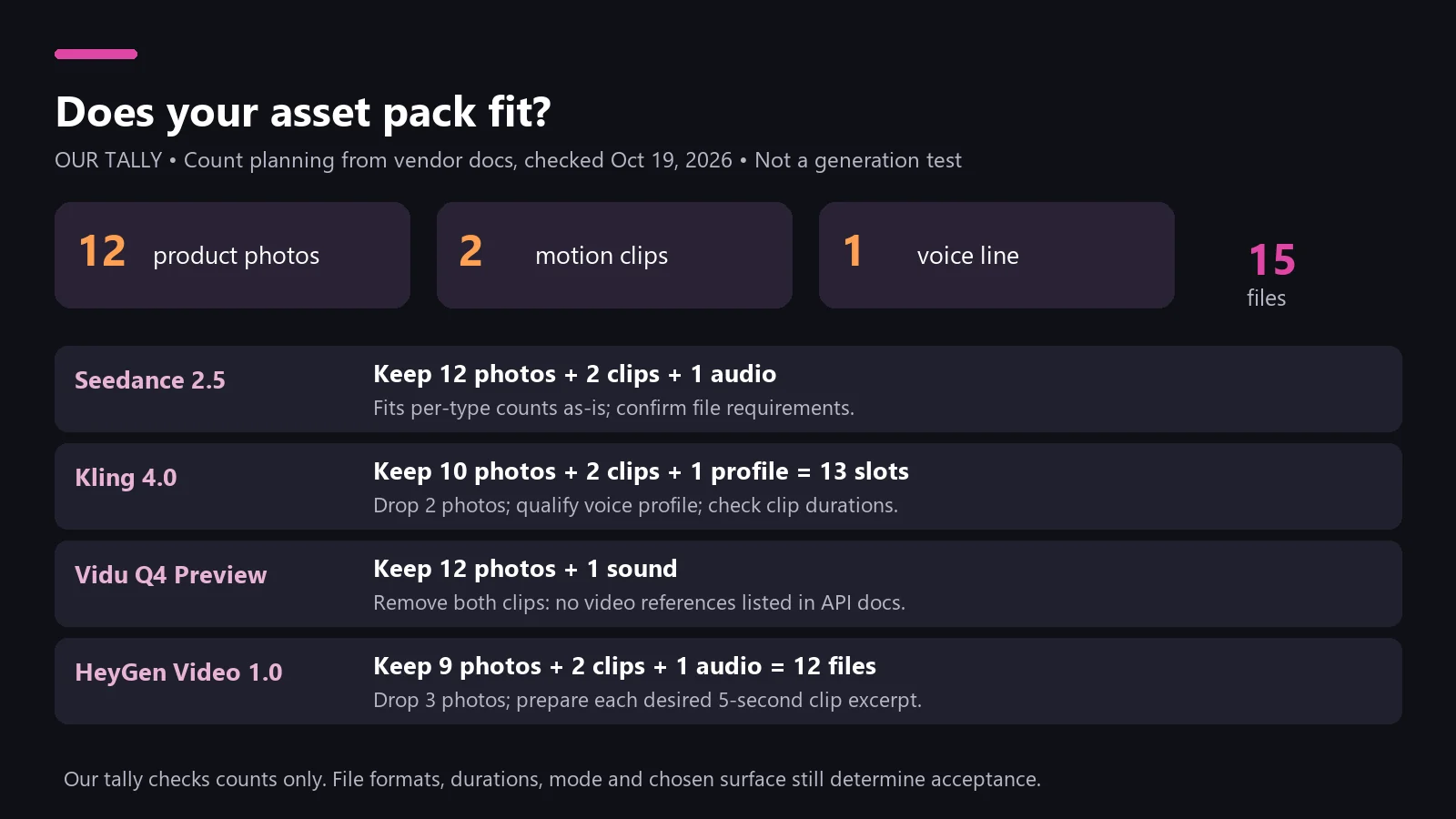 Our tally for 12 photos + 2 clips + 1 voice line; format, duration and surface checks still apply.
- Seedance: the pack fits the documented per-type counts as-is. Confirm individual file requirements on your chosen surface.
- Kling: remove at least two photos to reach 10 images. With two clips and one voice profile, that is 13 reference slots, our tally, leaving two under the combined ceiling. The voice line must qualify for a profile, and the clips must meet the shared duration rules.
- Vidu: retain the 12 photos and one qualifying sound, but remove both clips from this endpoint’s pack. This fits the listed counts while giving up the motion references.
- HeyGen: remove three photos. Nine images + two clips + one audio reference = 12 total, our tally. Prepare each motion excerpt around the five seconds you want read.
Choose photos to remove by their role in the shot. Make a contact sheet, mark duplicates, and preserve the views that explain the product’s distinguishing details. Keep a written record of the omitted assets so a later revision can restore them deliberately.
FAQ
Which AI video model accepts the most reference images?
Seed says Seedance 2.5 accepts 30 images, the highest documented image cap among these four as of Oct 19, 2026. This is a per-type limit.
Does Seedance 2.5 accept 50 references?
Seed specifies 30 images, 10 video clips and 10 audio clips. Fifty is the 30 + 10 + 10 sum, as fal lists it (fal-reported), not a separate official interchangeable-file allowance.
Can I use reference videos with Kling 4.0 keyframes?
Kling says its separate Keyframes entry does not support reference assets. Use the documented Omni Reference workflow when planning around reference clips.
Why does HeyGen ignore most of my reference video?
HeyGen says it reads the first five seconds. Cut the desired excerpt before upload, then preview that cut to confirm the action starts where you expect.
Ready to turn your shot brief into a video? Start creating with PixVerse.