Kling 4.0 Is Available: Specs, Access, Wait or Switch
Source-based overview, facts checked Oct 15, 2026. Last updated: Oct 15, 2026.
As of Oct 15, 2026, Kling’s official account states that Kling 4.0 is fully available. Its launch post on X announces a refreshed creation interface on kling.ai and access through MCP and CLI. This supersedes our October 14 assessment based on earlier rollout pages.
You can now try Kling 4.0 against a fixed scene rather than wait for a launch announcement. Check your account’s available controls before assigning production work: full availability does not confirm every pending feature or universal plan entitlement.
Confirmed Kling 4.0 Specifications
Kling’s official creation guide describes the following vendor-reported full-model specifications. Flash has a separate feature set, explained below.
| Area | Vendor-reported full-model capability |
|---|---|
| Native duration | 3–30 seconds per generation |
| Resolution | Up to 4K; the introduction labels 4K/1080p 10-bit HDR output coming soon |
| Audio | Two-channel stereo |
| Timeline control | Up to 10 flexible keyframe images |
| Mixed references | Up to 15 combined assets, including images, videos, subjects, and voice references |
| Video extension | Repeated extensions up to 2 minutes total; coming soon |
The reference allowance has nested limits: up to 10 images, 5 videos totaling 30 seconds, and 7 subjects, including up to 3 video-based subjects. Those are ceilings within the combined allowance, not quantities you can add together. Kling’s guide explicitly preserves the overall cap.
Kling’s September 30 introduction still marks 10-bit HDR at 4K and 1080p as coming soon on our October 15 recheck. Its guide describes 4K support separately. Check resolution and HDR independently in the export options; the launch statement does not specifically resolve HDR availability.
The same introduction and the product FAQ still mark repeated extension up to 2 minutes as coming soon. Keep that pending separately from the 30-second native generation limit, including checks on continuity between extensions.
Keyframes and references also do different jobs. A keyframe specifies a visual milestone along the timeline; a reference supplies information about a character, product, motion, or style. For a product demonstration, first decide when the reveal and interaction happen, then choose the assets needed to describe them. Filling every input slot is not a production goal.
Kling 4.0 Rollout: Source, Claim, and Status
The official launch statement now leads the timeline. Older rows explain the earlier assessment, rather than establish today’s access status.
| Source | Claim | Status |
|---|---|---|
| Official Kling X post, October 15 | “KLING 4.0 Is Now Fully Available”; refreshed creation UI on kling.ai; access through MCP and CLI. | Official launch statement. |
| Kling introduction, September 30 | Flash access starts September 28 for Ultra Yearly subscribers; wider rollout follows in October. | Earlier official status; superseded for overall launch availability. |
| Kling product page | Still describes the full model as coming this October and Flash as a limited rollout on our October 15 recheck. | Earlier rollout wording remains visible; superseded by the launch statement. |
| IssueWire release, October 12 | Global release occurred October 10. | Historical third-party/vendor-reported claim from kling3.io; not the official launch evidence. |
| APIMaster, October 9 | General availability and public API details were not confirmed. | Historical third-party assessment; superseded for overall availability, not evidence of current API terms. |
| Our October 14 reading of earlier official pages | Full-model general availability was not established; limited Flash access was. | Earlier editorial inference; superseded by the October 15 official launch statement. |
The IssueWire page has an October 12 dateline and names kling3.io as its source. Keep its October 10 claim as historical third-party reporting, not a verified official release date.
The Kling homepage now promotes Kling 4.0 and MCP/CLI. However, the product page and 4.0-versus-3.0 comparison still carry earlier October rollout wording. We treat those availability passages as superseded, while retaining explicit feature-level pending labels.
Kling 4.0 MCP and CLI Access
The official launch post announces MCP and CLI as access routes, and the homepage promotes agent-driven batch creation. It does not establish that every account, plan, or region has identical access. Before automating production, verify your account’s setup instructions and complete a small generation. MCP/CLI access alone does not confirm public API identifiers, pricing, or quotas; APIMaster’s earlier assessment cannot settle those current terms.
Flash Is a Different Product Decision
Kling’s official product FAQ describes Flash as supporting up to 20 seconds at 720p in 8-bit SDR, with text-to-video, image-to-video, and Omni Reference. It explicitly excludes first/last frames and multi-keyframes.
These remain the documented variant differences on October 15. Flash access does not establish full-model timeline control or HDR delivery; confirm the selected model and export options.
What Changes Compared With Kling 3.0?
Kuaishou’s original 3.0 announcement already described native audio, multi-shot storytelling, reference-based generation, and video up to 15 seconds. Audio and storytelling are therefore not entirely new with 4.0.
Kling’s official 4.0-versus-3.0 comparison gives this vendor-reported breakdown:
| Capability | Kling 3.0 series | Full Kling 4.0 |
|---|---|---|
| Duration | 3–15 seconds | 3–30 seconds |
| Image milestones | Start/end frames; no multiple keyframes | Up to 10 keyframes |
| Audio channels | Single-channel | Two-channel stereo |
| Resolution | Includes 4K | Includes 4K |
| Reference video | One video, up to 15 seconds | Up to five videos, 30 seconds combined |
The vendor’s current comparison lists 4K for both generations. The more consequential changes are the longer native sequence, additional timeline milestones, and expanded reference combinations. For a short product shot, duration may matter little; for a longer scene with several timed reveals, the control changes are more relevant.
For context, our earlier Kling 3.0 explainer covers the previous generation. Use the current official comparison for this upgrade decision rather than assuming every older specification or access detail remains current.
Improved realism, motion stability, and lip sync are vendor-reported claims in the comparison. Turn each into an observable test: recognizable faces during movement, coherent object contact, and dialogue aligned with mouth movement.
Kling 4.0 vs PixVerse V6: Compare the Scenario
The official PixVerse V6 page documents vendor-reported support for 15-second 1080p generation, native multi-shot scenes, native audio, text-to-video, image-to-video, and aspect-ratio controls. Our V6 review provides further workflow context.
| Your project | What to evaluate |
|---|---|
| A short vertical product teaser | Test V6 against your composition, motion, and sound requirements. A longer generation window may add little to this brief. |
| A continuous sequence beyond 15 seconds | Try full Kling 4.0’s vendor-reported 30-second duration; test continuity before assigning the shot to it. |
| A storyboard with several specified visual milestones | Test full-model keyframe control in your account. Flash’s FAQ excludes that feature. |
| A delivery brief requiring 4K HDR | Verify the actual export and HDR availability. The cited V6 page documents 1080p; the Kling introduction marks HDR coming soon. |
Start by matching the shot to the documented controls, then measure usable results and actual spending. A project needing a short social teaser has a different acceptance test from one requiring a continuous long take or precise storyboard timing.
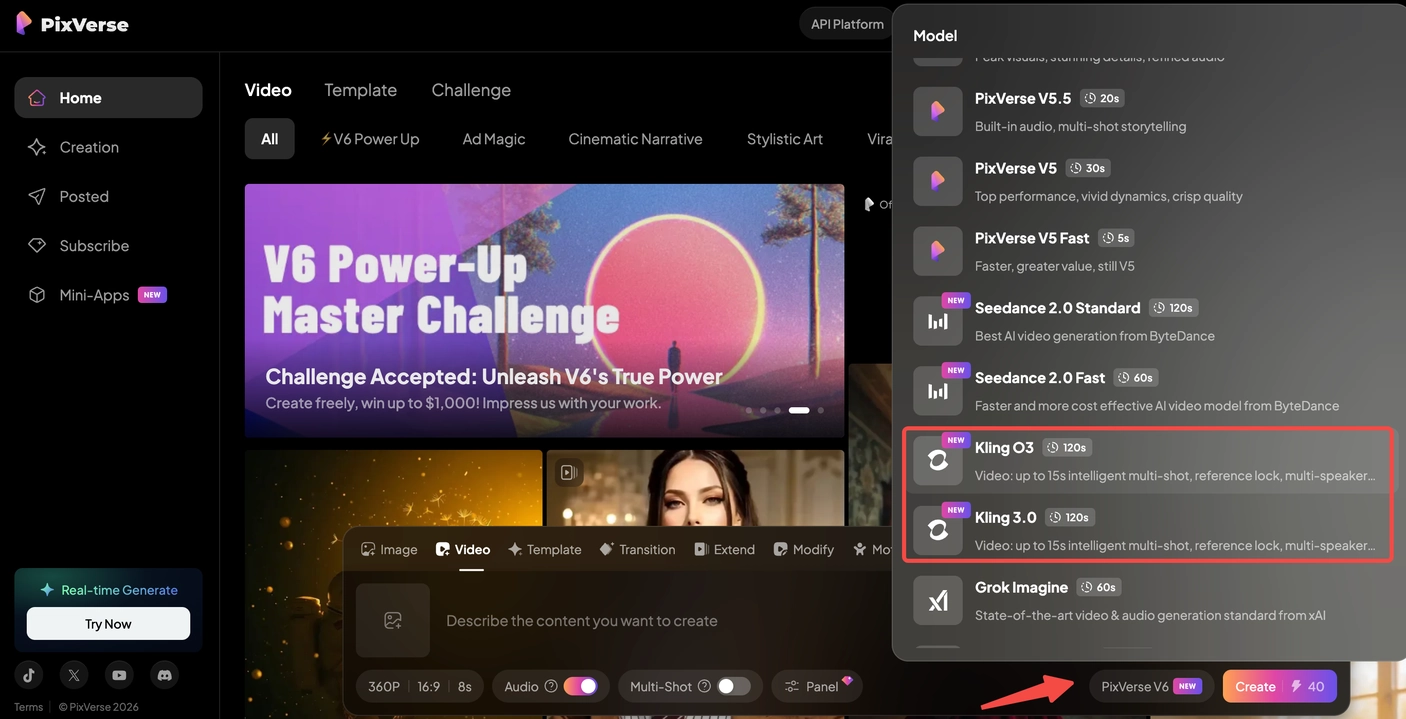
Screenshot from our Kling O3 and 3.0 guide, showing the earlier model-selection interface. Check the selected model name before comparing workflows.
Should You Wait or Switch?
You can try Kling 4.0 now. Use its longer duration or keyframe controls when they address a specific shot requirement. Define success before viewing promotional demos, then verify the controls in your account. A launch announcement is a reason to test, not a reason to migrate every project.
Wait only for a required feature that remains pending, such as HDR or two-minute extension. Finish suitable shots with your current workflow while evaluating 4.0. Our Sora 3 release-status guide applies the same discipline: distinguish published evidence from expectations before scheduling production.
For a useful comparison, choose an original scene with observable requirements. For example, have a presenter pick up a distinctive package, rotate it, and place it back while the camera moves closer. Keep the brief, reference assets, and acceptance criteria consistent across tools, adapting only the instructions each interface requires.
Review the whole clip. Does the package retain its shape? Does the hand maintain contact? Does speech match the visible performance? Save rejected attempts as well as the selected output, and record time spent revising. That gives you evidence about your own production needs instead of another attractive isolated frame.
For MCP, CLI, or API work, complete a working integration before scheduling a batch. Compare the cost of accepted footage, including retries and editing effort, rather than assuming a price advantage.
Frequently Asked Questions
Is Kling 4.0 out?
Yes: Kling’s official October 15 post states that Kling 4.0 is fully available. Flash remains a distinct variant with narrower documented capabilities. Check your selected model; the launch statement does not confirm every feature or universal account entitlement.
What is the Kling 4.0 release date?
October 15, 2026 is the date of the official full-availability statement. Earlier official pages gave an October window and September 28 Flash early access. The October 10 global-launch date remains a historical third-party claim from IssueWire.
What is the difference between Kling 4.0 and 3.0?
The vendor-reported comparison increases native duration from 15 to 30 seconds, adds up to 10 keyframes, and expands mixed references. It also lists stereo audio for 4.0. Both generations list 4K, so resolution alone does not describe the upgrade.
Can Kling 4.0 generate a two-minute video?
Kling announces up to 2 minutes through repeated video extensions, marked coming soon in its introduction. Native generation is 3–30 seconds. Plan an extension workflow separately from a single-pass shot, including checks on transitions and continuity.
Related Resources
- What Is Kling 3.0?
- Sora 3 Release Status: Official Facts and What’s Next
- PixVerse V6 Review and Workflow Guide
If your next brief fits a short text-to-video or image-to-video workflow, PixVerse is a practical place to build a baseline for comparison with Kling 4.0. Start with one scene, review the result, and let that evidence guide the next tool decision.