Pole Vault on the Cotton Swab Desk: PixVerse Miniature Sports Effect
Upload your photo and do pole vault on the cotton-swab-covered desk. That is the official prompt for PixVerse’s newly launched Pole Vault on the Cotton Swab Desk template — a one-photo V6 effect that shrinks your subject into a tiny vaulter on a desktop arena.
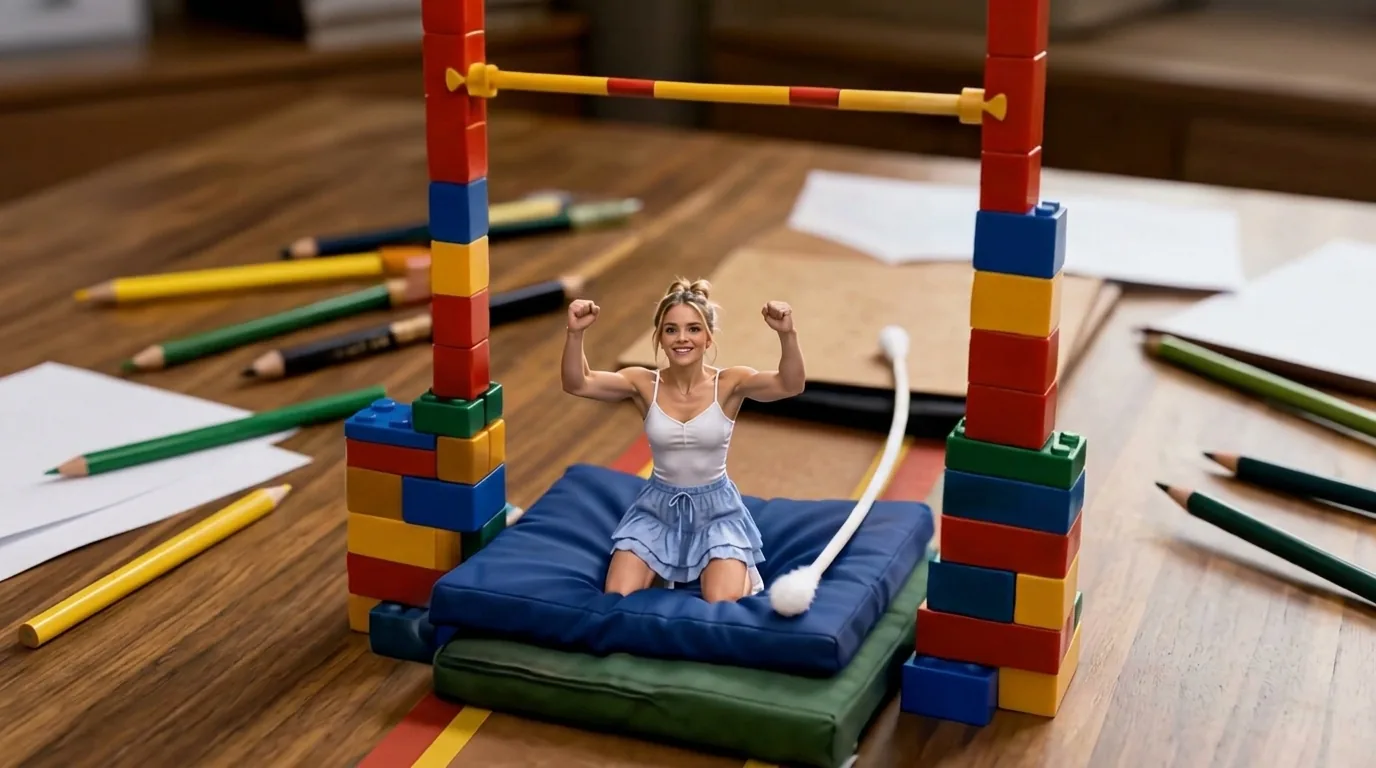
The official preview shows a miniature athlete celebrating on a blue mat between toy-brick uprights, a giant cotton swab lying beside the landing pad on a pencil-covered desk. The same one-click flow works with a portrait of you, a friend, or a child.
See It In Action
What Is the Pole Vault on the Cotton Swab Desk Template?
Pole Vault on the Cotton Swab Desk is a new PixVerse image-to-video template. You upload one photo; PixVerse V6 generates a 10-second vertical video with a soundtrack. You do not write a prompt — the template prompt is locked, so the effect stays consistent.
Template details
| Field | Value |
|---|---|
| Template name | Pole Vault on the Cotton Swab Desk |
| Template ID | 422322286759168 |
| Output | Video |
| Model | PixVerse V6 |
| Input | 1 photo |
| Duration | 10 seconds |
| Quality | 360p / 540p / 720p / 1080p |
| Audio | Included |
| Custom prompt | Off |
| Launched | Sep 02 2026 |
How it works
- Upload one photo — a clear portrait works best
- Select Pole Vault on the Cotton Swab Desk — search the name in PixVerse templates, or use Template ID
422322286759168 - Generate — PixVerse V6 applies the effect automatically
- Download and share — export the 10-second clip, up to 1080p, for TikTok, Reels, or Shorts
What’s in the Official Preview
The template preview is a desktop pole-vault arena, not a simple sports overlay:
- A tiny athlete staged on a blue landing mat
- Toy-brick uprights with a crossbar for the vault
- A giant cotton swab lying across the desk like a pole
- Pencils, paper, and desk props towering around the scene
It is part of the same miniature-sports wave as the tiny gymnast and tabletop baseball effects: your uploaded face stays recognizable while the body competes at toy scale.
How to Create Your Pole Vault on the Cotton Swab Desk Video
Step 1: Choose a photo
Use a well-lit shot where the face is clear. Front-facing portraits match the official preview style best.
Step 2: Open PixVerse
Visit PixVerse on web or in the app, then open the template library.
Step 3: Find Pole Vault on the Cotton Swab Desk
Search Pole Vault on the Cotton Swab Desk or look under newly launched templates. Confirm Template ID 422322286759168.
Step 4: Generate
Upload the photo and generate. The template does not accept a custom prompt, so you do not need to describe the scene.
Tips
- Use one subject per photo for a cleaner miniature result
- High-resolution images keep facial features sharper after the shrink
- Export 1080p to keep the desk props and cotton swab crisp
- The output is vertical and ships with a soundtrack
Frequently Asked Questions (FAQ)
Q: Do I need to write a prompt? A: No. This template has custom prompts turned off. Upload one photo and generate.
Q: How long is the video? A: 10 seconds, generated with PixVerse V6.
Q: What quality is available? A: 360p, 540p, 720p, and 1080p.
Q: Is there audio? A: Yes. This template includes a soundtrack.
Q: How many photos do I upload? A: One. This is a single-image template.
Ready to clear the bar? Open PixVerse, search Pole Vault on the Cotton Swab Desk, and generate from one photo.
Related templates:
- Static Rock Climbing Pose — frozen mid-move on the wall
- Have a Free Rock Climbing Experience — summit at sunset
- Let’s take an adventure in the bathroom — tiny-world bathroom adventure
- Little Gymnast