Open-Source Audio-Video Models: Kandinsky 6.0 vs Helix World
Source-based overview; facts checked Oct 14, 2026.
Choosing an audio-video model starts with the experience you want to create. Do you need a finished clip with matching sound, or a world that responds while someone explores it? Then comes a separate decision: do you want to operate the model yourself, or use a hosted product?
Kandinsky 6.0 Video and Helix World make that distinction useful. Kandinsky’s publishers describe a short-clip generator; Helix World’s team describes an interactive audiovisual world model. Both publish code and model resources, but their workflows and deployment requirements differ. Their official repositories are the starting points for this comparison: Kandinsky 6.0 and HelixWorld.
At PixVerse, we recommend evaluating the creative task, the controls, and the operating burden together. Start with the output you need, then work backward to the model and deployment path.
Kandinsky 6.0 Video: Short Clips With Synchronized Sound
According to the official Pro model card, Kandinsky 6.0 Video comes in 29B-parameter Pro and 3B-parameter Lite versions. The publishers describe both as generating five-second clips with synchronized 44 kHz audio, including lip sync, from text or an image. Full HD output uses a separate super-resolution model; it should not be confused with native generation resolution.
The repository carries an MIT license, and the official Pro and Lite model cards also identify MIT licensing. Keep the exact checkpoint and its accompanying terms in your deployment records rather than relying on a headline about openness.
Does Lite Fit a Consumer GPU?
Lite is the smaller option to investigate for consumer hardware, but avoid reading “3B” as a complete memory requirement. Its model card lists additional components, including text encoders, a video autoencoder, an audio autoencoder, and a vocoder. The pipeline is more than its main transformer.
Kandinsky Lab’s performance table includes consumer GPUs and says those runs use block offloading. Its vendor-reported result is 437 seconds for Lite SD on an RTX 4090, for a five-second clip using the non-distilled model after warmup. Weight loading and MP4 encoding are excluded. Budget for those additional steps when planning a local workflow.
For a first experiment, our recommendation is to test the smallest configuration that meets your needs. Measure the entire process, including loading, retries, and export. The official quick-start guide documents device presets, offloading, sampling controls, and optional super-resolution. Change one setting at a time so you can tell what improved the result.
Helix World: Explore an Image With Picture and Stereo Audio
In its October 12, 2026 announcement, Noiz AI identifies Helix World as a joint project with the Hong Kong University of Science and Technology. The described experience starts from one image: WASD moves the camera, arrow keys change the view, and video and spatial stereo sound are generated together. The intended sound field changes with the camera’s viewpoint.
The release timeline needs some precision. While the announcement introduces the project on October 12, the official GitHub news section dates the Preview v1 code and checkpoint release to September 3, 2026 and HelixBench’s release to October 12. These are different milestones, so October 12 should not be presented as the first availability of every artifact.
Real-Time Claims Come With Hardware Conditions
The team’s vendor-reported steady-state result is a real-time factor of 0.77 at 768×512 and 24 fps on one NVIDIA H800, including audio and video decoding. Its preview setup gives a vendor-reported recommendation of 80 GB of GPU memory. Hardware provisioning is therefore a central part of evaluating this preview.
For planning purposes, distinguish throughput from control delay. Noiz’s demo description gives a vendor-reported chunk length of about 1.3 seconds, with new input taking effect from the next chunk. Evaluate both sustained playback and how quickly a turn or instruction becomes visible.
Open Code and Checkpoint Terms Need Separate Checks
The GitHub license section labels the code Apache 2.0 and directs readers to the checkpoint for weight licensing. The Hugging Face preview card displays an Apache-2.0 tag but also tells users to consult the applicable model license.
There is an additional dependency distinction: the project’s NOTICE file identifies LTX-2-derived code and model assets under the LTX-2 Community License, with downloaded Gemma and Hugging Face assets subject to their own terms. For commercial deployment, review those components individually. A repository badge alone is an incomplete basis for a licensing decision.
Where PixVerse R2 Fits
Helix World’s interactive workflow makes it relevant to world-model discussions. PixVerse R2 addresses the same broad creative question: how can a user keep shaping a world while it generates?
Our R2 introduction describes persistent state within a running session: earlier actions and inputs shape what happens later. It also describes text, reference, audio, and action inputs entering the same ongoing world. For example, prompts can alter the environment during navigation, while WASD movement and arrow-key camera controls guide exploration.
The R2 technical overview explains its multi-timescale memory approach: Sink Memory keeps character, scene, style, and world-rule anchors; Rolling History tracks recent motion and camera changes; and an Object KV Cache retains relevant object-level history. If your project depends on returning to a location or maintaining a character, use that requirement as a test case.
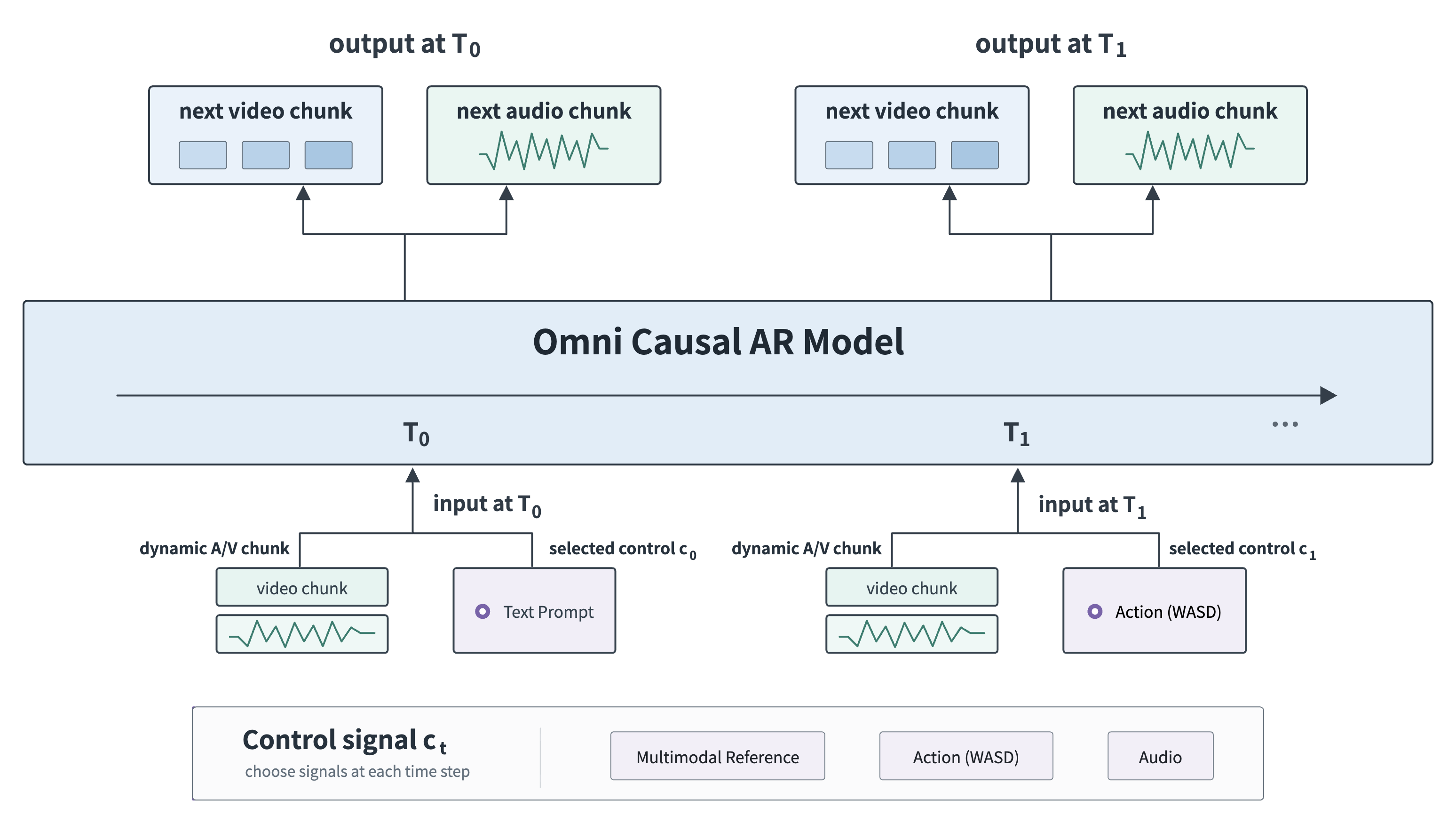
PixVerse’s published R2 control diagram, reused from the technical overview: different inputs update the same continuing audiovisual world.
The public interface documentation distinguishes the model’s multimodal design from the current public experience, which focuses on movement and prompt-based interaction. Match your trial to the controls actually exposed by the experience you enter.
Open vs. Closed: Compare the Workflow You Will Operate
Model access and product access are separate questions. Downloadable weights may matter greatly to an engineering team; a browser experience may matter more to a creator trying to finish a scene. Compare these concrete deployment paths. The numerical entries use the Kandinsky performance table and HelixWorld preview setup; R2 capabilities follow the documentation linked above.
| Decision | Kandinsky 6.0 Lite: self-hosted | Helix World Preview: self-hosted | PixVerse R2: hosted experience |
|---|---|---|---|
| Output | Five-second video with synchronized audio | Navigable video with camera-aligned stereo | Continuing audiovisual world with session state |
| Compute and entry barrier | Vendor-reported 437 s for a five-second Lite SD clip on RTX 4090; non-distilled, after warmup, excluding loading/export | Vendor-reported 80 GB VRAM recommended for Preview v1 | Browser entry; current public interaction focuses on movement and prompts |
| Controllability | Text/image conditioning and exposed pipeline parameters | WASD navigation and arrow-key camera control | WASD movement, camera direction, and prompts that alter a running scene |
| Continuity | Plan around completed clips | Evaluate scene and spatial-audio continuity during navigation | Persistent anchors, recent history, and object-level memory |
| Cost planning | Count local compute, setup, storage, and rejected clips | Count GPU provisioning, streaming capacity, and maintenance | Check current access terms and measure the cost of usable sessions |
Estimate the cost of an accepted result by dividing the total cost of a trial by the number of outputs you would actually use. Include loading and export in clip production. For interactive work, also count sessions interrupted by drift, slow response, or sound that fails to match the view.
Controllability deserves the same care. Source access offers a different kind of control from a prompt box, camera action, or reference input. Decide which intervention your project requires before treating openness as a creative-quality score.
How to Choose Without Overreading Launch Benchmarks
Match hardware, settings, output type, and timing boundaries before comparing numbers. A useful trial connects each technical capability to something you need to accomplish: delivering a clip, exploring a scene, or maintaining a character through repeated interactions.
For your own trial, write the acceptance criteria first:
- Choose the output. Test a finished audiovisual clip separately from an interactive session. Give each a relevant success criterion.
- Test sound deliberately. Include a visible impact, a pause, and speech where supported. Check whether timing holds, rather than accepting plausible background audio.
- Test spatial and historical consistency. In a navigable world, turn away from a sound source, return to a location, and repeat an action. Record what changes unexpectedly.
- Record the whole operating cost. Include setup effort, loading, inference, export, and failed attempts. Preserve the configuration so another person can reproduce the trial.
Our practical starting recommendation is Kandinsky 6.0 Lite for an engineering-led short-clip experiment on compatible consumer hardware. Consider Helix World when camera-conditioned stereo and inspectable world-model inference are central to the investigation. Evaluate R2 when persistent session state and live interaction are the experience you want to explore.
FAQ
Is Kandinsky 6.0 Free for Commercial Use?
The project’s MIT license permits commercial use of the covered software without a license fee, provided its copyright and permission notices are retained as required. The official Pro and Lite cards also identify MIT licensing. Review the exact checkpoint and bundled components for your deployment, and budget separately for hardware or hosted compute.
Can Kandinsky 6.0 Run on a Consumer GPU?
Yes. Kandinsky Lab’s performance table documents consumer-GPU runs with block offloading, including the vendor-reported RTX 4090 example above. Start with a documented device preset and measure the complete pipeline on your machine. The Lite transformer’s parameter count alone does not describe the memory used by every component.
What Is the Difference Between Kandinsky 6.0 and Helix World?
Kandinsky 6.0 generates completed audiovisual clips from text or an image. Helix World generates an interactive scene whose picture and spatial stereo respond to camera movement and keyboard actions. Choose according to whether your deliverable is a video to export or an environment someone can steer.
How Does PixVerse R2 Remember a Generated World?
R2’s documented memory design combines persistent anchors, recent history, and object-level representations to carry relevant state forward within a running session. Its controls can influence what happens next while generation continues. Test this by revisiting a location or repeating an interaction and checking whether the scene and character stay coherent.
Related Resources
- PixVerse Introduces R2: Persistent, Playable Worlds
- PixVerse R2: Scaling Real-Time Omni World Models
- AI Video Prompt Guide for Cinematic Scenes
If a running, responsive world is closer to your idea than a finished clip, explore PixVerse R2 and judge how movement, prompts, and continuity fit your creative brief.