FLUX 3 Image Klein Local Guide: GPU, Setup, API Costs
Source-based overview; facts checked Oct 16, 2026. Speed, quality and benchmark claims are vendor-reported unless stated otherwise. Prices and early-access terms change; check provider pages before budgeting.
Last updated: Oct 16, 2026
FLUX 3 Image Klein gives creators a practical choice: generate stills on their own hardware or pay per image. In its October 15 launch post, Black Forest Labs (BFL) describes a 5.6B-parameter open-weights image model. For a designer making product shots, key art or opening frames, the question is whether local control justifies setup and maintenance.
Start with distilled Klein for everyday generation; consider Base when training is the goal. If you already own a suitable GPU, test a small representative batch before committing. If you are considering buying hardware, compare that expense with the API costs below. For the video model, see our FLUX 3 Video review; this guide focuses on image weights and local deployment.
PixVerse Blog editorial title card; the diagrams below explain setup decisions rather than demonstrate generated output.
What FLUX 3 Image Klein Is (and How It Differs From FLUX 3 Video)
BFL’s launch announcement says Klein supports text-to-image, editing, up to ten references and output up to 4K. It calls the editing “pixel-perfect” and describes bounding boxes for placement or regional edits. BFL also says its API includes pixel restoration to preserve unedited regions exactly. These are vendor claims, not results from our own testing.
Keep the API promise separate from a local pipeline: BFL’s model card says bounding boxes guide composition but are not hard pixel masks. When preparing a product frame, inspect packaging, lettering and supposedly untouched regions yourself. Treat Klein as the still-image stage; use the linked video review for the separate video product. Our FLUX.2 overview provides earlier Klein lineage context.
Klein vs Klein Base: Which Checkpoint to Download
The BFL model card distinguishes these checkpoints and identifies distilled Klein as the model behind BFL’s API. Settings below are vendor-reported; the card’s “none” guidance corresponds to CFG 1 in BFL’s documentation.
| Choice | Steps | CFG | Use | Availability |
|---|---|---|---|---|
black-forest-labs/flux-3-image-klein |
16 | 1 / no guidance | Generation and editing | Hugging Face; BFL API |
black-forest-labs/flux-3-image-klein-base |
50 | 3.5 | Fine-tuning, LoRA, research | Hugging Face; fal Base endpoints |
fal separately lists Base text-to-image and Base editing. Do not assume a hosted Base request is the same product or price as BFL’s distilled endpoint.
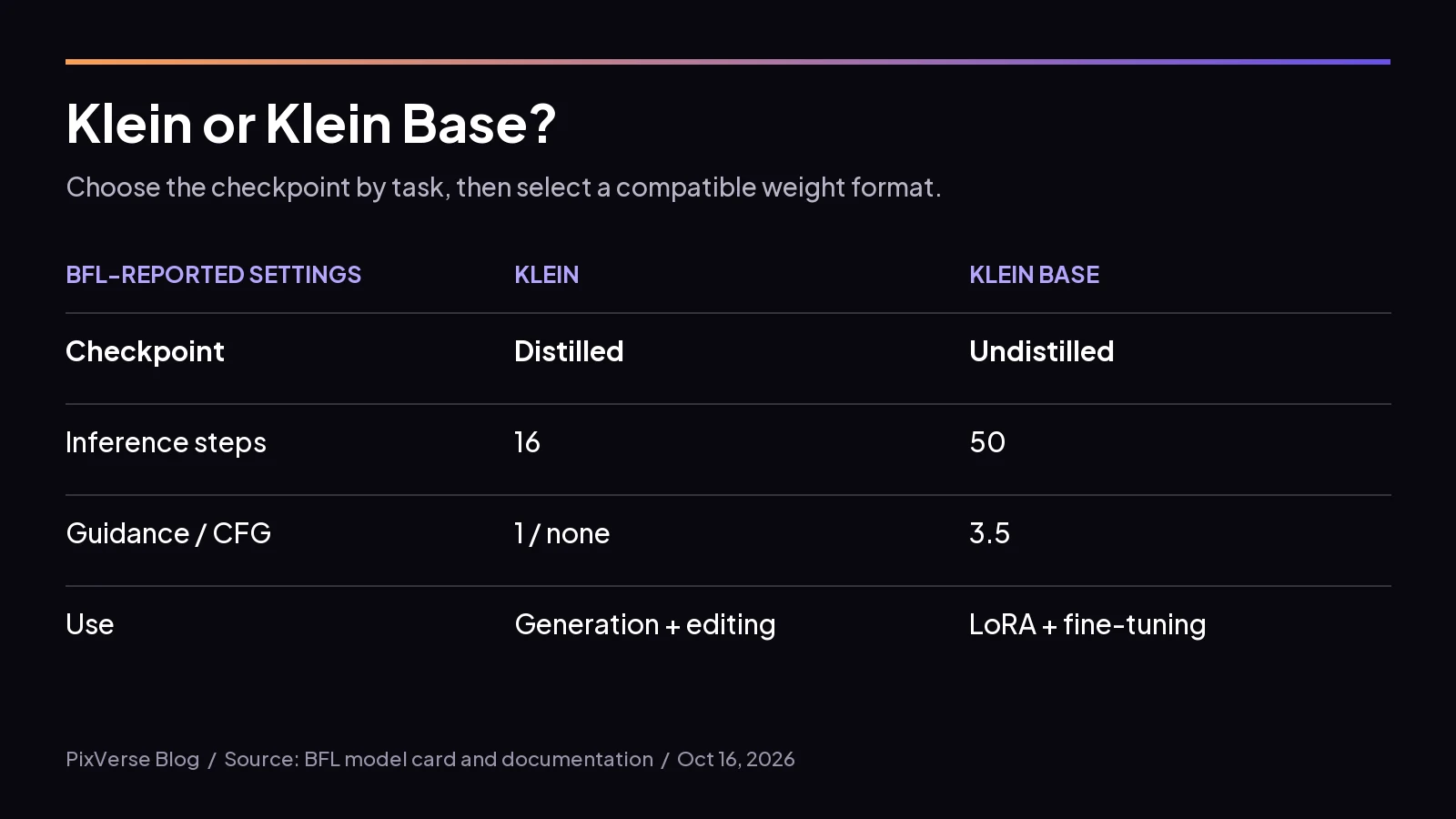 Self-made summary of BFL’s reported checkpoint settings; choose by workflow before downloading weights.
BFL’s release notes say LoRA training works through Diffusers or Ostris AI Toolkit with arch: flux3, and a Base-trained LoRA also loads into distilled Klein. For a studio, that suggests training a style adapter on Base, then evaluating it in the faster generation workflow. Compare the adapter against approved brand references before batch use.
FLUX 3 Klein GPU Requirements
The BFL documentation says Klein can run on a single consumer GPU down to an RTX 3090. Use that vendor-reported example as a starting point for an RTX 3090-class or newer machine, not a guarantee that every workflow fits. Check the current model card and measure your chosen configuration.
The Hugging Face launch guide reports these quantization conditions:
| GPU generation | Weight option | Fast-kernel condition |
|---|---|---|
| Ampere, such as RTX 3090 | Compatible quantized weights | Lower memory, no quantization speedup |
| Ada, Hopper, Blackwell | FP8 fp8r |
Compute capability 8.9+ |
| Blackwell | NVFP4 | Matching flashinfer-python and flashinfer-cubin versions |
Hugging Face reports roughly two seconds for distilled 1024 × 1024 generation on an H100; BFL reports under 0.6 seconds per 1MP image on GB300 with NVFP4. Neither establishes your desktop latency.
There is no single VRAM number for all configurations. Published weight sizes and specific memory measurements do not establish a universal minimum. Budget for the encoder, image processing, references and prompt expansion as well as the transformer. Begin with one modest output and log peak allocated memory, elapsed time, resolution, reference count and offloading settings. Repeat with your actual editing task before attempting a large queue.
How to Run FLUX 3 Image Klein Locally
Diffusers
Use an isolated Python environment with a CUDA-capable PyTorch installation. The BFL Diffusers example uses the development version and ModularPipeline:
pip install git+https://github.com/huggingface/diffusers.gitimport torch
from diffusers import ModularPipeline
pipe = ModularPipeline.from_pretrained("black-forest-labs/flux-3-image-klein")
pipe.load_components(dtype=torch.bfloat16)
pipe.to("cuda")
# Save your prompt upsampler's full scene caption in this file first.
with open("expanded-prompt.txt", encoding="utf-8") as caption_file:
caption = caption_file.read().strip()
image = pipe(prompt=caption, output="images")[0]
image.save("klein.png")This is a shortened inference example, not a measured desktop configuration. BFL says not to use Klein without its prompt upsampler. Its setup documentation explains that Diffusers does not invoke it automatically: run prompt expansion separately and pass the resulting caption. Follow that page’s Transformers example for the upsampler; plan its memory separately before moving everything onto one GPU.
BFL’s model card lists Qwen3-VL-4B-Instruct as the text encoder, alongside BF16, FP8 and NVFP4 transformer variants. Download only the format your loader needs, retaining the encoder and autoencoder; avoid fetching every variant. If the BF16 example exceeds memory, use the Hugging Face guide’s supported quantized-loading or CPU-offloading path rather than assuming the same code suits every card.
ComfyUI
The BFL documentation gives this three-step route:
- Update ComfyUI.
- Download the Klein weights required by your selected workflow.
- Load the Klein workflow linked from BFL’s documentation and enter your prompt.
Check how the workflow handles prompt expansion before running short instructions. Save a working graph and its settings with your project. Test generation first, then add a reference edit, so failures remain easy to isolate.
Local vs API: Cost and Control
As of Oct 16, 2026, BFL’s release notes list these vendor-reported per-image prices, with the same schedule for generation and editing:
| Output tier | BFL API price per image |
|---|---|
| 768 × 768 | $0.008 |
| 1K | $0.009 |
| 1.5K | $0.011 |
| 2K | $0.014 |
| 4K | $0.036 |
Our calculation from list prices: 1,000 images cost $9 at 1K or $36 at 4K. That counts generated images, not approved deliverables. Include rejected drafts in your volume estimate.
On Oct 16, 2026, OpenRouter’s Klein model page says from $0.008/image. The floor is not a flat rate for every resolution. fal’s Base generation and Base editing pages show planned prices of $0.027 at 1K and $0.108 at 4K on the same date. Confirm those planned rates before budgeting.
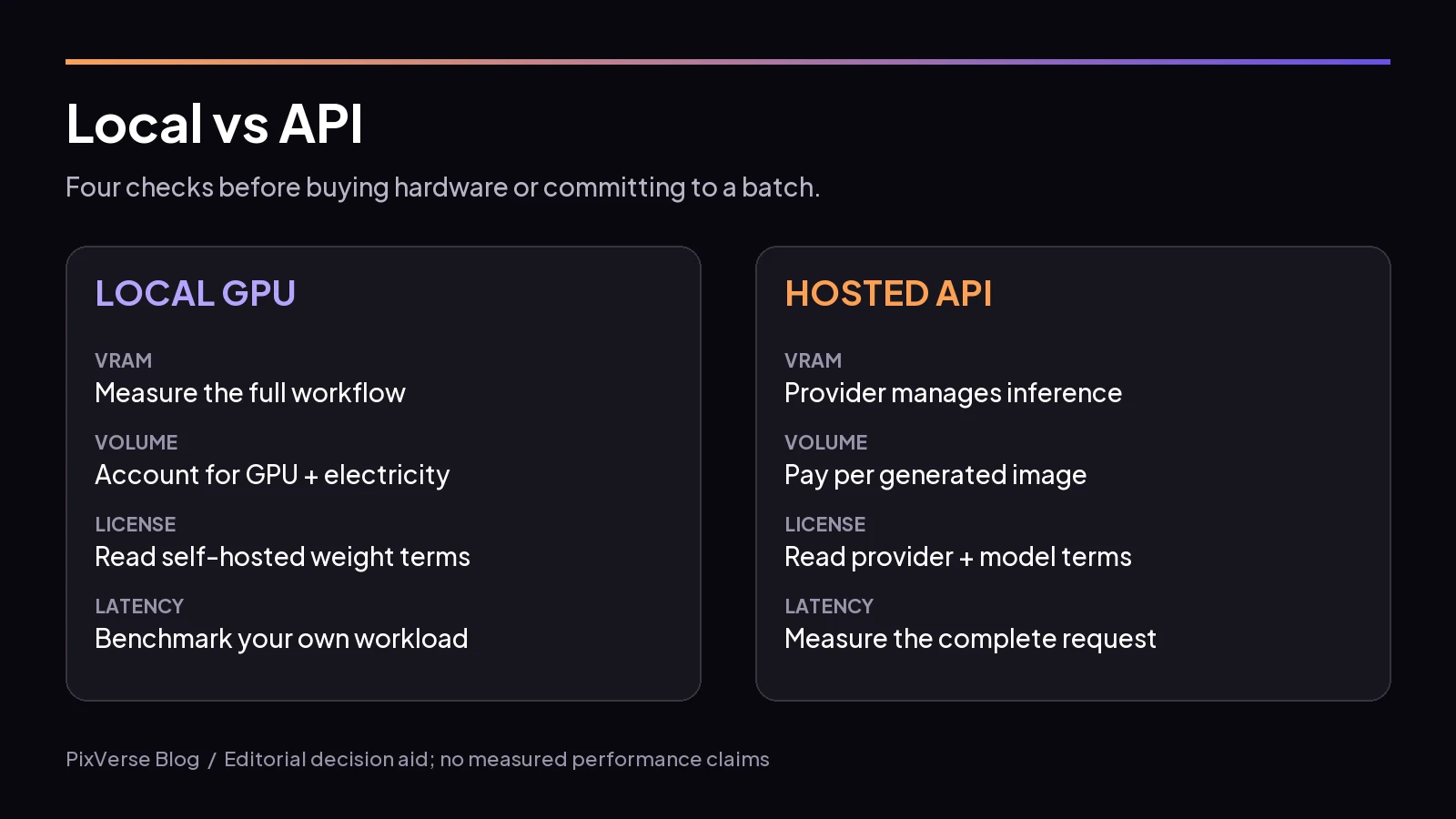 Self-made decision aid: hardware fit, workload volume, license terms and latency all affect the choice.
For your own break-even estimate, divide local fixed costs by the API price minus measured local variable cost per image. Include electricity, hardware depreciation and maintenance time; if the denominator is zero or negative, volume alone cannot justify the purchase. Owning the GPU already changes that calculation substantially.
Local deployment offers control over batch scheduling and where reference files are processed. Audit your actual pipeline’s network behavior before treating it as private. An API avoids managing inference hardware, but adds a provider relationship. Read the applicable license and service terms either way; hardware ownership does not answer the commercial-use question.
Using Klein Stills in a Video Workflow
Prepare a still that can survive motion: approve the subject silhouette, crop, lighting and product details before animation. Keep the approved frame beside its prompt, reference list and settings. Review a small motion test before generating a campaign’s worth of variations.
Use that still as a starting-frame or keyframe asset in your chosen video tool. Separate composition instructions from motion instructions: first settle what the frame contains, then describe one action and one camera move. This workflow does not imply a hosted Klein integration.
Open PixVerse to start your next video project with your approved still ready for the next stage.
FAQ
Can I run FLUX 3 Image Klein on my own GPU?
BFL says it runs on consumer GPUs down to an RTX 3090. Treat that as vendor-reported compatibility guidance. Check the selected loader, weight format and prompt-expansion setup, then measure memory and speed on your intended resolution and reference count before committing to a batch.
What is the difference between Klein and Klein Base?
The BFL release notes describe distilled Klein for fast inference, and Base for fine-tuning and LoRA training. Choose distilled for routine still creation. Choose Base when adaptation is the task, and evaluate the resulting adapter in your delivery workflow before standardizing on it.
How much does FLUX 3 Image Klein cost through an API?
As of Oct 16, 2026, BFL lists $0.008 at 768 square, $0.009 at 1K and $0.036 at 4K per image. Those are vendor list prices. Budget against your chosen output tier and total attempts; distributor listings and Base endpoints need their own pricing check.
Can I use FLUX 3 Klein images commercially?
BFL lists both checkpoints under the FLUX Kommunity License in its launch announcement. Read the license on Hugging Face for the commercial terms that apply to your situation. Keep that review separate from choosing hardware or a checkpoint, and check the provider’s terms for hosted use.