VAMPIRE LORD: Official Template Guide
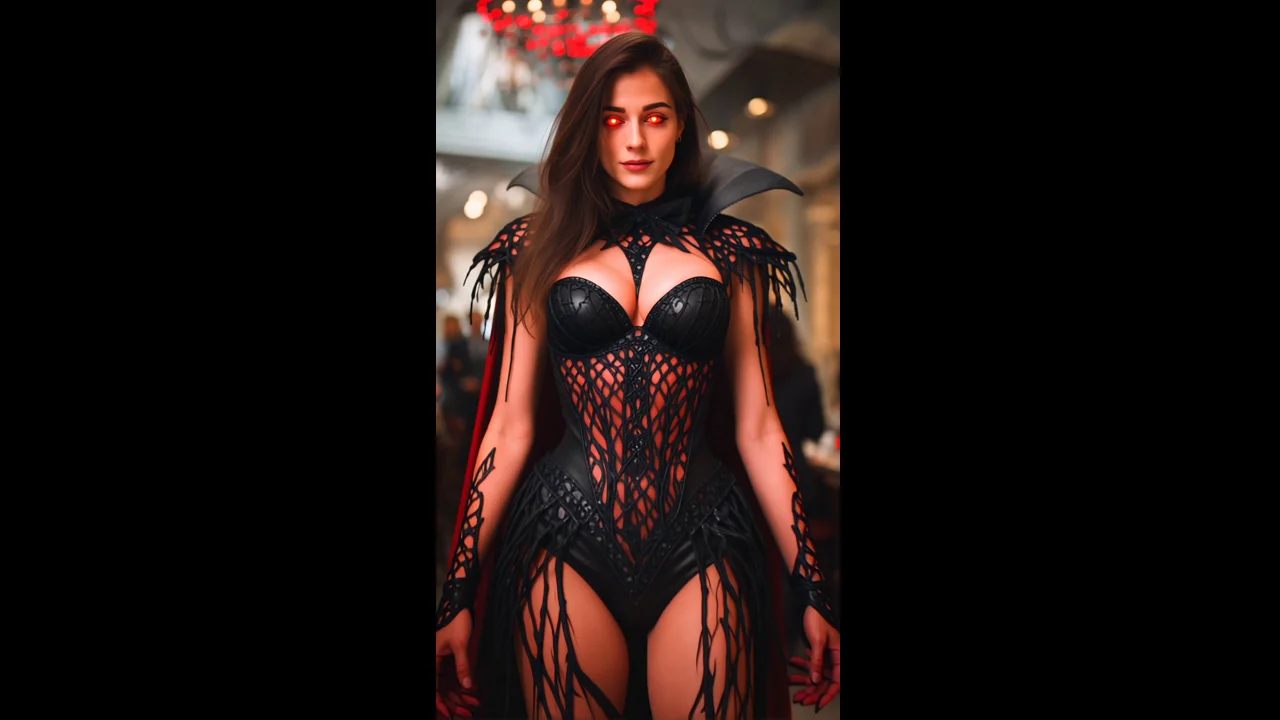
Create a new PixVerse result with VAMPIRE LORD. Its official prompt is: “Transform into a Vampire Lord in a Nightclub.”
See It In Action
What Is the Template?
VAMPIRE LORD is a PixVerse video template powered by V5.6. Use the required photo input and let the official prompt guide the result.
Template details
| Field | Value |
|---|---|
| Template ID | 402897572350409 |
| Output | Video |
| Model | PixVerse V5.6 |
| Input | 1 photo |
| Duration | 8 seconds |
| Quality | 360p / 540p / 720p / 1080p |
| Audio | Included |
| Custom prompt | Off |
| Launched | May 23 2026 |
What’s in the Official Preview
The official preview demonstrates the core VAMPIRE LORD effect described by PixVerse: Transform into a Vampire Lord in a Nightclub.
How to Create
Upload the required photo input, choose the template in PixVerse, and generate. The template prompt is built in, so no custom prompt is required.
- Upload 1 photo
- Open PixVerse — VAMPIRE LORD.
- Generate — VAMPIRE LORD.
- Download and share — VAMPIRE LORD.
Tips
- Use a clear, well-lit photo
- Keep the main subject easy to recognize
- Review the official prompt before generating
Frequently Asked Questions (FAQ)
Q: What does VAMPIRE LORD do? A: It applies the official effect described in the prompt: Transform into a Vampire Lord in a Nightclub.
Q: How many photos are required? A: 1 photo.
Q: Is a custom prompt available? A: No. The official template prompt is used automatically.
Ready to try VAMPIRE LORD? Open PixVerse and choose the template.
Related templates: