Summer Star: Reveal Your Photo on a Giant Beachside Billboard
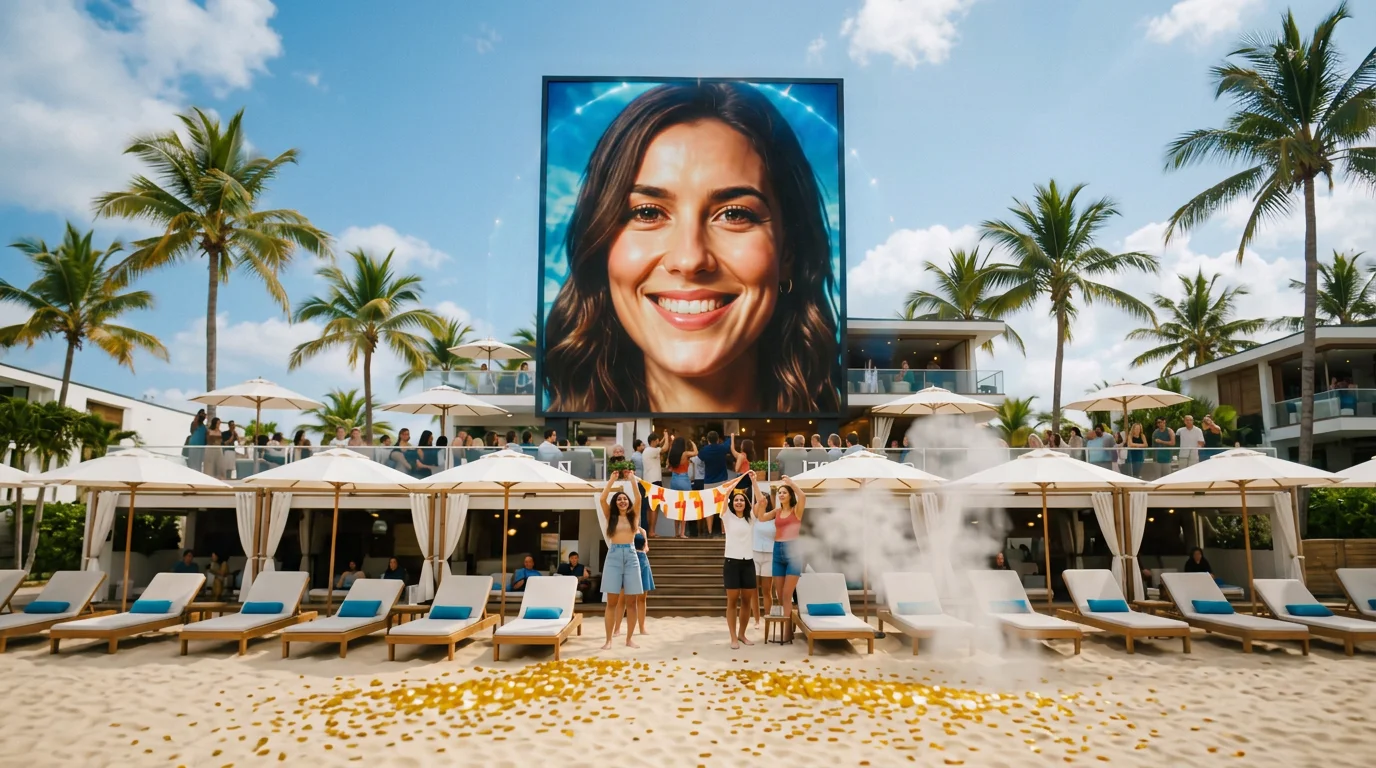
You made it to the big screen! A massive billboard reveal on the beach. That is the official prompt for PixVerse’s newly launched Summer Star template — an impactful V6 image-to-video effect that showcases your photo across a colossal seaside billboard towering over a crowded sunny tropical beach.
The official preview shows the camera pulling back across golden beach sands and cheering vacationers to unveil a massive billboard displaying the subject’s portrait against the blue ocean sky. The one-click flow works wonderfully with photos of you, friends, or creators.
See It In Action
What Is the Summer Star Template?
Summer Star is an iconic PixVerse image-to-video template powered by PixVerse V6. You upload one photo; PixVerse V6 generates a 5-second vertical celebrity reveal video. You do not write a prompt — the template prompt is locked, so the effect stays consistent.
Template name Video
| Field | Value |
|---|---|
| Template name | Summer Star |
| Template ID | 414764104026287 |
| Output | Video |
| Model | PixVerse V6 |
| Input | 1 photo |
| Duration | 5 seconds |
| Quality | 360p / 540p / 720p / 1080p |
| Audio | Included |
| Custom prompt | Off |
| Launched | Jul 28 2026 |
How it works
- Upload one photo — a clear portrait or well-lit shot works best
- Select Summer Star — search the name in PixVerse templates, or use Template ID
414764104026287 - Generate — PixVerse V6 applies the effect automatically
- Download and share — export the clip for TikTok, Reels, or Shorts
What’s in the Official Preview
- A monumental seaside billboard displaying the subject’s portrait in high detail
- A vibrant tropical beach scene filled with vacationers looking up and cheering
- Sparkling ocean waves, golden sand, and bright summer sunshine
- A dramatic camera zoom-out highlighting your grand celebrity breakthrough
How to Create Your Summer Star Video
Step 1: Choose a photo
Choose a clear portrait or headshot with good lighting and contrast.
Step 2: Open PixVerse
Visit PixVerse on web or in the app, then open the template library.
Step 3: Find {name}
Search Summer Star or look under newly launched templates. Confirm Template ID 414764104026287.
Step 4: Generate
Upload the photo and generate. The template does not accept a custom prompt, so you do not need to describe the scene.
Tips
- Confident, smiling, or model-like portraits look incredible on the giant billboard
- High-resolution photos ensure billboard imagery remains crystal clear during the camera pullback
- Single-subject headshots yield the cleanest and most dramatic billboard reveal
- The output is vertical 1080p, perfectly sized for TikTok, Instagram Reels, and Shorts
Frequently Asked Questions (FAQ)
Q: Do I need to write a prompt? A: No. Summer Star has custom prompts turned off. Upload one photo and generate.
Q: How long is the video? A: 5 seconds, generated with PixVerse V6.
Q: What quality is available? A: 360p, 540p, 720p, and 1080p.
Q: How many photos do I upload? A: One. This is a single-image template.
Q: Does it include audio? A: Yes. The generated clip includes celebratory crowd and summer beach audio.
Ready for your billboard moment? Open PixVerse, search Summer Star, and generate from one photo.
Related templates:
- Summer Aura King — unleash an epic beachside legend aura
- Pet Summer Debut — movie-star pet poolside glamour
- Festival Dance — groove under vibrant outdoor festival lights
- Little Gymnast — tiny gymnast on the rings