Skyfall Mecha Assembly: Become a Giant Mech in 15 Seconds
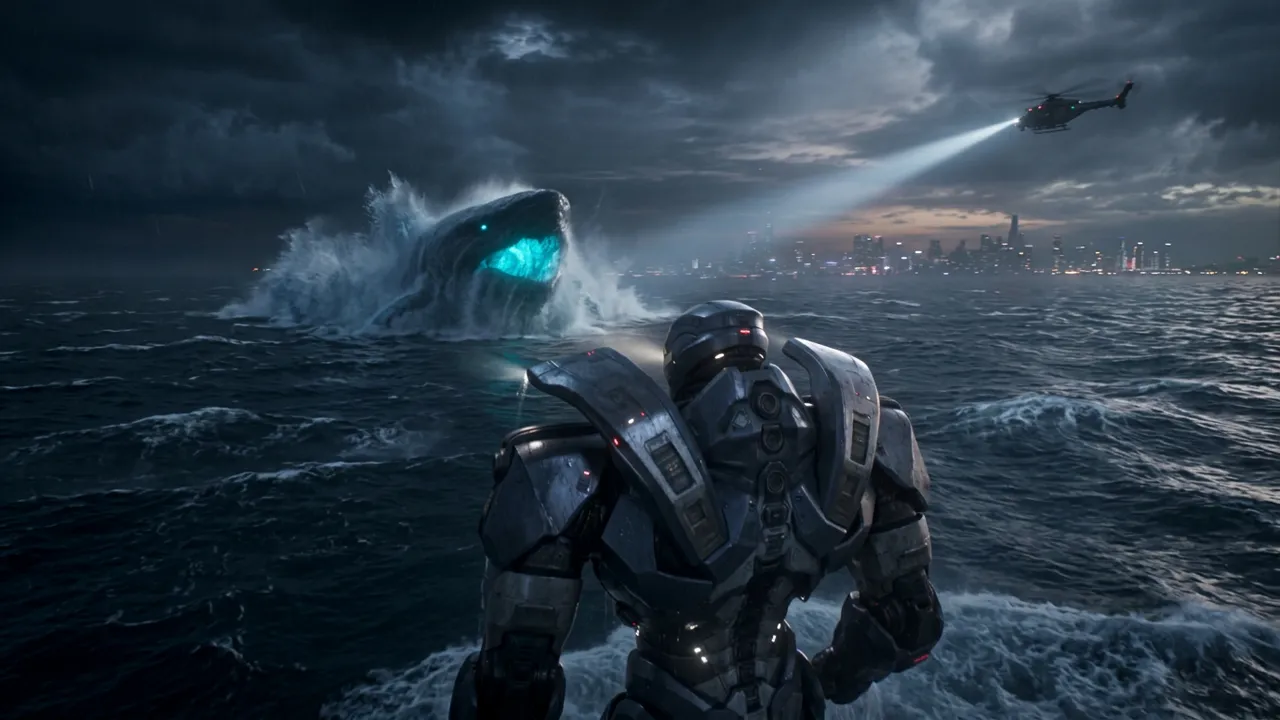
Upload a portrait to create a cinematic sci-fi mecha transformation. That is the official prompt for Skyfall Mecha Assembly — a one-photo PixVerse V6 template where your character leaps from a high-altitude aircraft, assembles into a massive industrial mech during freefall, crashes into the sea, then rises to face a glowing ocean creature.
The official preview is pure blockbuster: a stormy night ocean, a searchlight sweeping from an aircraft overhead, and the newly assembled mech seen from behind as a giant glowing creature breaches the waves in front of it.
See It In Action
What Is the Skyfall Mecha Assembly Template?
Skyfall Mecha Assembly is a new PixVerse image-to-video transformation template. You upload one portrait; PixVerse V6 generates a 15-second vertical sci-fi short. You do not write a prompt — the template prompt is locked, so the freefall-to-boss-fight sequence stays consistent.
Template details
| Field | Value |
|---|---|
| Template name | Skyfall Mecha Assembly |
| Template ID | 419842893321536 |
| Output | Video |
| Model | PixVerse V6 |
| Input | 1 photo |
| Duration | 15 seconds |
| Quality | 360p / 540p / 720p / 1080p |
| Audio | Included |
| Custom prompt | Off |
| Launched | Aug 19 2026 |
How it works
- Upload one photo — a clear portrait or full-body shot works best
- Select Skyfall Mecha Assembly — search the name in PixVerse templates, or use Template ID
419842893321536 - Generate — PixVerse V6 applies the effect automatically
- Download and share — export the clip up to 1080p for TikTok, Reels, or Shorts
What’s in the Official Preview
The sample plays like a movie trailer in four beats:
- A leap from a high-altitude aircraft above a stormy ocean
- Mid-air assembly into a massive industrial mech during freefall
- A colossal sea impact with towering spray
- The mech rising to face a glowing blue ocean creature under a searchlight
At 15 seconds it is one of the longest templates in this batch — closer to a mini short film than a gag clip.
How to Create Your Skyfall Mecha Assembly Video
Step 1: Choose a photo
Use a well-lit shot where the face is clear. Front-facing portraits match the official preview best.
Step 2: Open PixVerse
Visit PixVerse on web or in the app, then open the template library.
Step 3: Find Skyfall Mecha Assembly
Search Skyfall Mecha Assembly under newly launched templates. Confirm the Template ID from the details table above.
Step 4: Generate
Upload the photo and generate. The template does not accept a custom prompt, so you do not need to describe the scene.
Tips
- Use a clear portrait so your character reads well inside the action
- The output is vertical, ready for Shorts, Reels, and TikTok
- Export 1080p to keep the night-ocean detail and glowing creature sharp
- Pair it with Dark Bio-Armor Transformation for a sci-fi double feature
Frequently Asked Questions (FAQ)
Q: Do I need to write a prompt? A: No. Skyfall Mecha Assembly has custom prompts turned off. Upload one portrait and generate.
Q: How long is the video? A: 15 seconds, generated with PixVerse V6.
Q: What quality is available? A: 360p, 540p, 720p, and 1080p.
Q: How many photos do I upload? A: One portrait. This is a single-image template.
Q: Is there audio? A: Yes. The template ships with a cinematic soundtrack.
Ready to assemble your mech? Open PixVerse, search Skyfall Mecha Assembly, and generate from one portrait.
Related templates:
- Dark Bio-Armor Transformation — dark battlefield armor transformation
- Shatter the Meteor and Save the Earth — exploding meteor over the city
- Become the Final Boss of the Game with One Click — game-boss transformation
- Little Gymnast — tiny gymnastics portrait