Real-Life Claw Machine Copies: Turn Photos into Plush Prizes
Upload any subject and turn it into tiny prize-sized copies inside a real arcade claw machine. That is the official prompt for Real-Life Claw Machine Copies — a one-photo PixVerse V6 effect where 4–5 miniature versions of your subject sit among the plushies, the claw grabs one by the body, drops it through the visible prize hole, and the subject exits from the lower pickup door in a lively handheld phone-video style.
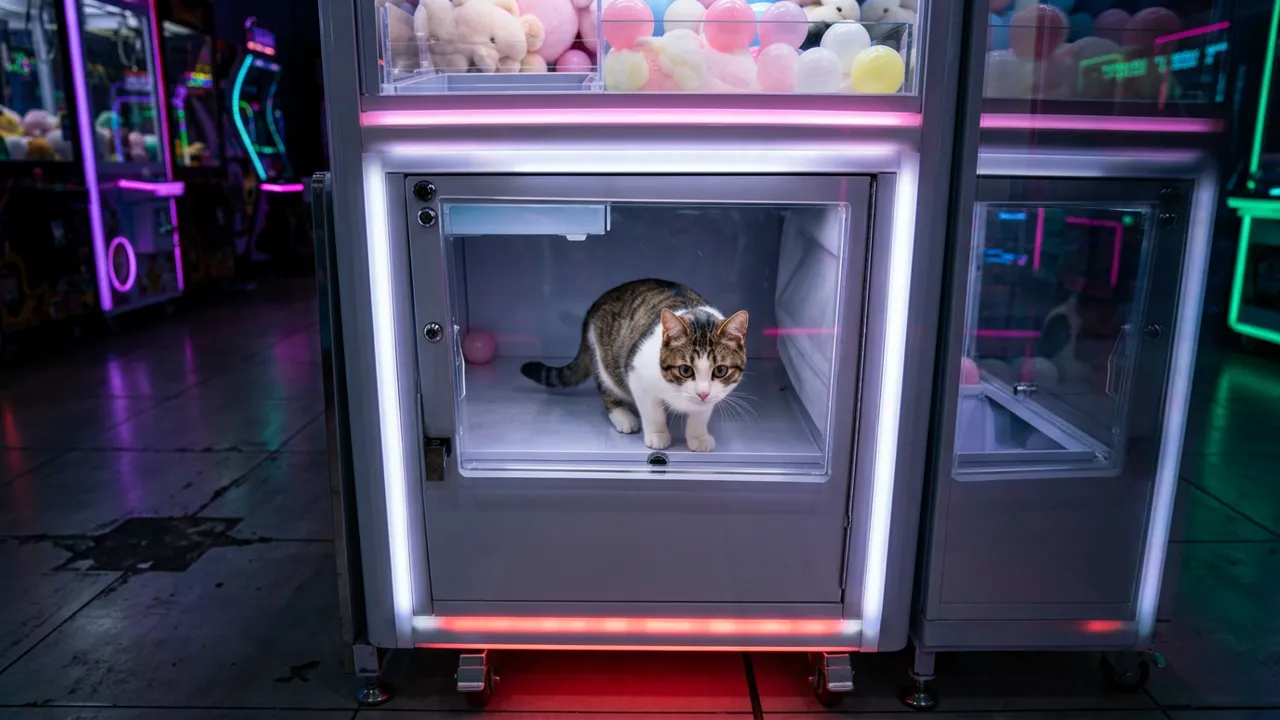
The official preview shows the concept on a cat: the feline peers out from the glass prize area of a glowing claw machine, rows of pastel plush toys lined up on the shelf above, shot like a casual arcade phone video.
See It In Action
What Is the Real-Life Claw Machine Copies Template?
Real-Life Claw Machine Copies is a new PixVerse image-to-video miniature template. You upload one photo of any subject — a person, a pet, an object; PixVerse V6 generates a 15-second vertical video. You do not write a prompt — the template prompt is locked, so the claw-grab sequence stays consistent.
Template details
| Field | Value |
|---|---|
| Template name | Real-Life Claw Machine Copies |
| Template ID | 419840515781952 |
| Output | Video |
| Model | PixVerse V6 |
| Input | 1 photo |
| Duration | 15 seconds |
| Quality | 720p |
| Audio | Included |
| Custom prompt | Off |
| Launched | Aug 19 2026 |
How it works
- Upload one photo — a clear portrait or full-body shot works best
- Select Real-Life Claw Machine Copies — search the name in PixVerse templates, or use Template ID
419840515781952 - Generate — PixVerse V6 applies the effect automatically
- Download and share — export the clip up to 720p for TikTok, Reels, or Shorts
What’s in the Official Preview
The sample plays out like a real arcade visit:
- 4–5 tiny prize-sized copies of your subject inside the machine
- A glowing arcade claw machine with pastel plush toys
- The claw grabbing one copy by the body
- The drop through the visible prize hole
- The subject exiting from the lower pickup door
The handheld phone-video framing sells the illusion that it really happened at the arcade.
How to Create Your Real-Life Claw Machine Copies Video
Step 1: Choose a photo
Use a well-lit shot where the face is clear. Front-facing portraits match the official preview best.
Step 2: Open PixVerse
Visit PixVerse on web or in the app, then open the template library.
Step 3: Find Real-Life Claw Machine Copies
Search Real-Life Claw Machine Copies under newly launched templates. Confirm the Template ID from the details table above.
Step 4: Generate
Upload the photo and generate. The template does not accept a custom prompt, so you do not need to describe the scene.
Tips
- Pets and expressive faces make the funniest tiny prizes
- Use a photo with a clear, uncluttered subject for cleaner mini copies
- The output is vertical 720p, ready for short-form platforms
- Film-style captions like POV: you won yourself work great here
Frequently Asked Questions (FAQ)
Q: Do I need to write a prompt? A: No. Real-Life Claw Machine Copies has custom prompts turned off. Upload one photo and generate.
Q: How long is the video? A: 15 seconds, generated with PixVerse V6.
Q: What quality is available? A: 720p.
Q: What can I upload? A: Any subject — a person, a pet, or an object. One photo per generation.
Q: Is there audio? A: Yes. The template ships with its own soundtrack.
Ready to become a claw machine prize? Open PixVerse, search Real-Life Claw Machine Copies, and generate from one photo.
Related templates:
- Caught Mid-Lift! — tiny-person lift gag
- Dance on Phone — dancing on a giant smartphone
- Mood Weather Forecast — cloudy mood turning sunny
- Little Gymnast — tiny gymnastics portrait