Power Flex: Turn Your Photo into a Strong Biceps Video
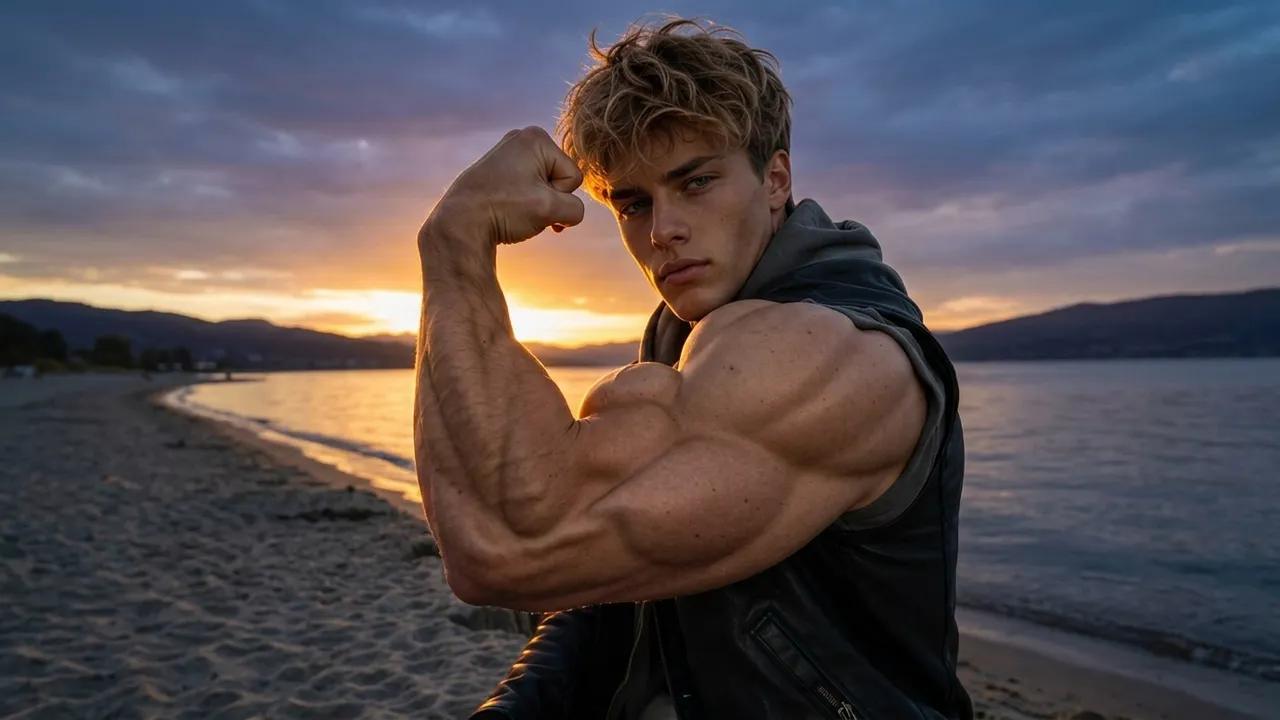
Pump up the biceps. Strike your strongest power pose. That is the official prompt for the newly launched Power Flex template — a one-photo PixVerse V6 effect that gives your subject an exaggerated, cartoonishly muscular flexing arm.
The official preview shows a young man at sunset by the water, staring into the camera while curling one massively swollen bicep. Upload your own portrait and the template stages the same over-the-top strength gag on you.
See It In Action
What Is the Power Flex Template?
Power Flex is a new PixVerse image-to-video comedy template. You upload one photo; PixVerse V6 generates a 5-second vertical video of your subject striking a power pose with one impossibly bulked-up arm. You do not write a prompt — the template prompt is locked, so the effect stays consistent.
Template details
| Field | Value |
|---|---|
| Template name | Power Flex |
| Template ID | 419843399118144 |
| Output | Video |
| Model | PixVerse V6 |
| Input | 1 photo |
| Duration | 5 seconds |
| Quality | 360p / 540p / 720p / 1080p |
| Audio | Included |
| Custom prompt | Off |
| Launched | Aug 19 2026 |
How it works
- Upload one photo — a clear portrait or full-body shot works best
- Select Power Flex — search the name in PixVerse templates, or use Template ID
419843399118144 - Generate — PixVerse V6 applies the effect automatically
- Download and share — export the clip up to 1080p for TikTok, Reels, or Shorts
What’s in the Official Preview
The sample is a sunset flex, not a gym transformation:
- A close portrait of the subject looking straight at the camera
- One arm curled into a flex with the bicep comically enlarged
- A lakeside sunset with warm backlight in the background
- A casual outfit — dark vest over light clothing
- A 5-second punchline built for reaction clips and memes
The humor comes from the contrast: a normal portrait, then one arm that looks impossibly strong.
How to Create Your Power Flex Video
Step 1: Choose a photo
Use a well-lit shot where the face is clear. Front-facing portraits match the official preview best.
Step 2: Open PixVerse
Visit PixVerse on web or in the app, then open the template library.
Step 3: Find Power Flex
Search Power Flex under newly launched templates. Confirm the Template ID from the details table above.
Step 4: Generate
Upload the photo and generate. The template does not accept a custom prompt, so you do not need to describe the scene.
Tips
- Use a front-facing portrait with a visible arm for the cleanest gag
- High-resolution photos keep the face sharp next to the giant bicep
- One subject per photo — group shots dilute the joke
- Export 1080p so the flex close-up stays crisp
Frequently Asked Questions (FAQ)
Q: Do I need to write a prompt? A: No. Power Flex has custom prompts turned off. Upload one photo and generate.
Q: How long is the video? A: 5 seconds, generated with PixVerse V6.
Q: What quality is available? A: 360p, 540p, 720p, and 1080p.
Q: How many photos do I upload? A: One. This is a single-image template.
Q: Is there audio? A: Yes. The template ships with its own soundtrack.
Ready to strike your strongest pose? Open PixVerse, search Power Flex, and generate from one photo.
Related templates:
- Caught Mid-Lift! — tiny-person lift gag
- Dance on Phone — dancing on a giant smartphone
- Mood Weather Forecast — cloudy mood turning sunny
- Little Gymnast — tiny gymnastics portrait