Pet Dance Trainee: Turn Your Pet into a Dance Star
Upload a photo of your pet and turn your furry baby into a dance trainee. That is the official prompt for PixVerse’s newly launched Pet Dance Trainee template — a one-photo V6 effect that puts your pet through idol-style dance training.
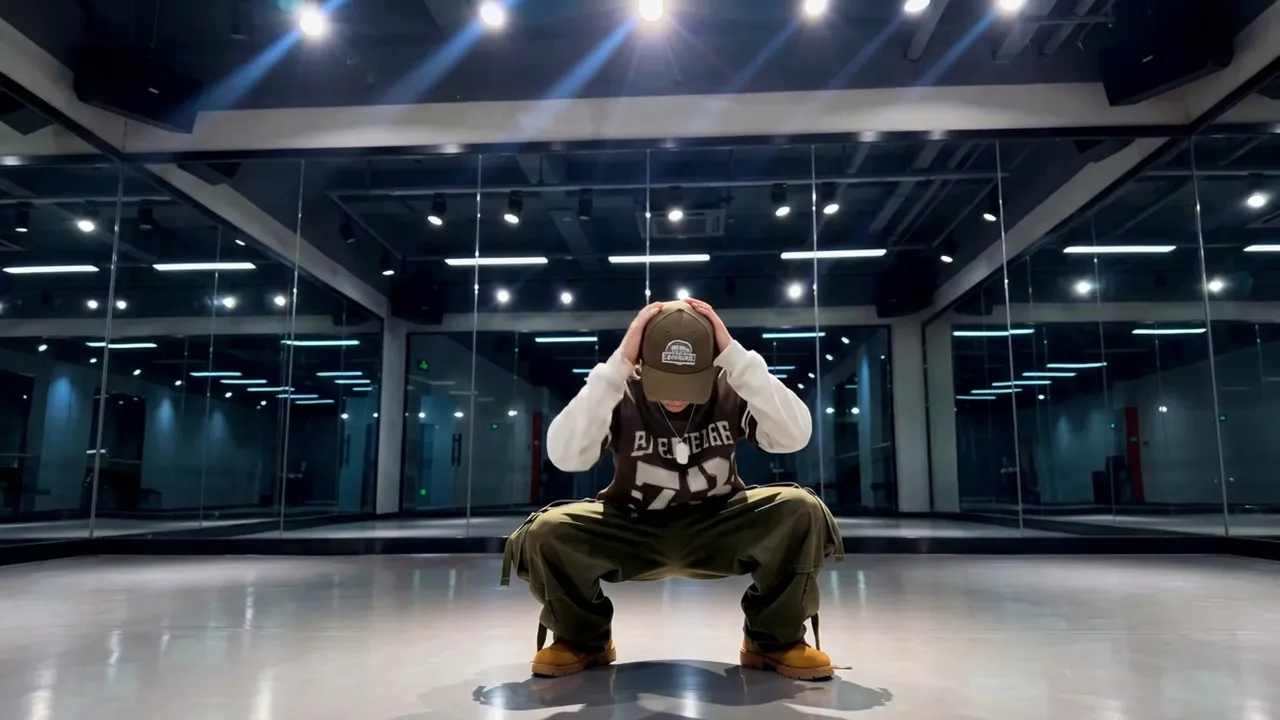
The official preview is staged like a trainee audition: a dancer in streetwear and a cap holding a starting pose in a mirrored studio under bright spotlights. Upload your pet and your furry baby takes that same spotlight.
See It In Action
What Is the Pet Dance Trainee Template?
Pet Dance Trainee is a new PixVerse image-to-video template. You upload one photo; PixVerse V6 generates an 11-second vertical video with built-in music. You do not write a prompt — the template prompt is locked, so the effect stays consistent.
Template details
| Field | Value |
|---|---|
| Template name | Pet Dance Trainee |
| Template ID | 420171294385600 |
| Output | Video |
| Model | PixVerse V6 |
| Input | 1 photo |
| Duration | 11 seconds |
| Quality | 360p, 540p, 720p, 1080p |
| Audio | Built-in music |
| Custom prompt | Off |
| Launched | Aug 21 2026 |
How it works
- Upload one photo — a clear shot of your pet with its face visible
- Select Pet Dance Trainee — search the name in PixVerse templates, or use Template ID
420171294385600 - Generate — PixVerse V6 applies the effect automatically
- Download and share — export the 11-second clip for TikTok, Reels, or Shorts
What’s in the Official Preview
The template preview plays like a K-pop audition tape:
- A moody dance studio with mirrors and overhead spotlights
- Streetwear styling with a cap for that trainee look
- A confident starting pose as the music kicks in
- Your uploaded pet keeps its own face while the scene makes it the trainee
It is made for fans of the idol-trainee trend: your pet debuts as the main dancer.
How to Create Your Pet Dance Trainee Video
Step 1: Choose a photo
Use a well-lit shot where your pet’s face is clear. A bold, direct gaze fits the trainee concept best.
Step 2: Open PixVerse
Visit PixVerse on web or in the app, then open the template library.
Step 3: Find Pet Dance Trainee
Search Pet Dance Trainee or look under newly launched templates. Confirm Template ID 420171294385600.
Step 4: Generate
Upload the photo and generate. The template does not accept a custom prompt, so you do not need to describe the scene.
Tips
- Use one pet per photo for the cleanest stage result
- A symmetrical front-facing shot frames well under the spotlights
- High-resolution images keep facial detail sharp in the dark studio
- The output is vertical with music, ready for short-form platforms
Frequently Asked Questions (FAQ)
Q: Do I need to write a prompt? A: No. Pet Dance Trainee has custom prompts turned off. Upload one photo and generate.
Q: How long is the video? A: 11 seconds, generated with PixVerse V6.
Q: What quality is available? A: 360p, 540p, 720p, and 1080p.
Q: How many photos do I upload? A: One. This is a single-image template.
Q: Can I use a cat photo? A: Yes. Any pet photo works — dogs, cats, and other pets all debut as dance trainees.
Ready for your furry baby to debut? Open PixVerse, search Pet Dance Trainee, and generate from one photo.
Related templates:
- Cute Puppy Dancing — your pet showing its dance moves
- Love Scenario Hand Dance — copy this viral gesture dance
- Pet Fighting Monsters — your pet as a caped monster-fighter
- Little Gymnast — tiny gymnastics counterpart