NPC, ME:MULTIPLIED: Clone Crowd Video with PixVerse V6
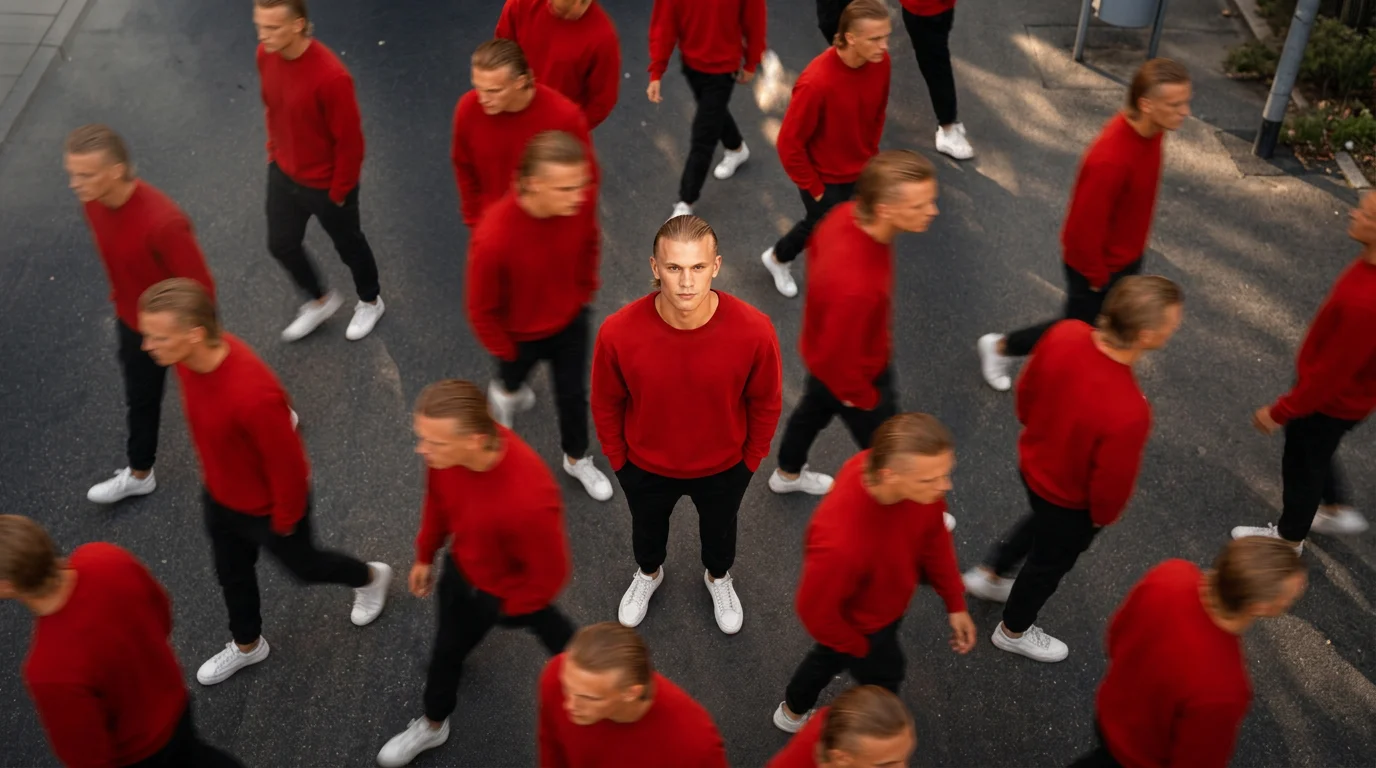
In the Clone Crowd, my body is here, my mind is everywhere, and life goes on. That is the official prompt for PixVerse’s NPC, ME:MULTIPLIED template — a V6 effect that surrounds your still center self with motion-blurred clones.
The official preview shows a top-down view of a person in a red sweater, black pants, and white sneakers standing still on asphalt while identical copies walk past in blurred motion.
See It In Action
What Is the NPC, ME:MULTIPLIED Template?
NPC, ME:MULTIPLIED is a PixVerse image-to-video template. Upload one photo; PixVerse V6 generates a 6-second vertical video. Custom prompts are off.
Template details
| Field | Value |
|---|---|
| Template name | NPC, ME:MULTIPLIED |
| Template ID | 415516870383552 |
| Output | Video |
| Model | PixVerse V6 |
| Input | 1 photo |
| Duration | 6 seconds |
| Quality | 360p / 540p / 720p / 1080p |
| Audio | Included |
| Custom prompt | Off |
| Launched | Jul 25 2026 |
How it works
- Upload one photo
- Select NPC, ME:MULTIPLIED — Template ID
415516870383552 - Generate
- Download up to 1080p
What’s in the Official Preview
The sample is a clone-crowd street shot:
- One sharp central figure looking up at the camera
- Multiple identical copies walking in different directions
- Motion blur on the walking clones
- Dark asphalt ground and a high-angle framing
It fits identity memes, “NPC life” jokes, and surreal city edits.
How to Create Your NPC, ME:MULTIPLIED Video
Step 1: Choose a photo
Use a clear full-body or three-quarter shot with a readable outfit. The red-sweater sample shows how clothing becomes the clone uniform.
Step 2: Open PixVerse
Visit PixVerse.
Step 3: Find NPC, ME:MULTIPLIED
Search NPC, ME:MULTIPLIED. Confirm Template ID 415516870383552. The Chinese title is NPC,我的分身.
Step 4: Generate
Upload and generate. Custom prompts are off.
Tips
- One person per photo
- Distinct clothing colors help the clone crowd read clearly
- Export 1080p to keep the motion blur and still center sharp
- Pair with Mini Social Recharge for a two-clip identity series
Frequently Asked Questions (FAQ)
Q: What do I upload? A: One photo.
Q: How long is the clip? A: 6 seconds.
Q: Is audio included? A: Yes.
Q: Can I rewrite the clone scene with a prompt? A: No. Custom prompts are off.
Q: What resolutions are available? A: 360p, 540p, 720p, and 1080p.
Ready to multiply yourself? Open PixVerse and search NPC, ME:MULTIPLIED.
Related templates:
- Mini Social Recharge — mini-me recharged by social likes
- Hat Off, Hero Rise — person or pet becomes a superhero
- Selfie in the basement — superpower selfie in an empty corner
- Little Gymnast — tiny gymnast on the rings