Never-Fading Dance: Turn One Photo into a Dance Video
Dark mood, endless love — one photo turns into a dance that never fades. Never-Fading Dance is a newly launched PixVerse V6 template: upload one still, get a 14-second dance video with the template soundtrack already attached.
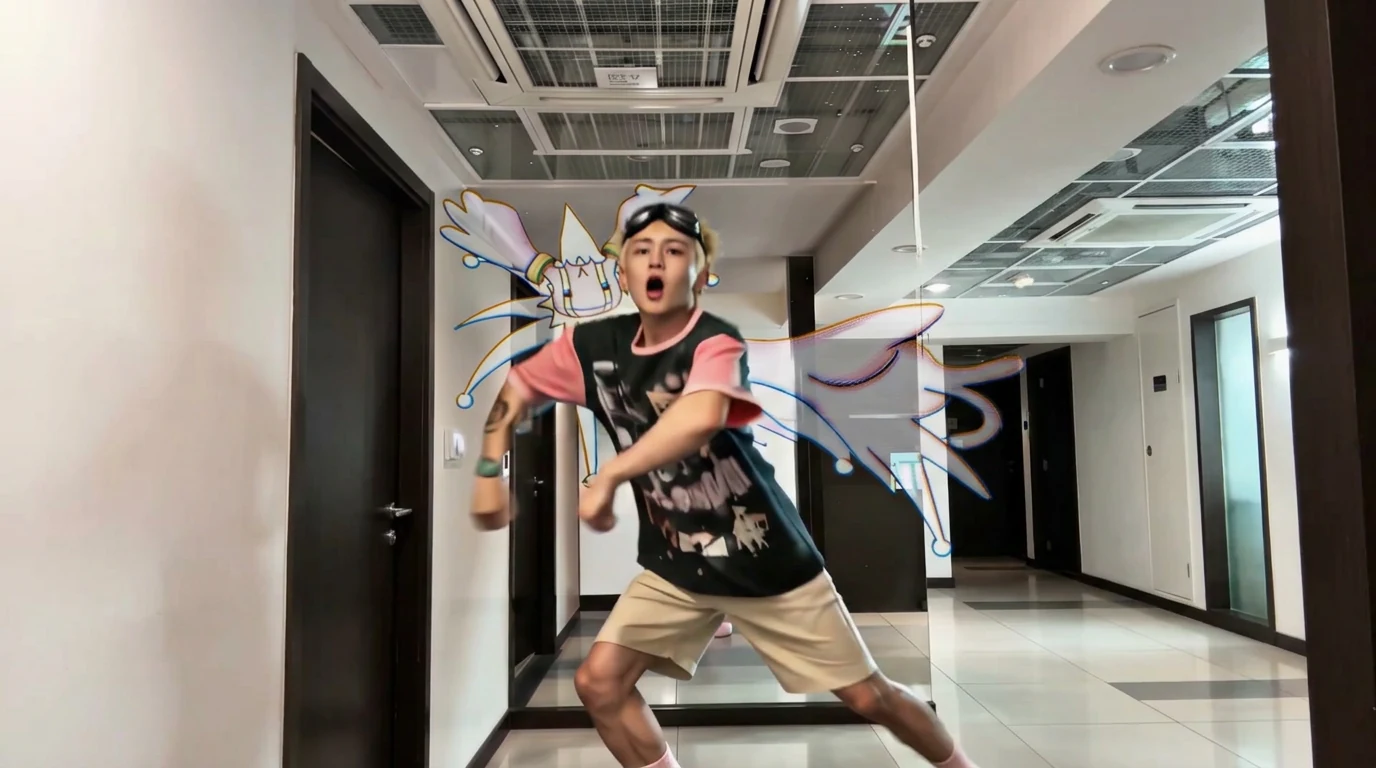
The official preview is an energetic indoor performance — a dancer in a black-and-pink graphic tee, beige shorts, and goggles on the forehead, with illustrated motion trails wrapping the hallway. Your photo supplies the face; the template supplies the choreography, motion graphics, and audio.
See It In Action
What Is the Never-Fading Dance Template?
This is a one-click dance effect, not a motion-control workflow. You do not upload a reference video. PixVerse V6 takes a single image and generates the 14-second performance.
Template details
| Field | Value |
|---|---|
| Template name | Never-Fading Dance |
| Template ID | 422337309832832 |
| Output | Video |
| Model | PixVerse V6 |
| Input | 1 photo |
| Duration | 14 seconds |
| Quality | 360p / 540p / 720p / 1080p |
| Audio | Included |
| Custom prompt | Off |
| Launched | Sep 02 2026 |
How it works
- Upload one photo
- Select Never-Fading Dance — Template ID
422337309832832 - Generate
- Export up to 1080p
What’s in the Official Preview
The sample is a hallway dance with graphic overlays:
- Full-body choreography, wide stance, open mouth
- Black tee with pink sleeves, beige shorts, pink socks
- Goggles resting on the forehead
- Colorful illustrated wings and motion trails behind the dancer
- Indoor corridor lighting and tiled floor
If you want a cleaner mall-fashion dance instead, use Wishing You and I Both a Good Time. Never-Fading Dance is the longer, more graphic of the two new dance templates.
How to Create Your Never-Fading Dance Video
Step 1: Choose a photo
A sharp, front-facing portrait helps the 14-second identity hold. Full-body photos also work because the dance is framed wide.
Step 2: Open PixVerse
Go to PixVerse.
Step 3: Find the template
Search Never-Fading Dance. The Chinese title is 永不褪色的舞步.
Step 4: Generate
Upload and generate. Custom prompts are off, so you cannot rewrite the dance in text.
Tips
- One person per photo matches the official clip
- Use a high-resolution face — 14 seconds is long enough for drift if the source is soft
- The template includes audio; you do not need to drop in a track first
- Export 1080p for TikTok or Reels
Frequently Asked Questions (FAQ)
Q: What is the official prompt? A: “Dark mood, endless love — one photo turns into a dance that never fades.”
Q: How long is the video? A: 14 seconds.
Q: Does it include music? A: Yes.
Q: Can I upload a dance reference video? A: No. This template takes one image, not a motion-control pair.
Q: What quality options exist? A: 360p, 540p, 720p, and 1080p.
Ready for a dance that does not fade? Open PixVerse and search Never-Fading Dance.
Related templates:
- Wishing You and I Both a Good Time — 15-second mall dance
- AI Dancing Baby — viral dance template
- Street Time Freeze — freeze the street instead
- Download the PixVerse app