Michico Dance Challenge: Graceful Beat-Synced Moves on PixVerse
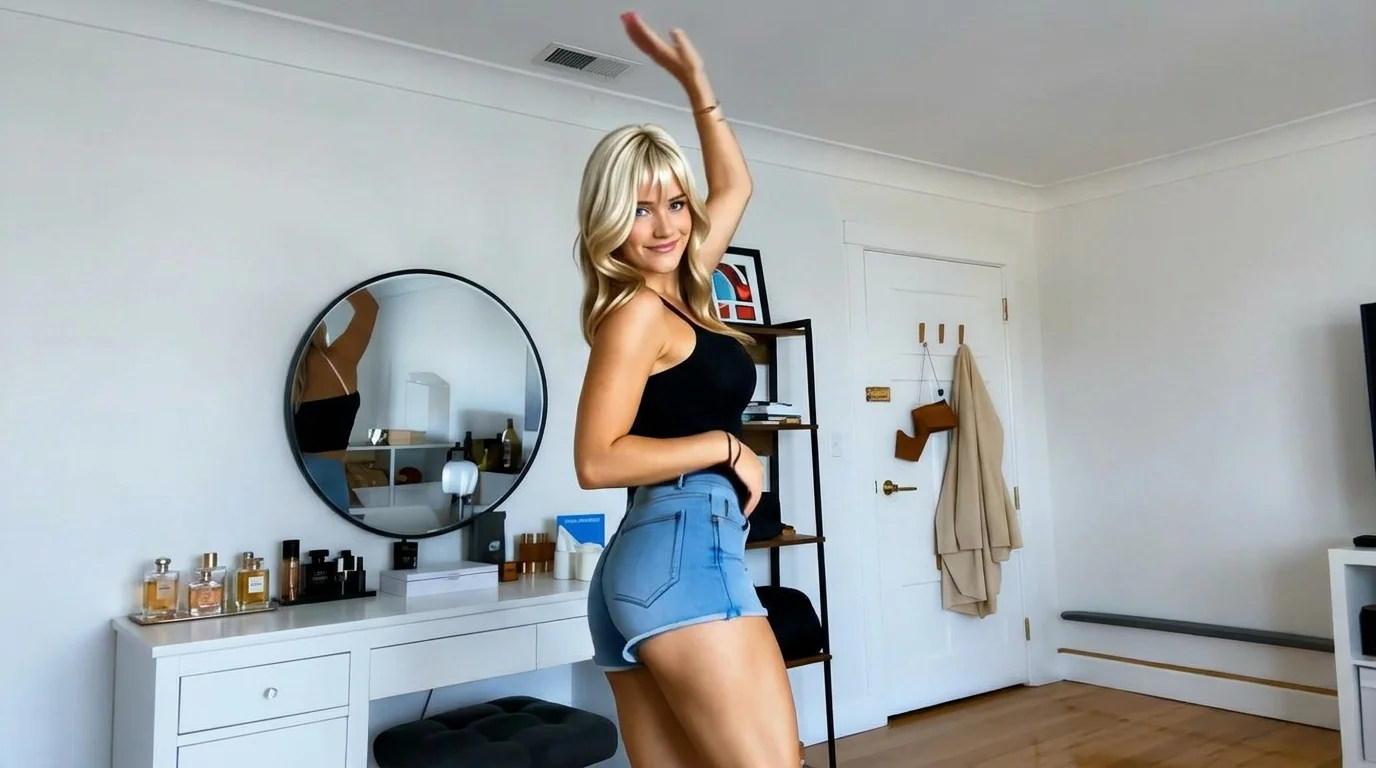
Upload a single full-body photo to generate a Michico popular dance video, featuring graceful and natural movements, perfect beat synchronization, and strong appeal. That is the official prompt for PixVerse’s Michico Dance Challenge template — an elegant 7-second V6 dance effect that combines fluid arm choreography with irresistible social rhythm.
The official preview showcases elegant hand waves, smooth body turns, and charming rhythmic bounces that sync seamlessly to the viral Michico sound. One full-body portrait creates a captivating dance performance.
See It In Action
What Is the Michico Dance Challenge Template?
Michico Dance Challenge is a graceful viral dance template powered by PixVerse V6. Upload one full-body image to generate a 7-second vertical video featuring smooth expressive choreography, synchronized music, and resolutions up to 1080p.
Template details
| Field | Value |
|---|---|
| Template name | Michico Dance Challenge |
| Template ID | 419655655822336 |
| Output | Video |
| Model | PixVerse V6 |
| Input | 1 photo |
| Duration | 7 seconds |
| Quality | 360p / 540p / 720p / 1080p |
| Custom prompt | Off |
| Launched | Aug 18 2026 |
How it works
- Upload one photo — a clear portrait or full-body shot works best
- Select Michico Dance Challenge — search the name in PixVerse templates, or use Template ID
419655655822336 - Generate — PixVerse V6 applies the effect automatically
- Download and share — export the 7-second clip for TikTok, Reels, or Shorts
What’s in the Official Preview
The template preview brings the official concept to life:
- Graceful flowing hand waves and charming stylized arm choreography
- Natural full-body transitions maintaining balance, poise, and posture
- Precise beat synchronization matching every bounce to the music track
- Studio-quality lighting highlighting outfit textures and facial expression
The effect preserves facial identity while generating fluid, coherent animation matching the prompt.
How to Create Your Michico Dance Challenge Video
Step 1: Choose a photo
Upload a clear full-body photo taken from the front. Make sure arms, hands, and legs are visible so the delicate arm movements animate with maximum grace.
Step 2: Open PixVerse
Visit PixVerse on web or in the app, then open the template library.
Step 3: Find Michico Dance Challenge
Search Michico Dance Challenge or look under newly launched templates. Confirm Template ID 419655655822336.
Step 4: Generate
Upload the photo and generate. The template does not accept a custom prompt, so you do not need to describe the scene.
Tips
- Full-length standing shots show off the elegant balance of the routine
- Flowing dresses, stylish suits, or casual streetwear all look fantastic
- Export at 1080p for crystal-clear social sharing on TikTok and Reels
- Try with personal photos, virtual avatars, or stylized character art
Frequently Asked Questions (FAQ)
Q: Do I need to write a prompt? A: No. Michico Dance Challenge has custom prompts turned off. Upload one photo and generate.
Q: How long is the video? A: 7 seconds, generated with PixVerse V6.
Q: What quality is available? A: 360p / 540p / 720p / 1080p.
Q: How many photos do I upload? A: One. This is a single-image template.
Q: What makes the Michico dance unique? A: It emphasizes fluid, graceful hand movements and subtle hip bounces rather than fast aggressive steps, giving it an elegant aesthetic.
Ready to dance with grace and rhythm? Open PixVerse, search Michico Dance Challenge, and create your video.
Related templates:
- Two Dance — catchy beat-synced duo routine
- Subject 3 Fever — global viral dance phenomenon
- this and that — trending social dance challenge
- Little Gymnast — miniature gymnast on rings