Holy Beast Summoning Technique: Call Forth Your Divine Guardian
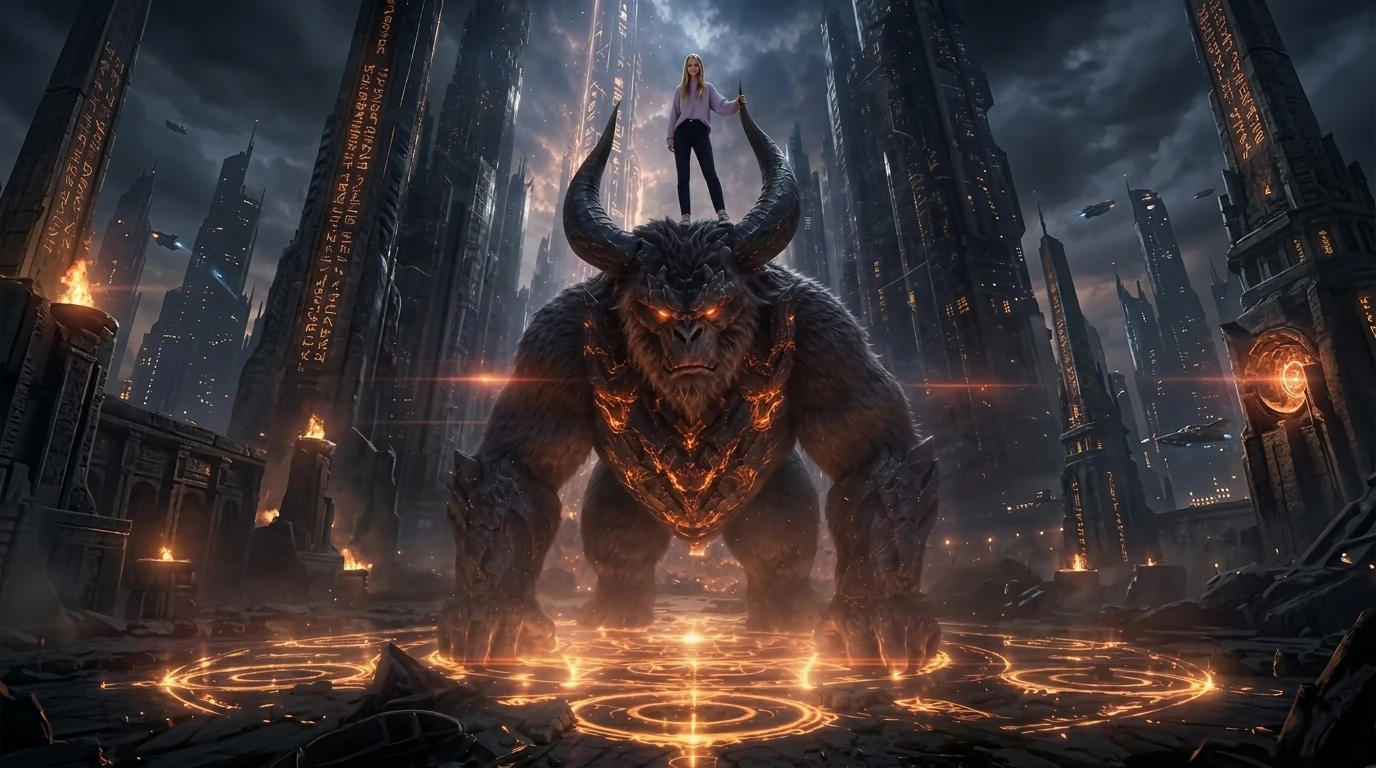
Summon your own divine beast!. That is the official prompt for PixVerse’s newly launched Holy Beast Summoning Technique template — a one-photo V6 effect that brings this vision to life with fluid motion and stunning detail.
The official preview showcases an epic fantasy summoning ritual: glowing arcane energy swirls as a formidable mythical beast emerges in a blast of light and aura, responding to the caller. The same one-click flow works with your portrait, an OC design, or a pet photo.
See It In Action
What Is the Holy Beast Summoning Technique Template?
Holy Beast Summoning Technique is a fantasy image-to-video template powered by PixVerse V6. You upload one photo; PixVerse V6 generates an 8-second vertical video depicting a grand magical summoning circle unleashing a divine guardian. You do not write a prompt — the template prompt is locked, so the mystical effect stays consistent.
Template details
| Field | Value |
|---|---|
| Template name | Holy Beast Summoning Technique |
| Template ID | 418801639489024 |
| Output | Video |
| Model | PixVerse V6 |
| Input | 1 photo |
| Duration | 8 seconds |
| Quality | 360p / 540p / 720p / 1080p |
| Audio | Included |
| Custom prompt | Off |
| Launched | Aug 13 2026 |
How it works
- Upload one photo — a clear portrait or well-lit photo works best
- Select Holy Beast Summoning Technique — search the name in PixVerse templates, or use Template ID
418801639489024 - Generate — PixVerse V6 applies the effect automatically
- Download and share — export the 8-second clip for TikTok, Reels, or Shorts
What’s in the Official Preview
The template preview showcases a polished, cohesive scene built around the official prompt:
- Intricate glowing summoning runes illuminating the ground in mystical energy
- Dramatic manifestation of a towering divine creature wrapped in elemental light
- Dynamic camera sweep accentuating scale, power, and cinematic impact
- Epic fantasy battle soundtrack fully synchronized to the magical climax
The template is ideal for anime fans, gamers, and fantasy creators wanting to show off their inner summoner.
How to Create Your Holy Beast Summoning Technique Video
Step 1: Choose a photo
Photos with dramatic expressions, heroic stances, or cosplay attire look especially natural when paired with the summoning circle.
Step 2: Open PixVerse
Visit PixVerse on web or in the app, then open the template library.
Step 3: Find Holy Beast Summoning Technique
Search Holy Beast Summoning Technique or browse newly launched templates. Confirm Template ID 418801639489024.
Step 4: Generate
Upload the photo and generate. The template does not accept a custom prompt, so you do not need to describe the scene.
Tips
- Full-body or three-quarter poses give the summoner a commanding stage presence
- Moody or high-contrast portraits blend seamlessly with dark fantasy energy
- Try using a pet photo to reveal their true ancient mythical spirit form
- Download at 1080p to capture every streak of lightning and magical particle
Frequently Asked Questions (FAQ)
Q: Do I need to write a prompt? A: No. Holy Beast Summoning Technique has custom prompts turned off. Upload one photo and generate.
Q: How long is the video? A: 8 seconds, generated with PixVerse V6.
Q: What quality is available? A: 360p / 540p / 720p / 1080p.
Q: How many photos do I upload? A: One. This is a single-image template.
Q: Does the video include sound or music? A: Yes. An epic fantasy orchestral soundtrack is integrated directly into the video.
Ready to summon your divine guardian? Open PixVerse, search Holy Beast Summoning Technique, and generate from one photo.
Related templates:
- Three Lifetime Bond — reincarnation romance across eras
- Born To Shine On Stage — festival headliner performance
- Where Did This Cobweb Come From? — funny spiderweb prank clip
- Little Gymnast — tiny gymnast on the rings