Giga Chad: Turn Any Photo into a Bigger-Jaw Meme Portrait
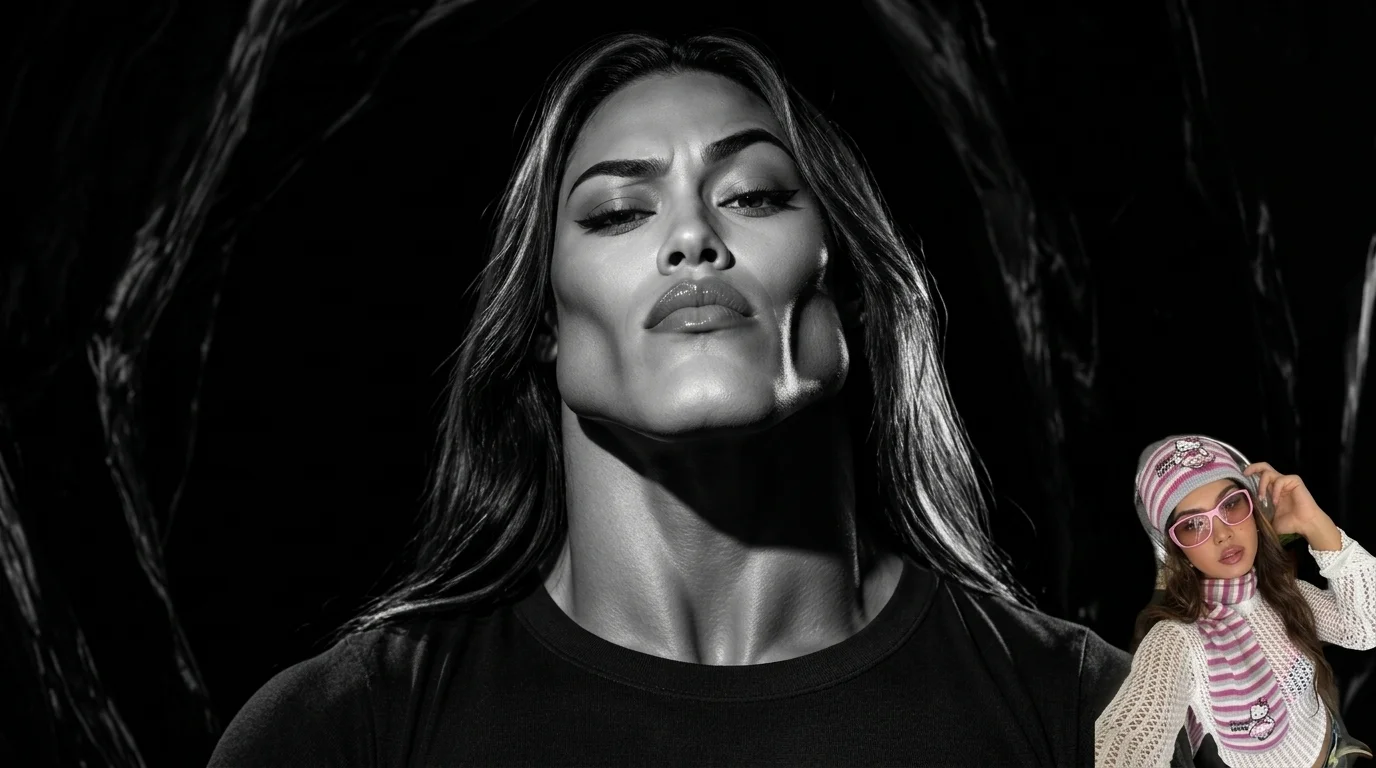
Bigger jaw. Bigger aura. Bigger meme. That is the official prompt for PixVerse’s Giga Chad template — a one-photo effect that restages your subject as an exaggerated square-jawed meme portrait on a black background.
The official preview morphs uploaded photos into stark black-and-white Giga Chad portraits with glitchy RGB-split transitions, and it works on pet photos too — one preview frame turns a cat into a chiseled-jaw Chad while a small cutout of the source photo sits in the corner.
See It In Action
What Is the Giga Chad Template?
Giga Chad is a PixVerse image template. You upload one photo; the Qwen Image model generates a single meme portrait. You do not write a prompt — the template prompt is locked, so the effect stays consistent.
Template details
| Field | Value |
|---|---|
| Template name | Giga Chad |
| Template ID | 420879207937472 |
| Output | Image |
| Model | Qwen Image |
| Input | 1 photo |
| Duration | Single image |
| Quality | 360p, 540p, 720p, 1080p |
| Custom prompt | Off |
| Launched | Aug 25 2026 |
How it works
- Upload one photo — a clear face-forward portrait or pet photo works best
- Select Giga Chad — search the name in PixVerse templates, or use Template ID
420879207937472 - Generate — the model applies the meme effect automatically
- Download and share — export the portrait for memes, avatars, or Shorts covers
What’s in the Official Preview
The template preview is a high-contrast meme portrait, not a simple filter:
- An exaggerated square jaw and thick neck on a black background
- Stark black-and-white studio lighting on the face
- Glitchy RGB-split and scanline transitions between frames
- A small cutout of the source photo in the corner for the before-and-after gag
- Pet support — the preview includes a cat morphed into a Chad
The uploaded face stays recognizable while the jawline, lighting, and mood are pushed into full meme territory.
How to Create Your Giga Chad Portrait
Step 1: Choose a photo
Use a well-lit shot where the face is clear. Front-facing portraits of people or pets both match the official preview style.
Step 2: Open PixVerse
Visit PixVerse on web or in the app, then open the template library.
Step 3: Find Giga Chad
Search Giga Chad or look under newly launched templates. Confirm Template ID 420879207937472.
Step 4: Generate
Upload the photo and generate. The template does not accept a custom prompt, so you do not need to describe the scene.
Tips
- Use one subject per photo for the cleanest jawline morph
- High-resolution images keep eyes and fur sharper in the portrait
- Pets work — the official preview turns a cat into a Chad
- The output is vertical, ready for memes and short-form covers
Frequently Asked Questions (FAQ)
Q: Do I need to write a prompt? A: No. Giga Chad has custom prompts turned off. Upload one photo and generate.
Q: Is the output a video or an image? A: A single meme portrait image, generated with the Qwen Image model.
Q: What quality is available? A: 360p, 540p, 720p, and 1080p.
Q: How many photos do I upload? A: One. This is a single-image template.
Q: Can I use a pet photo? A: Yes. The official preview morphs a cat into a Giga Chad.
Ready for a bigger jaw? Open PixVerse, search Giga Chad, and generate from one photo.
Related templates:
- Oriental Phonk! — Chinese-trend dance video
- Come Dance With the Kitten Quickly — cute kitten dance
- Bubble Pop — one-photo dance in a bookstore aisle
- Little Gymnast — tiny athlete on the rings