Dark Bio-Armor Transformation: Become a Dark Warrior in 15s
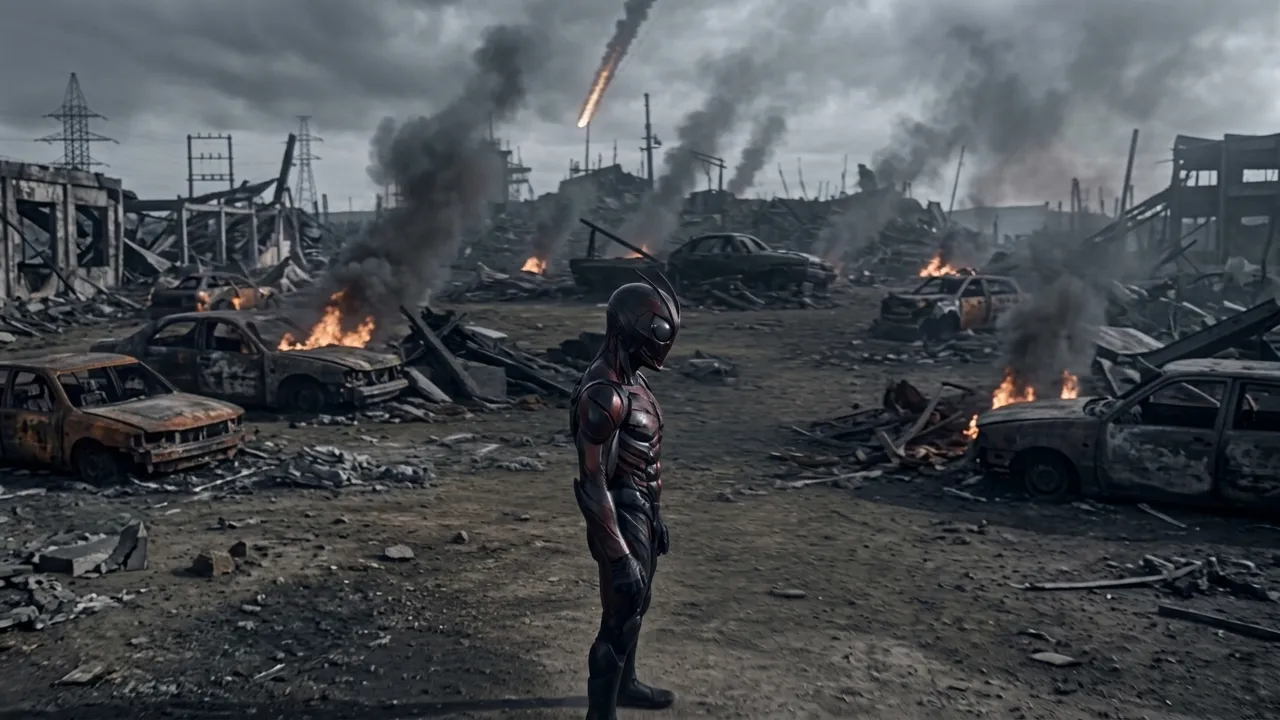
Upload a portrait and transform into a dark bio-armor warrior on an apocalyptic battlefield. That is the official prompt for Dark Bio-Armor Transformation — a one-photo PixVerse V6 effect where your character activates a cracked red crystal belt as black mist, blue arcs, and living black-red armor gradually form around the body in a grim cinematic one-shot transformation.
The official preview shows the transformed warrior standing on a scorched battlefield: burning wrecked cars, drifting smoke, and a missile streaking down through grey skies while the black-and-red armor gleams.
See It In Action
What Is the Dark Bio-Armor Transformation Template?
Dark Bio-Armor Transformation is a new PixVerse image-to-video transformation template. You upload one portrait; PixVerse V6 generates a 15-second vertical transformation sequence. You do not write a prompt — the template prompt is locked, so the armor-forming sequence stays consistent.
Template details
| Field | Value |
|---|---|
| Template name | Dark Bio-Armor Transformation |
| Template ID | 419841266734400 |
| Output | Video |
| Model | PixVerse V6 |
| Input | 1 photo |
| Duration | 15 seconds |
| Quality | 720p |
| Audio | Included |
| Custom prompt | Off |
| Launched | Aug 19 2026 |
How it works
- Upload one photo — a clear portrait or full-body shot works best
- Select Dark Bio-Armor Transformation — search the name in PixVerse templates, or use Template ID
419841266734400 - Generate — PixVerse V6 applies the effect automatically
- Download and share — export the clip up to 720p for TikTok, Reels, or Shorts
What’s in the Official Preview
The sample is a full tokusatsu-style henshin scene:
- A cracked red crystal belt that triggers the transformation
- Black mist and blue electric arcs swirling around the body
- Living black-and-red armor forming over the character
- An apocalyptic battlefield with burning cars and falling ordnance
- A grim cinematic one-shot framing
At 15 seconds the transformation gets room to breathe — mist, arcs, and armor build in stages.
How to Create Your Dark Bio-Armor Transformation Video
Step 1: Choose a photo
Use a well-lit shot where the face is clear. Front-facing portraits match the official preview best.
Step 2: Open PixVerse
Visit PixVerse on web or in the app, then open the template library.
Step 3: Find Dark Bio-Armor Transformation
Search Dark Bio-Armor Transformation under newly launched templates. Confirm the Template ID from the details table above.
Step 4: Generate
Upload the photo and generate. The template does not accept a custom prompt, so you do not need to describe the scene.
Tips
- Use a clear front-facing portrait for the most recognizable warrior
- The output is vertical 720p, ready for short-form platforms
- Pair it with Skyfall Mecha Assembly for a sci-fi transformation set
- Export and add your own trending audio for extra reach
Frequently Asked Questions (FAQ)
Q: Do I need to write a prompt? A: No. Dark Bio-Armor Transformation has custom prompts turned off. Upload one portrait and generate.
Q: How long is the video? A: 15 seconds, generated with PixVerse V6.
Q: What quality is available? A: 720p.
Q: How many photos do I upload? A: One portrait. This is a single-image template.
Q: Is there audio? A: Yes. The template ships with its own soundtrack.
Ready to don the bio-armor? Open PixVerse, search Dark Bio-Armor Transformation, and generate from one portrait.
Related templates:
- Skyfall Mecha Assembly — freefall mech assembly over the ocean
- Become the Final Boss of the Game with One Click — game-boss transformation
- Summon the Frying Pan — zombie-killer pan gag
- Little Gymnast — tiny gymnastics portrait