Cow Cow Love: Turn a Selfie into a Sweet Moment with Cows
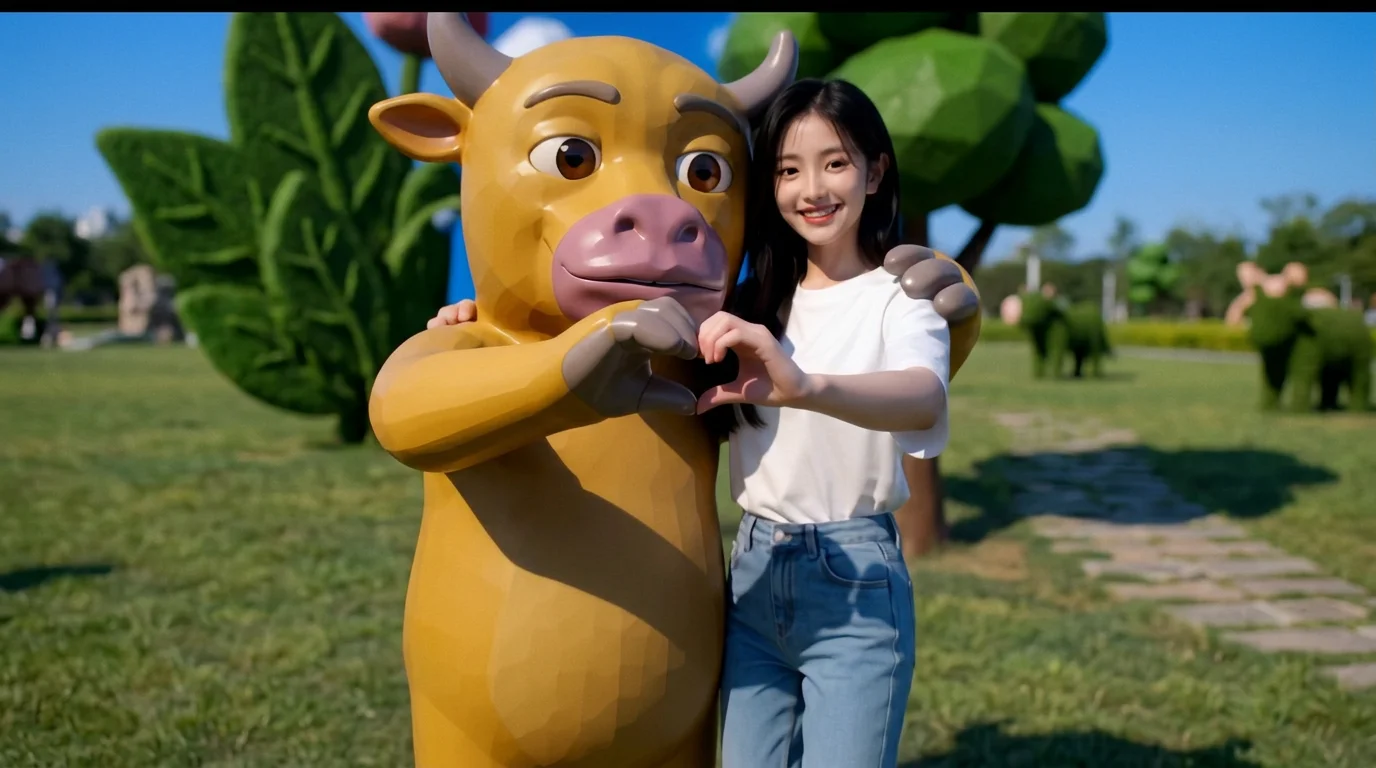
“Upload a selfie, and the cows will come — get your sweet love instantly.” That is the official prompt for PixVerse’s Cow Cow Love template — an endearing 5-second V6 effect.
The official preview is a vertical short-form clip generated from a single uploaded photo: The template brings delightful countryside charm to any selfie, creating an instant mood-lifting video.. The same one-click flow works with portraits, selfies, and everyday photos alike.
See It In Action
What Is the Cow Cow Love Template?
Cow Cow Love is a new PixVerse image-to-video template. You upload one photo; PixVerse V6 generates a 5-second vertical video. You do not write a prompt — the template prompt is locked, so the effect stays consistent.
Template details
| Field | Value |
|---|---|
| Template name | Cow Cow Love |
| Template ID | 420546982325696 |
| Output | Video |
| Model | PixVerse V6 |
| Input | 1 photo |
| Duration | 5 seconds |
| Quality | 360p, 540p, 720p and 1080p |
| Custom prompt | Off |
| Launched | Aug 23 2026 |
How it works
- Upload one photo — a clear, well-lit shot works best
- Select Cow Cow Love — search the name in PixVerse templates, or use Template ID
420546982325696 - Generate — PixVerse V6 applies the effect automatically
- Download and share — export the 5-second clip for TikTok, Reels, or Shorts
What’s in the Official Preview
The template preview is generated from a single uploaded photo:
- A sunny rural pasture with lush green grass and wooden fences
- Several friendly cows strolling up to greet and nuzzle the uploaded subject
- Sweet, humorous, and heartwarming animal interaction in crisp resolution
- Smooth facial consistency and natural lighting transitions
The template brings delightful countryside charm to any selfie, creating an instant mood-lifting video.
How to Create Your Cow Cow Love Video
Step 1: Choose a photo
Use a well-lit shot where the subject is clear. Front-facing portraits and selfies match the official preview style best.
Step 2: Open PixVerse
Visit PixVerse on web or in the app, then open the template library.
Step 3: Find Cow Cow Love
Search Cow Cow Love or look under newly launched templates. Confirm Template ID 420546982325696.
Step 4: Generate
Upload the photo and generate. The template does not accept a custom prompt, so you do not need to describe the scene.
Tips
- Smiling selfies and bright close-up portraits work best for this cute animal interaction
- Outdoor backgrounds complement the country meadow theme nicely
- Export in 1080p to keep the cows’ expressive eyes and coat textures sharp
- Quick 5-second duration makes it ideal for Instagram Stories and TikTok soundbites
Frequently Asked Questions (FAQ)
Q: Do I need to write a prompt? A: No. Cow Cow Love has custom prompts turned off. Upload one photo and generate.
Q: How long is the video? A: 5 seconds, generated with PixVerse V6.
Q: What quality is available? A: 360p, 540p, 720p and 1080p.
Q: How many photos do I upload? A: One. This is a single-image template.
Q: Where do I find this template?
A: Open PixVerse, search Cow Cow Love, or look it up by Template ID 420546982325696.
Ready to try Cow Cow Love? Open PixVerse, search Cow Cow Love, and generate from one photo.
Related templates:
- Extreme Rock Climbing — Turn Your Photo into a Climbing Master Video
- Cute Slot Machine — Win the Jackpot with Your Photo on PixVerse AI
- The Band in the Kitchen — Turn Your Photo into a Kitchen Concert
- Little Gymnast — tiny gymnast counterpart