Capybara Lounge: Chill by the Pool with a Cool Capybara
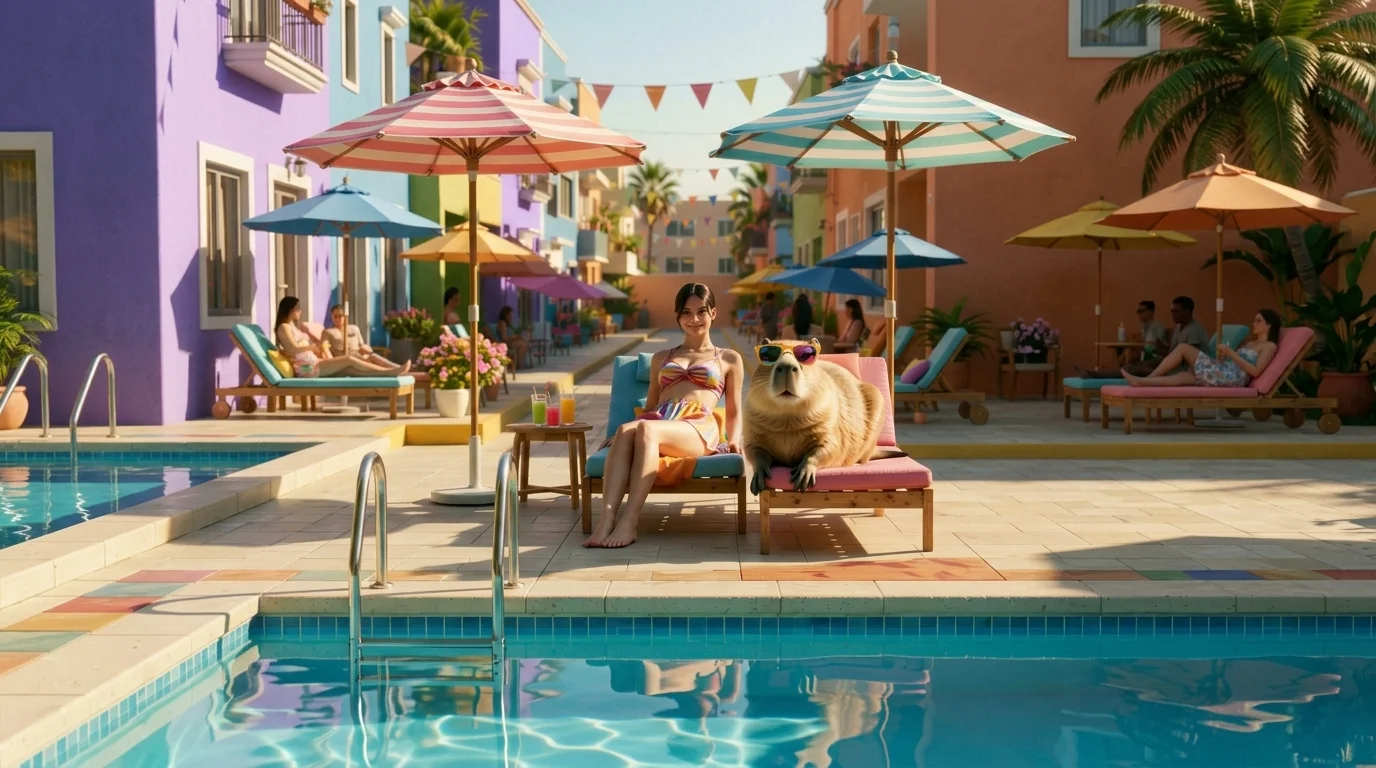
Unwind beside a sunglasses-wearing capybara at a stylish summer pool. That is the official prompt for PixVerse’s newly launched CAPYBARA LOUNGE template — an ultra-chill V6 image-to-video effect that places your subject in a sunlit resort pool party beside the internet’s most relaxed animal.
The official preview shows the subject lounging in modern poolside chairs alongside a stylish capybara sporting trendy dark shades, surrounded by sparkling pool water and palm trees. The one-click flow works effortlessly with personal portraits, friends, or pets.
See It In Action
What Is the CAPYBARA LOUNGE Template?
CAPYBARA LOUNGE is a relaxing PixVerse image-to-video template powered by PixVerse V6. You upload one photo; PixVerse V6 generates a 10-second vertical aesthetic clip. You do not write a prompt — the template prompt is locked, so the effect stays consistent.
Template name Video
| Field | Value |
|---|---|
| Template name | CAPYBARA LOUNGE |
| Template ID | 414115113914869 |
| Output | Video |
| Model | PixVerse V6 |
| Input | 1 photo |
| Duration | 10 seconds |
| Quality | 360p / 540p / 720p / 1080p |
| Audio | Included |
| Custom prompt | Off |
| Launched | Jul 28 2026 |
How it works
- Upload one photo — a clear portrait or well-lit shot works best
- Select CAPYBARA LOUNGE — search the name in PixVerse templates, or use Template ID
414115113914869 - Generate — PixVerse V6 applies the effect automatically
- Download and share — export the clip for TikTok, Reels, or Shorts
What’s in the Official Preview
- A cool capybara wearing dark sunglasses lounging effortlessly by the water
- The subject resting in chic resort loungers with refreshing summer drinks
- Turquoise swimming pool water with shimmering reflections and sunlit palms
- A calm, lo-fi aesthetic and serene summer luxury holiday atmosphere
How to Create Your CAPYBARA LOUNGE Video
Step 1: Choose a photo
Choose a well-lit portrait or casual photo with clear facial lighting.
Step 2: Open PixVerse
Visit PixVerse on web or in the app, then open the template library.
Step 3: Find {name}
Search CAPYBARA LOUNGE or look under newly launched templates. Confirm Template ID 414115113914869.
Step 4: Generate
Upload the photo and generate. The template does not accept a custom prompt, so you do not need to describe the scene.
Tips
- Relaxed, chill, or smiling expressions blend seamlessly into the resort vibe
- High-resolution photos maintain clear skin tones and crisp poolside lighting
- Casual or summer outfits naturally complement the luxury pool setting
- The output is vertical 1080p, tailored for Instagram Reels, TikTok, and Shorts
Frequently Asked Questions (FAQ)
Q: Do I need to write a prompt? A: No. CAPYBARA LOUNGE has custom prompts turned off. Upload one photo and generate.
Q: How long is the video? A: 10 seconds, generated with PixVerse V6.
Q: What quality is available? A: 360p, 540p, 720p, and 1080p.
Q: How many photos do I upload? A: One. This is a single-image template.
Q: Does it include audio? A: Yes. The generated clip includes relaxing summer lounge background music.
Ready to chill with a capybara? Open PixVerse, search CAPYBARA LOUNGE, and generate from one photo.
Related templates:
- Pet Summer Debut — movie-star pet poolside glamour
- Summer Aura King — unleash an epic beachside legend aura
- Elephant Splash — sunny jungle lake water fight
- Little Gymnast — tiny gymnast on the rings