Blocky Mini-Me: Turn Any Photo into a Tiny Block Twin
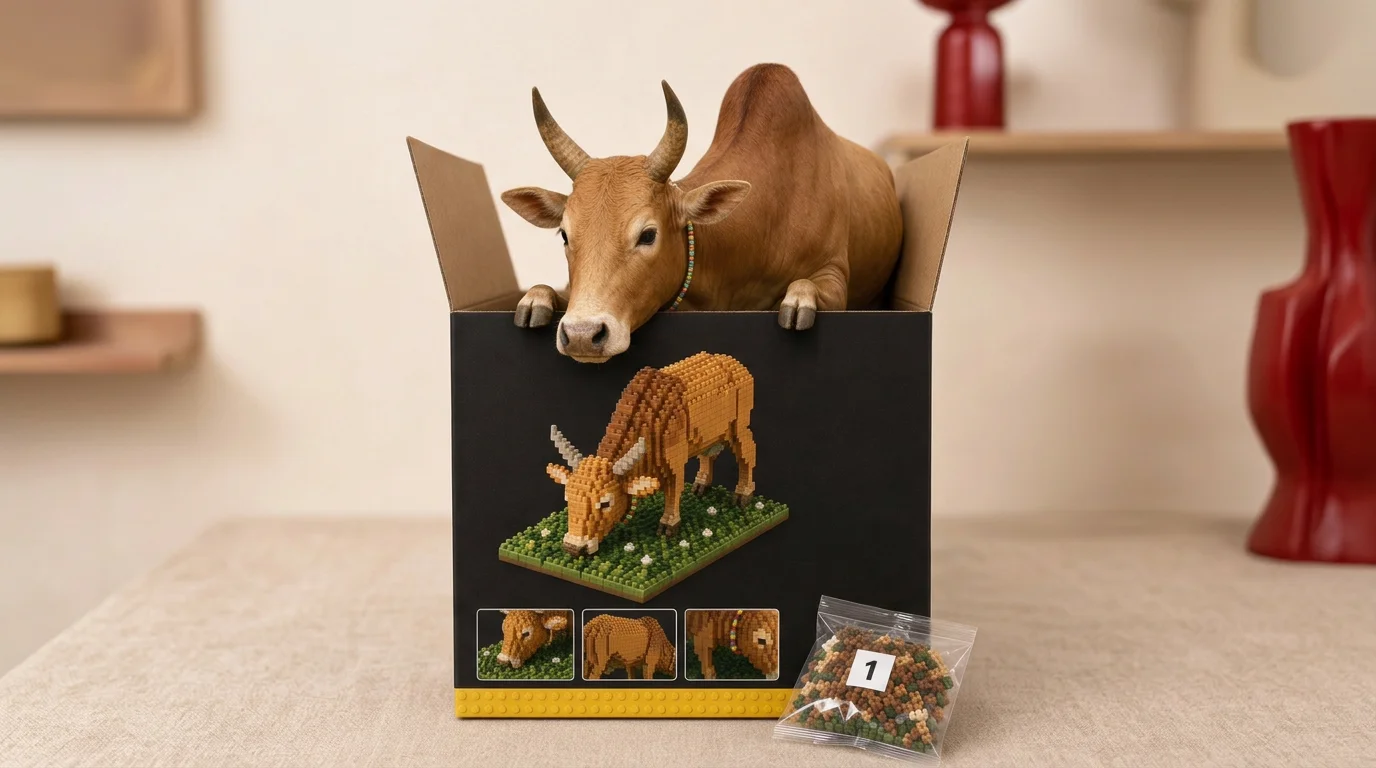
Unbox Your Tiny Block Twin. That is the official prompt for PixVerse’s Blocky Mini-Me template — a playful Qwen Image effect that transforms your photo into a stylized miniature block toy figurine.
The official preview shows a stylized block-style mini twin held in hand beside its collectible packaging box, featuring blocky geometric joints, cute facial styling, and plastic toy textures.
See It In Action
What Is the Blocky Mini-Me Template?
Blocky Mini-Me is a creative PixVerse image template powered by Qwen Image. You upload one photo; Qwen Image creates a single high-resolution stylized collectible toy portrait. Custom prompts are locked so the signature toy aesthetic remains consistent.
Template details
| Field | Value |
|---|---|
| Template name | Blocky Mini-Me |
| Template ID | 414905453081600 |
| Output | Image |
| Model | Qwen Image |
| Input | 1 photo |
| Duration | Single image |
| Quality | 360p / 540p / 720p / 1080p |
| Custom prompt | Off |
| Launched | Jul 22 2026 |
How it works
- Upload one photo — a clear portrait or well-lit shot works best
- Select Blocky Mini-Me — search the name in PixVerse templates, or use Template ID
414905453081600 - Generate — Qwen Image applies the stylized look automatically
- Download and share — export up to 1080p for avatars, wallpapers, or social posts
What’s in the Official Preview
- Charming block-toy styling that reimagines your hairstyle, outfit, and facial features
- Realistic desktop diorama background with miniature collectible packaging box
- Clean plastic toy material sheen with sharp geometric edges and joints
- High-resolution still portrait perfect for avatars, social media icons, and wallpapers
How to Create Your Blocky Mini-Me Portrait
Step 1: Choose a photo
Choose a clear front-facing portrait. Distinct hairstyles and colorful clothing translate especially well into block toy designs.
Step 2: Open PixVerse
Visit PixVerse on web or in the app, then open the template library.
Step 3: Find Blocky Mini-Me
Search Blocky Mini-Me or look under newly launched templates. Confirm Template ID 414905453081600.
Step 4: Generate
Upload your photo and generate. Qwen Image creates your blocky figurine portrait instantly.
Tips
- Solo portraits work best to ensure accurate miniature character generation
- Bright, vibrant colors make the toy finish pop on screen
- Export at 1080p for crisp plastic textures and packaging details
- Pair with Mini Me Unboxed for a complete designer-toy collection theme
Frequently Asked Questions (FAQ)
Q: Do I need to write a prompt? A: No. Blocky Mini-Me has custom prompts turned off. Upload one photo and generate.
Q: Is the output a video or an image? A: A single high-resolution image, generated with Qwen Image.
Q: What quality is available? A: 360p, 540p, 720p, and 1080p.
Q: How many photos do I upload? A: One photo. This is a single-image template.
Q: Can I use this for pet photos? A: Yes, pets can also be rendered as adorable block-style toy companions.
Ready to unbox your block twin? Open PixVerse, search Blocky Mini-Me, and generate from one photo.
Related templates:
- Mini Me Unboxed — collectible 3D surprise figure unboxing
- Winged Couture — ethereal high-fashion runway portrait with wings
- Cheat Day Busted — hilarious instant treadmill panic after one bite
- Little Gymnast — tiny gymnast on the rings