Birthday on Fire: Blow Out Candles in a Fiery Burst
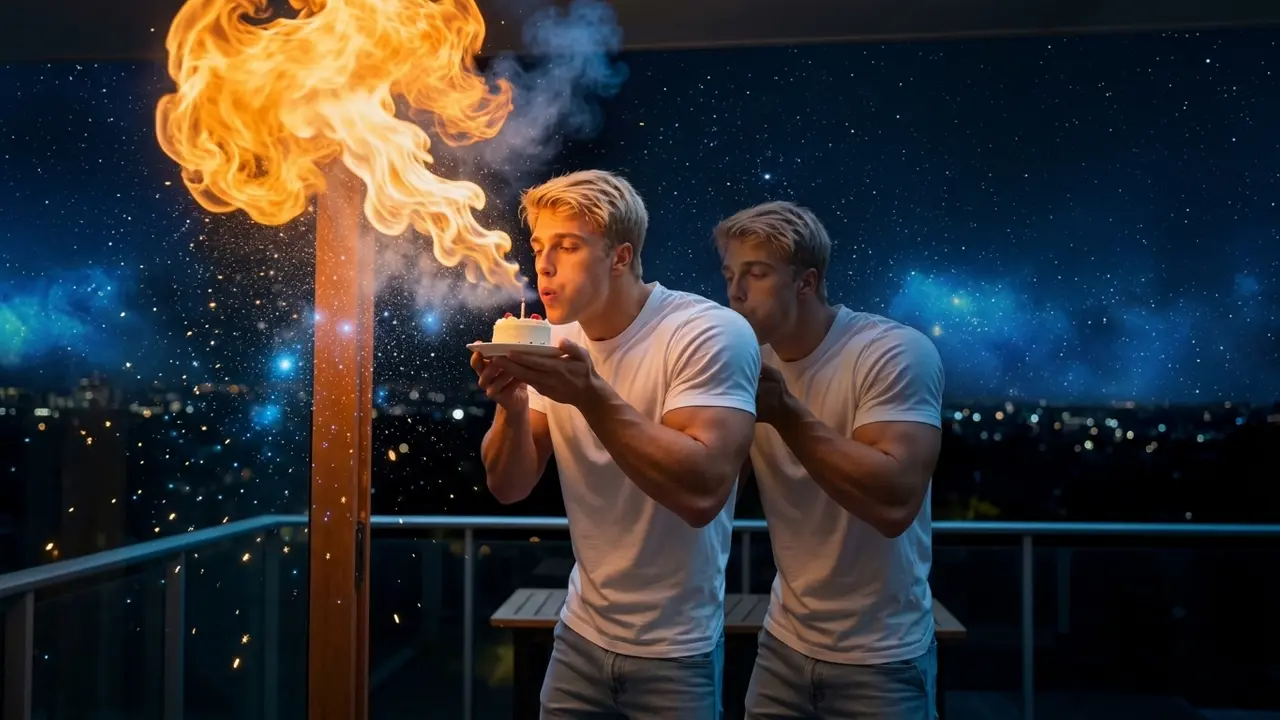
Upload a photo and watch yourself blow out the candles in a cinematic burst of fire. That is the official prompt for PixVerse’s Birthday on Fire template — a single-photo V6 effect that brings your subject to life.
The official preview shows a celebratory birthday scene where leaning in to blow out the cake candles triggers a dramatic, cinematic blaze of flames. The same one-click flow works with a portrait of you, a friend, or family celebrating a milestone.
See It In Action
What Is the Birthday on Fire Template?
Birthday on Fire is a dynamic image-to-video template powered by PixVerse V6. You upload one photo; PixVerse V6 generates a 7-second vertical video that turns blowing out birthday candles into an epic blaze. You do not write a prompt — the template prompt is locked, so the cinematic fire effect stays consistent.
Template details
| Field | Value |
|---|---|
| Template name | Birthday on Fire |
| Template ID | 418401353385024 |
| Output | Video |
| Model | PixVerse V6 |
| Input | 1 photo |
| Duration | 7 seconds |
| Quality | 720p |
| Audio | Included |
| Custom prompt | Off |
| Launched | Aug 11 2026 |
How it works
- Upload one photo — a clear portrait or well-lit photo works best
- Select Birthday on Fire — search the name in PixVerse templates, or use Template ID
418401353385024 - Generate — PixVerse V6 applies the effect automatically
- Download and share — export the 7-second clip for TikTok, Reels, or Shorts
What’s in the Official Preview
The template preview showcases a polished, cohesive scene built around the official prompt:
- Festive birthday cake candles flickering before a dramatic breath
- Spectacular burst of cinematic fire engulfing the frame upon blowing
- Intense warm flame lighting and swirling spark particle dynamics
- High fidelity facial preservation capturing the celebratory moment
The template turns traditional birthday wishes into an unforgettable viral spectacle: your celebration photo gains cinematic intensity and high-energy impact.
How to Create Your Birthday on Fire Video
Step 1: Choose a photo
Use a clear, well-lit photo of the birthday subject, ideally looking forward with a smile or ready to blow out candles.
Step 2: Open PixVerse
Visit PixVerse on web or in the app, then open the template library.
Step 3: Find Birthday on Fire
Search Birthday on Fire or browse newly launched templates. Confirm Template ID 418401353385024.
Step 4: Generate
Upload the photo and generate. The template does not accept a custom prompt, so you do not need to describe the scene.
Tips
- Front-facing portrait shots provide the best alignment with the candle and flame trajectory
- Good lighting ensures facial details stay clear amid the bright fire effects
- Works great with friends, kids, or colleagues celebrating a birthday
- Export at 720p for fast, direct sharing on Instagram Stories, TikTok, or WhatsApp
Frequently Asked Questions (FAQ)
Q: Do I need to write a prompt? A: No. Birthday on Fire has custom prompts turned off. Upload one photo and generate.
Q: How long is the video? A: 7 seconds, generated with PixVerse V6.
Q: What quality is available? A: 720p.
Q: How many photos do I upload? A: One. This is a single-image template.
Q: Does the video include sound or music? A: Yes. The template includes synchronized celebratory sound effects matching the fiery burst.
Ready to ignite your birthday celebration? Open PixVerse, search Birthday on Fire, and generate from one photo.
Related templates:
- Sugar on My Lips! — dance like popping candy
- Skeleton Beat — shake it like the viral meme skeleton
- Revealing My Divinity — walk toward the giant monster
- Little Gymnast — tiny gymnast on the rings