Become the Final Boss of the Game with One Click (PixVerse)
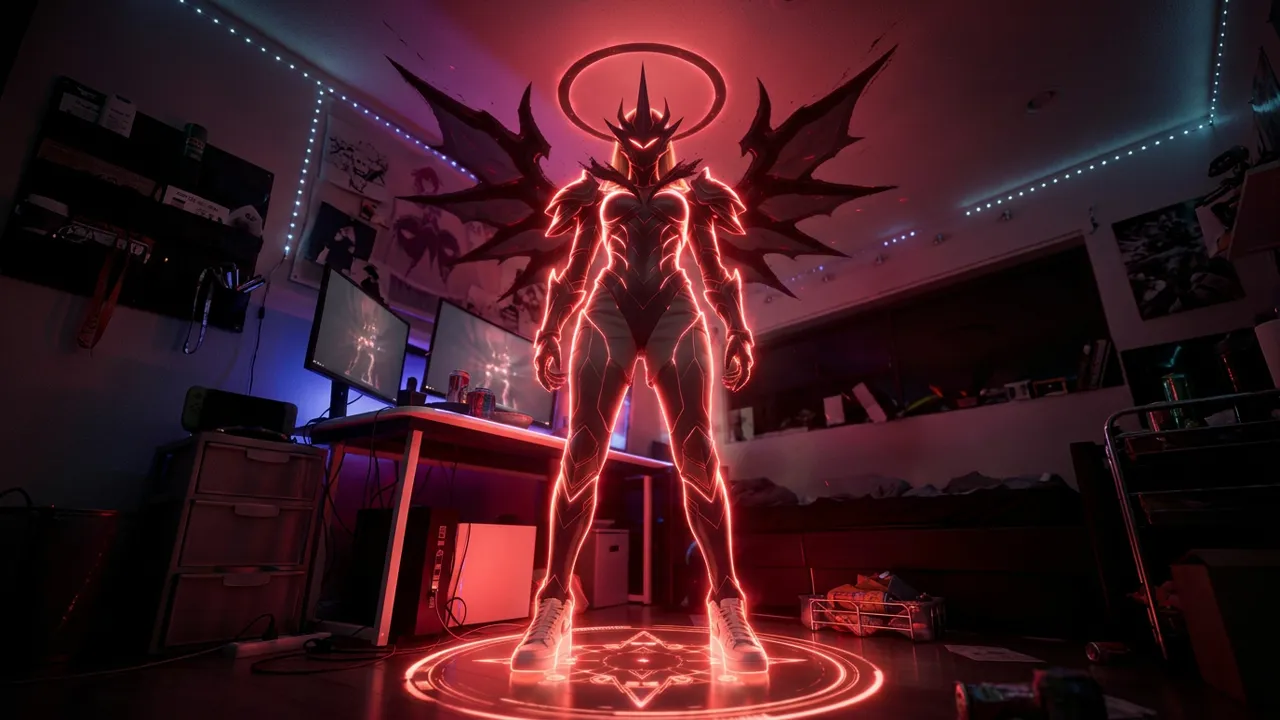
Upload a photo, and you can become the big boss in the game. That is the official prompt for Become the Final Boss of the Game with One Click — a one-photo PixVerse V6 effect that transforms your subject into a towering glowing villain, complete with game-style boss-entrance UI.
The official preview is a full boss reveal: a winged demon silhouette wreathed in red neon light, a glowing halo, a magic circle underfoot, and a Final Boss Appears banner with a boss health bar across the screen.
See It In Action
What Is the Become the Final Boss of the Game with One Click Template?
Become the Final Boss of the Game with One Click is a new PixVerse image-to-video game template. You upload one photo; PixVerse V6 generates a 9-second vertical video. You do not write a prompt — the template prompt is locked, so the boss transformation stays consistent.
Template details
| Field | Value |
|---|---|
| Template name | Become the Final Boss of the Game with One Click |
| Template ID | 419839544798528 |
| Output | Video |
| Model | PixVerse V6 |
| Input | 1 photo |
| Duration | 9 seconds |
| Quality | 720p |
| Audio | Included |
| Custom prompt | Off |
| Launched | Aug 19 2026 |
How it works
- Upload one photo — a clear portrait or full-body shot works best
- Select Become the Final Boss of the Game with One Click — search the name in PixVerse templates, or use Template ID
419839544798528 - Generate — PixVerse V6 applies the effect automatically
- Download and share — export the clip up to 720p for TikTok, Reels, or Shorts
What’s in the Official Preview
The sample stages the classic RPG boss entrance:
- A towering winged villain wreathed in glowing red light
- A Final Boss Appears banner in bold game typography
- A boss health bar and glowing magic circle UI
- A dark gamer bedroom visible behind the apparition
- A 9-second reveal built for hype edits
It is made for gamers — the UI overlay turns a portrait into a raid encounter.
How to Create Your Become the Final Boss of the Game with One Click Video
Step 1: Choose a photo
Use a well-lit shot where the face is clear. Front-facing portraits match the official preview best.
Step 2: Open PixVerse
Visit PixVerse on web or in the app, then open the template library.
Step 3: Find Become the Final Boss of the Game with One Click
Search Become the Final Boss of the Game with One Click under newly launched templates. Confirm the Template ID from the details table above.
Step 4: Generate
Upload the photo and generate. The template does not accept a custom prompt, so you do not need to describe the scene.
Tips
- Use a dramatic portrait so the villain reveal hits harder
- One subject per photo keeps the boss framing clean
- The output is vertical 720p, ready for short-form platforms
- Pair it with a boss-fight sound or caption for extra hype
Frequently Asked Questions (FAQ)
Q: Do I need to write a prompt? A: No. This template has custom prompts turned off. Upload one photo and generate.
Q: How long is the video? A: 9 seconds, generated with PixVerse V6.
Q: What quality is available? A: 720p.
Q: How many photos do I upload? A: One. This is a single-image template.
Q: Is there audio? A: Yes. The template ships with its own soundtrack.
Ready for your boss entrance? Open PixVerse, search Become the Final Boss of the Game with One Click, and generate from one photo.
Related templates:
- Dark Bio-Armor Transformation — dark battlefield armor transformation
- Summon the Frying Pan — zombie-killer pan gag
- Skyfall Mecha Assembly — freefall mech assembly over the ocean
- Little Gymnast — tiny gymnastics portrait