Magnific One Review: Art Direction Beyond GPT Image 2
Source-based review, facts checked October 14, 2026; no independent hands-on testing.
Last updated: October 14, 2026.
Magnific One asks a useful question: how much of a finished image comes from the generator, and how much comes from the decisions made before generation? Its pitch puts an art director between a short brief and the image engine. For a creative team, the interesting possibility is spending less time translating intent into prompts and more time choosing a direction worth finishing.
Its potential value lies in repeatable direction and review. The useful buying question is how much work remains between a promising image and an approved asset.
The Mechanism: Decide How the Image Works First
Magnific’s product page describes a creative-direction layer that sits before generation. The user supplies an idea; the system interprets it and builds the instructions for the image. A Brand Kit can guide the result, and editing tools provide a finishing stage afterward.
Think of the sequence as brief, visual decisions, generation, review, then precise edits. Composition determines where attention goes. Lighting establishes shape and mood. Materials and texture make an abstract direction concrete. Those decisions are the substance of the proposed art-director layer, rather than an extra adjective appended to a prompt.
Magnific’s prompting guide advises naming the medium first and describing physical causes rather than vague effects: specify a material and a light source instead of simply requesting a premium look. It also demonstrates increasingly detailed briefs, from a single word to a scene with explicit framing and light.
The implication for users is straightforward: delegate the choices you are open to exploring, but state the ones the job cannot compromise. An image can be attractive and still fail because the product is too small or there is nowhere to place approved copy.
Draft and Final Solve Different Problems
According to the Magnific One documentation, Draft returns a grid of 4, 8, or 16 directions for the price of one image. Final produces a single image in 2K or 4K, with High and Max quality options. Brand Kit applies only in Final.
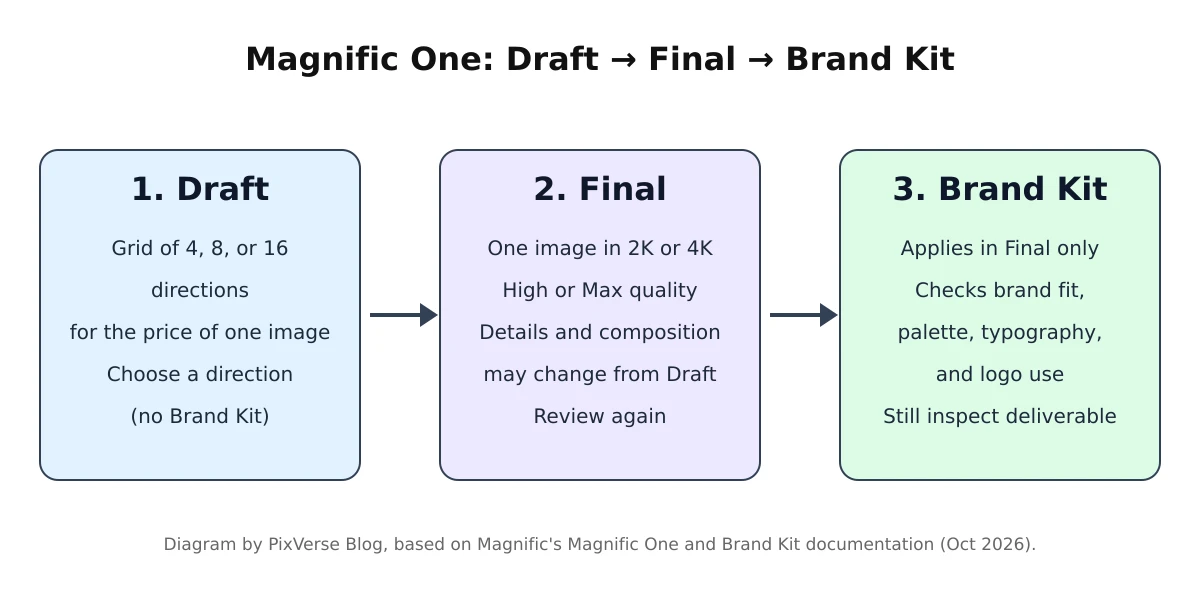
Workflow diagram by PixVerse Blog, summarizing Magnific’s Magnific One documentation and Brand Kit guide.
That separation makes sense for a review meeting. A grid can help a team compare ideas before committing to execution. The useful question is whether its options represent different concepts: a different viewpoint, visual metaphor, or treatment. Several near-identical frames offer less decision value than a smaller set of distinct approaches.
Magnific’s Draft-to-Final guidance warns that taking a selected Draft into Final can change details and composition. Treat this as another approval step. A promising preview does not lock the finished asset’s geometry or layout.
For a product campaign, compare the Final against the selected Draft and the original brief. Check whether the subject occupies the intended space and whether the crop still works. Resolution is useful for delivery, but it cannot compensate for losing the composition that made the concept worth choosing.
Brand Kit Adds Shared Rules and Checks
Magnific’s Brand Kit guide says a kit can start from a website, guidelines, images, or a written description. Users review the proposed palette, imagery, tone, and typography rules, then share the kit with a project or team. Corrections to off-brand results can become persistent rules.
Magnific’s generation and brand-check documentation says images generated with a kit are checked for brand fit, palette, typography, and logo use. Keep a client’s approval criteria alongside those checks.
The operational attraction is a reusable brief. Instead of asking every colleague to reconstruct the same visual identity, a team has a shared starting point. Our interpretation is that this could be more valuable than occasional aesthetic improvements, especially where many people contribute assets to one campaign.
The Brand Kit limitations are explicit: it does not guarantee exact typography, exact color values, or identical placement. The guide also lists print color systems and uploaded font files as unsupported.
Use the kit to guide creative choices, then inspect the deliverable. Keep approved logos and campaign copy available for finishing. A brand check should help a reviewer find problems; it should not become a reason to stop looking.
Is GPT Image 2 Underneath? Keep the Accounts Separate
In its launch report, VentureBeat identifies GPT Image 2 as the engine and records conflicting training descriptions.
LHC’s reporting also identifies GPT Image 2. It recounts an interview reference to post-training, followed by a written Magnific FAQ stating “Nothing was trained” without naming the underlying model. The FAQ response is attributed through that reporting.
These are two separate issues. Identifying the generator does not establish whether its weights were changed. Conversely, saying no training happened does not identify which generator was used. The public accounts leave the training description unresolved.
Magnific’s own current product documentation describes interpreting the request, writing a prompt, and applying references before generation. Our reading is that prompt orchestration is the clearest documented mechanism. We would not treat the launch as proof of a newly trained foundation model or independently verified modifications to GPT Image 2.
For buyers, this matters when assessing dependencies and repeatability. Ask what happens to an approved workflow if the underlying image engine changes. A stored brand brief can remain useful, but the same instructions should still be evaluated against new outputs.
What Is Prompt Orchestration Worth?
A useful baseline is a well-written manual brief. Our GPT Image 2 review and prompt guide provides a structure for naming the image’s job, composition, lighting, exact copy, and constraints. Use that as a comparison before assuming a packaged art-director layer creates value by itself.
Consider this example brief:
Create a campaign photograph of a ceramic travel mug for a morning commute. Keep the mug recognizable from the supplied reference. Leave clear space on the left for copy. Explore a quiet editorial mood. No generated logo or lettering.
Run the same business brief through the workflows you are considering. Then compare an explicit version that fixes the camera position, surface material, and light direction. This separates the value of automatically filling creative gaps from the value of following detailed instructions.
Judge the result by the work remaining. Did the automated direction produce an idea your team would choose? Could the reviewer explain why it fits the brand? Did the selected Final survive finishing without rebuilding the scene?
Our assessment is that orchestration is most promising when interpretation and coordination are the bottlenecks. If a designer already has a precise shot plan and reusable prompts, the additional value needs to come from easier exploration, shared guidance, or fewer corrections. A more elaborate interface alone does not answer that question.
Preference Results Are Vendor Evidence
Magnific’s October 11 launch post shows a vendor-reported 63.1% head-to-head preference result for Magnific One. LHC’s coverage cites a vendor-reported result of approximately 68.5% from a private company comparison. The difference is unresolved in the sources reviewed.
Do not combine them into a single score or use either as a forecast of campaign approval. Aesthetic preference and production readiness are different questions. Your evaluation should record review time, required corrections, and whether the asset meets the brief.
The Launch Offer and Ongoing Evaluation
At launch, Magnific advertised a limited-time unlimited-generation offer in its desktop app through October 15, 2026, for Premium+, Pro, and Business. The launch terms covered Draft and Final at High quality in 2K and 4K; Max quality used credits. Check Magnific’s current pricing and terms for today’s availability, eligible plans, and usage conditions.
Treat the offer as launch history, rather than a standing entitlement. Confirm the terms shown in your account before organizing an evaluation around unlimited generation.
For a focused evaluation, choose a real brief, explore Draft directions, take the selected concept to Final with the intended kit, and record the edits needed for approval. Evaluate the ongoing workflow on normal usage terms. An attractive launch offer does not establish the cost of repeatable production.
Magnific One FAQ
What is Magnific One?
Magnific One turns a plain-language brief into an art-directed image. Its product page describes a creative-direction layer before generation, with exploration, optional brand guidance, and editing in one workflow.
Does Magnific One use GPT Image 2?
LHC’s launch coverage identifies GPT Image 2. Magnific’s reported no-training response leaves the interview’s post-training language unresolved. Keep the reported engine identity separate from claims about changed model weights.
What is the difference between Draft and Final?
Draft helps you choose a direction; Final creates the selected image for finishing. Magnific’s prompting guide recommends exploring first, then recreating the chosen concept in Final. Review the finished composition again.
Does Brand Kit work in Draft mode?
No. Magnific’s Brand Kit guide specifies Final mode. Find a direction in Draft, then apply the kit in Final and check the result against your approved brand guidelines.
From Approved Direction to a PixVerse Shot
Magnific One’s documented workflow is worth evaluating for teams that want help turning a loose brief into a coherent still. Its value should be measured at approval: how much useful direction it contributes and how much work remains afterward.
For campaigns that continue into motion, approve the still first. Our product-photo-to-video tutorial describes uploading a prepared image to PixVerse for image-to-video. That provides a natural next step for a selected campaign frame, without implying a Magnific integration or automatic transfer of Brand Kit rules.
Start with restrained motion and review the product, composition, and lettering again. Carry the approved creative intent into the video brief; treat the moving result as a new asset to approve.