Krea 3 vs Nano Banana Pro vs GPT Image 2: Edit Speed
Source-based overview; facts checked Oct 16, 2026. Speed, quality and benchmark claims are vendor-reported unless stated otherwise. Prices and early-access terms change; check provider pages before budgeting.
Last updated: Oct 16, 2026
For a creative team restaging products or building campaign variants, waiting between edits breaks the review loop. A cheaper image also means little if the label changes and you have to start again. The useful question is how quickly an editor delivers an image your team can accept.
On Krea’s own numbers, Krea 3 deserves the first pilot for frequent iterative edits: its launch comparison reports under eight seconds at native 2K, against 33 seconds for Nano Banana Pro and 90 seconds for GPT Image 2. Those figures justify a test, not a quality verdict. Use the same product references, check unchanged details, and count reruns before moving a catalog workflow. For creators preparing video start frames, approve the still before adding motion.
An editing workflow comparison: latency matters alongside the number of usable results.
Krea 3 vs Nano Banana Pro vs GPT Image 2 at a Glance
Krea announced Krea 3 on Oct 15; its model page calls it Krea 3 Beta as of Oct 16, 2026. The table separates published figures from specifications these sources do not establish.
| Measure | Krea 3 | Nano Banana Pro | GPT Image 2 |
|---|---|---|---|
| Time per edit | Krea reports <8 s, native 2K | Krea reports 33 s median on Krea | Krea reports 90 s median on Krea |
| List price/image, Oct 16, 2026 | Krea reports $0.06 at 2K; $0.03 at 1K | Krea lists $0.135 | Krea lists $0.22 |
| Reference inputs | Krea blog: up to 6; Krea API: up to 8; fal: 1–4 | Limit not specified in cited comparison | Limit not specified in cited comparison |
| Resolution | Krea API lists 1K/2K; fal lists ~4 MP maximum | Resolution not specified in cited comparison | Resolution not specified in cited comparison |
| Access documented here | Krea lists its app/API and partners; fal requires early access as of Oct 16 | Edit jobs on Krea, per Krea | Edit jobs on Krea, per Krea |
Prices and timings above come from Krea’s comparison, with list prices excluding image references. Input and output limits follow Krea’s API documentation and fal’s page. They describe different serving surfaces, so check the endpoint you intend to use.
How Krea Measured Edit Speed (and What That Leaves Out)
Krea describes the other models’ figures as median request-to-finished times for edit jobs on Krea, sampled Sep 24–Oct 1, 2026, including the queue. Its Krea 3 entry is an under-eight-second statement at 2K; the chart does not explicitly give that entry the same median/date-window qualification. Source: Krea.
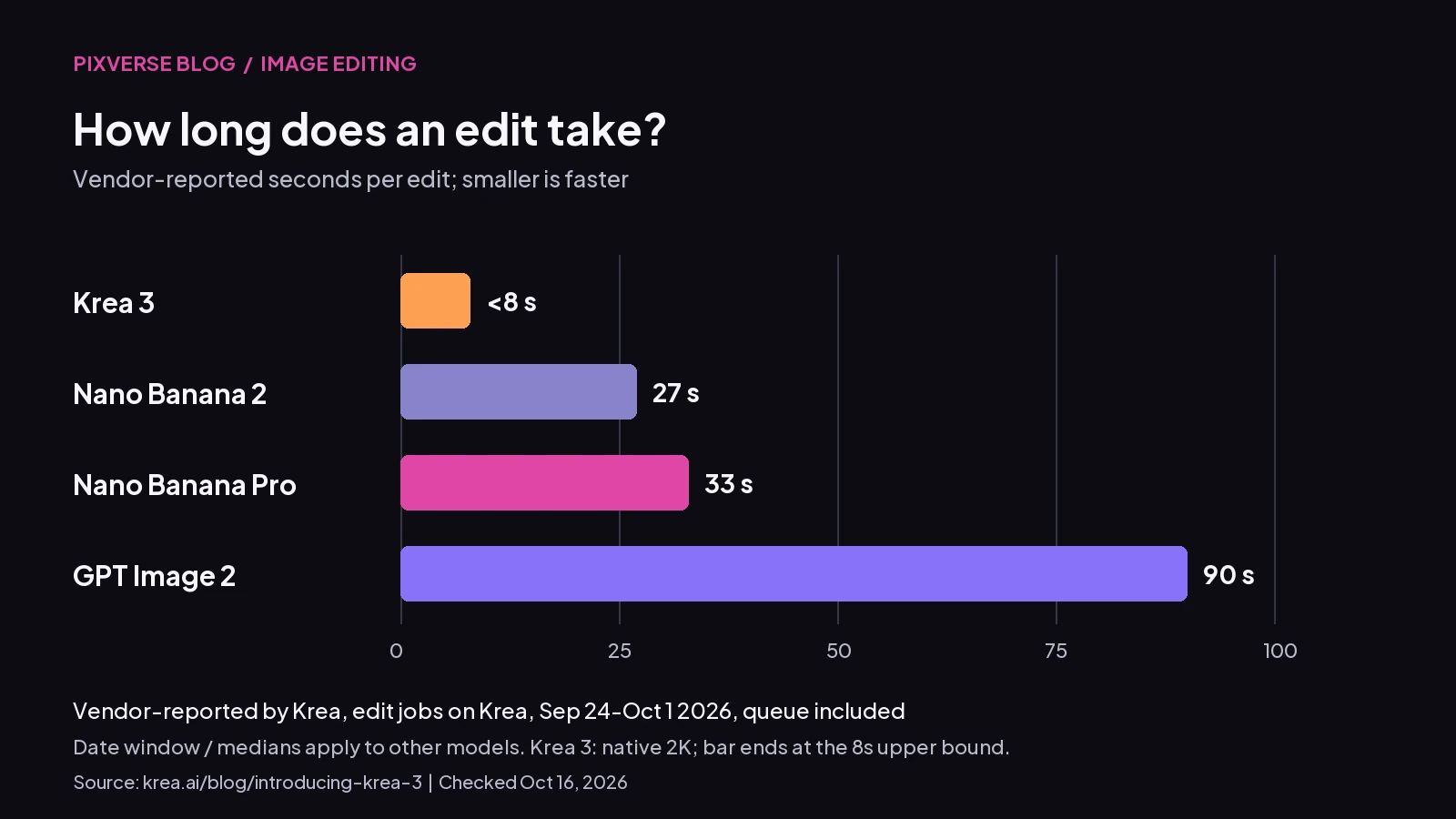 Vendor-reported by Krea. Krea 3: <8 s (upper bound statement at native 2K). Other-model bars: median request-to-finished times on Krea, Sep 24–Oct 1, 2026, queue included. Krea does not specify the same median/date-window basis for its own bar.
Provider routing, load, reference handling and output settings can change the wait. Krea also reports roughly four to five seconds for its fastest setup and says the model is not real time yet. That setup figure is not a promised API response time.
The chart does not score accepted outputs, unchanged text or product fidelity. Even the familiar “up to 4x faster” framing is Krea’s claim, repeated in launch coverage, not a Replicate benchmark. Evaluate latency and acceptance together.
Price per Edit and Cost at Volume
As of Oct 16, 2026, Krea lists $0.06 per 2K image and $0.03 at 1K. Its monthly example prices 100,000 edits at $6,000 for Krea 3, $13,500 for Nano Banana Pro and $22,000 for GPT Image 2, excluding image references. These are vendor-reported list-price scenarios, not quotes for your integration.
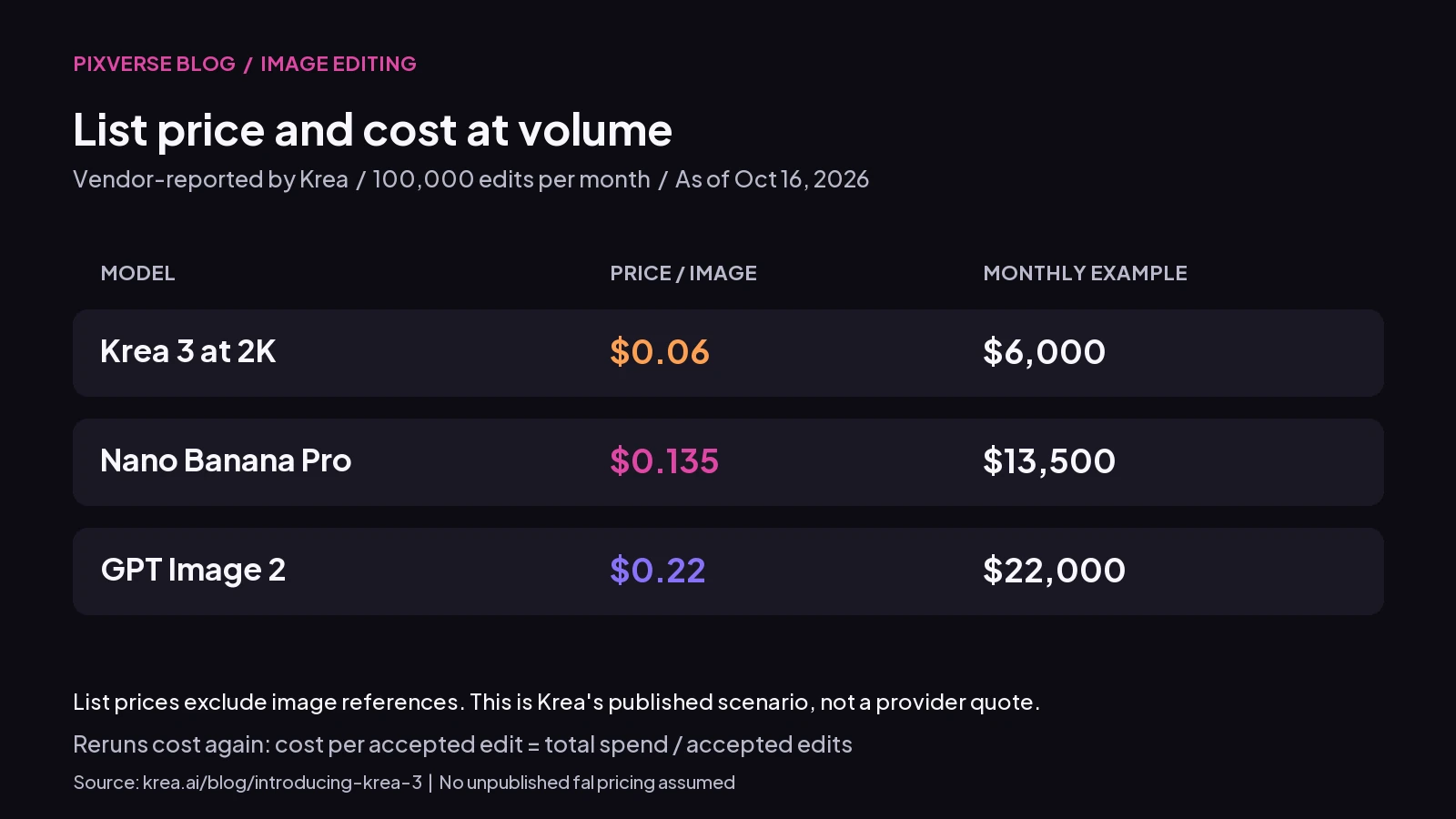 Krea’s vendor-reported volume example, checked Oct 16, 2026; reference inputs and rejected attempts need separate budgeting.
The difference is $7,500 against Nano Banana Pro and $16,000 against GPT Image 2—our calculation from list prices for that request volume. Reruns cost again. Track cost per accepted edit = total spend / accepted edits. For example, twenty billed attempts at $0.06 cost $1.20; if twelve pass review, the accepted-edit cost is $0.10, our calculation from list prices in a hypothetical test.
Provider billing needs its own check. As of Oct 16, Replicate says charges depend on output resolution, thinking mode and input-image megapixels. fal says its early-access pricing is shared with customers rather than published. Do not transfer Krea’s headline price into a fal budget.
Editing Features That Matter for Iteration
Reference limits differ: Krea’s blog says up to six images, Krea’s API accepts up to eight image_urls, and fal documents one to four for editing. Krea’s API lists 1K/2K resolutions and aspect-ratio presets spanning 1:1 to 21:9. fal describes a total output ceiling of roughly four megapixels, not an unrestricted 3200-pixel square.
For a fair pilot across providers, use a reference set every selected endpoint accepts. Give each reference a job: starting composition, product detail, material or character. Keep the untouched details explicit in your own brief.
fal describes multi-turn editing by feeding a result back as the next starting image. Save the original alongside each accepted version; inspect the chain for accumulated drift. A good final frame should not conceal a damaged logo three turns earlier.
Replicate documents an experimental regional_edit parameter requiring an input image. It warns of lower quality and slower generation, and advises against global changes. As of Oct 16, Replicate identifies its version as Berry, tuned for quality, with a faster Jam version forthcoming. Record the version and mode in your test.
Krea’s product and character consistency claims remain vendor-reported. Test lettering, silhouette, face identity and unrequested changes separately; one pleasing restage cannot establish reliability across a whole set.
Where GPT Image 2.5 Fits
GPT Image 2.5 is the newer OpenAI generation covered in our GPT Image 2.5 overview. Krea’s published comparison names GPT Image 2, and supplies no GPT Image 2.5 speed number. The 90-second entry cannot stand in for 2.5.
If you are choosing a workflow today, add 2.5 as a separate pilot candidate. Our GPT Image 2.5 vs GPT Image 2 guide provides upgrade context. Keep its results on their own row rather than inferring a speed or quality ranking from Krea’s older-model comparison.
How to Run Your Own 20-Edit Speed Test
Use twenty matched edit briefs per model. A practical sample is five product restages, five color/material swaps, five character-preserving edits and five small text or detail corrections. This is a proposed test protocol, not a benchmark we ran.
- Freeze inputs and settings. Use identical starting files and references, a shared output size, and original prompts. Record date, provider, model/version, mode and any prompt expansion. Separate tests when a setting cannot be matched.
- Time the full request. Start at submission and stop when the finished image is available. Include queues, report failures, and keep concurrency fixed. Report median and slowest response alongside individual observations.
- Review without model labels. Define a pass before running: requested change complete, product geometry and lettering intact, identity preserved, no material unintended edits. Apply the same criteria to every output.
- Log retries and spend. Keep the initial twenty-attempt result distinct from any repair round. Report accepted outputs, total billed attempts, actual spend and cost per accepted edit. Add reviewer time when manual repair matters.
Pilot Krea 3 first if waiting is your main bottleneck, then retain whichever model clears your quality threshold at the best accepted-edit cost. Twenty briefs provide a useful starting signal; expand the sample around your most expensive failure cases before committing a full catalog.
For a video campaign, fal identifies Krea 3 as a still-image model. Once a frame passes review, animate your approved still in PixVerse, then inspect product details again in motion.
FAQ
Is Krea 3 faster than Nano Banana Pro?
Krea reports under eight seconds at 2K versus a 33-second Nano Banana Pro median on its platform. That supports testing Krea 3 first for latency-sensitive work; measure your own provider and accepted-output rate.
How much does Krea 3 cost per image?
As of Oct 16, 2026, Krea lists $0.06 at 2K and $0.03 at 1K. Reference charges, modes and reruns can change the effective cost. fal’s early-access price is not public on its model page as of that date.
Where can I use the Krea 3 API?
Krea lists its API and partners fal, Hedra, Together AI, Nous Research, OpenRouter and Replicate. As of Oct 16, fal requires early-access requests and describes edit and text-to-image endpoints. Confirm access on your chosen service before building around it.
Does Krea 3 beat GPT Image 2.5?
The cited Krea comparison does not answer that question: it measures GPT Image 2. Run a separate, documented 2.5 comparison with the same inputs and acceptance criteria.