AI Video Agent Workflows: From Clips to Finished Videos
Source-based overview; facts checked October 14, 2026.
A useful way to read the latest AI video announcements is to ask what each product considers a complete job. Is it one generated shot, a rough cut, or a video that already has a script, visual structure, and sound?
Synthesia’s Syren beta announcement and HiDream.ai’s vivago R1 global launch release both put finished-video workflows at the center. At PixVerse, Canvas and the CLI provide another route: keep production context visible and make generation accessible to agents and scripts.
Together, these approaches suggest a shift toward delegating more of the production process, from organizing individual assets to shaping a complete video that a creator can review and refine.
What Is an AI Video Agent?
For this comparison, a video agent is a system that interprets a brief, plans production steps, uses tools to execute them, and responds to revisions with the wider project in mind. The useful distinction is the scope of the assignment. “Generate a shot of this product” asks for an asset. “Explain this product to a new customer” asks for editorial decisions as well.
A practical evaluation should look for a reviewable plan, access to the necessary media tools, retained project context, and a way to change the result. Check how clearly the system exposes each stage and where you can intervene before work proceeds.
“Finished” also needs a definition. An exported video may still need factual corrections, approved wording, or better pacing. When testing an agent, define the deliverable before judging its output. Our AI storyboard guide offers a useful starting point: specify the audience, message, references, and purpose of each scene.
Synthesia Syren: An AI Video Agent That Writes Video as Code
Synthesia announced Syren in beta on October 9, 2026. Its launch post describes an agent that writes the entire video as code, with Synthesia’s rendering engine playing it back live. Inputs can include a prompt, preset, or existing materials; the resulting video can combine motion graphics, animation, avatars, voiceover, music, and b-roll. Revisions happen through chat. Source: Synthesia’s launch announcement.
That architecture makes Syren an interesting candidate for designed explainers and launch content. Our reading is that the key test is whether a requested change preserves the rest of the composition. Ask for a shorter introduction or a clearer closing message, then inspect what else moved.
Synthesia’s Syren product page lists a vendor-reported video limit of three minutes, in landscape or portrait format. It also distinguishes Syren’s creative workflow from Studio’s emphasis on exact, repeatable content.
The product page promotes learning brand identity from existing videos, while its FAQ says full custom brand kits are coming soon. The launch post also places automatic brand learning under upcoming features. Verify which brand controls are available in your account before making them part of an approved production process.
vivago R1: An AI Video Agent for Coordinated Production
HiDream.ai’s October 7, 2026 release distributed through Newsfile announces global availability for vivago R1. It describes scriptwriting, storyboarding, generation, and editing in one workflow, with conversational revisions.
According to HiDream, a lead agent develops the production plan while specialized agents handle scripts, storyboards, characters, environments, and audio. Its HD-AgentOS coordinates their shared context. The company lists a vendor-reported video limit of five minutes per workflow, with project extension through further creation rounds.
The same release describes a CLI for production jobs and media processing. It also identifies integration of HiDream-O1-Video-1.0 as an upcoming update; that model should not be assumed to be integrated into R1 at launch.
Our interpretation is that this approach suits testing how much of an initial production pass can be delegated. The review question is whether the story survives revision: can you change an approved scene without losing the character, setting, or narrative decisions around it? A coherent first draft and a controllable second draft are separate achievements.
PixVerse Canvas and CLI: Keep the Project Visible and Automate the Work
PixVerse’s route gives creators a visual project workspace alongside tools that an external agent can operate. These are complementary ways to manage production; Canvas and the CLI should not be treated as interchangeable products.
Our Canvas introduction describes connected nodes for references, scripts, storyboards, generated media, and shot lists, alongside model comparison, result organization, batch tracking, and reusable workflows. The project and its decisions remain available for inspection.
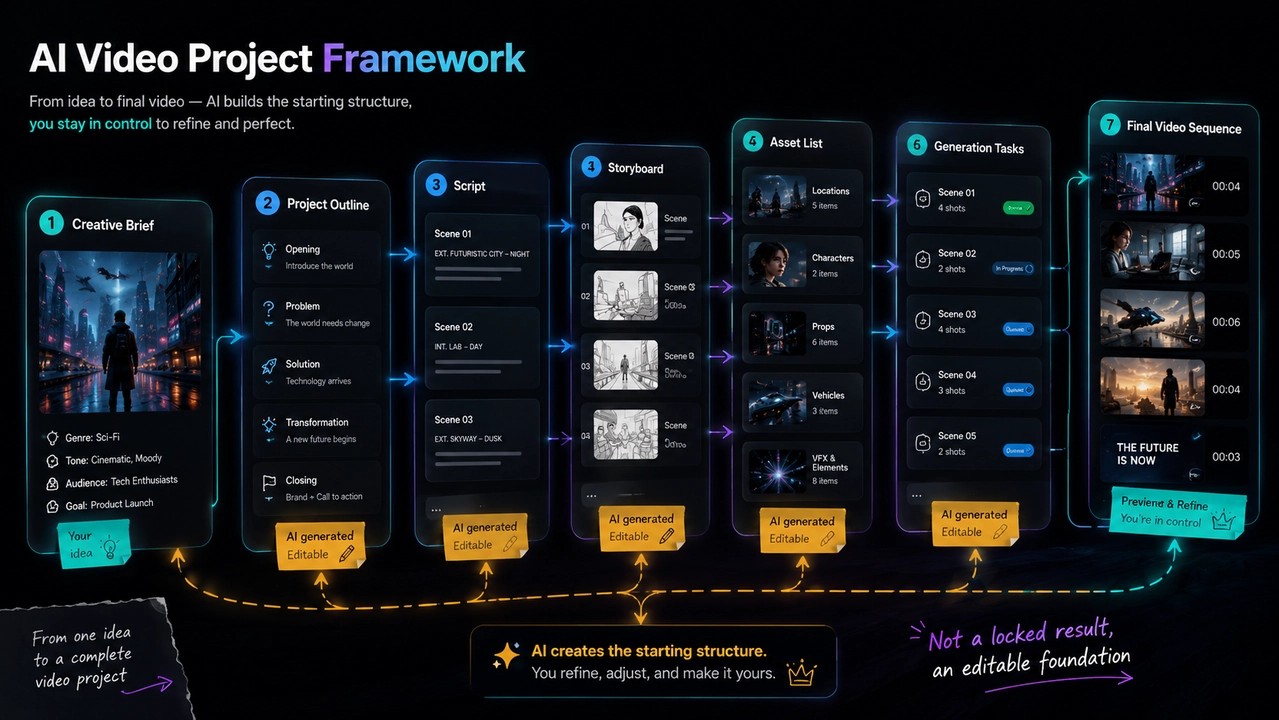
Illustrative PixVerse project workflow, reproduced from our Canvas workflow guide: planning and generation stay connected on one board.
For a creator, the practical appeal is selective delegation. Keep an approved reference beside the shots it informs, compare alternatives, and decide what moves forward. Our Canvas workflow guide shows how that structure connects planning and generation across a project.
The official PixVerse CLI page describes terminal access to video, image, voice, and music generation, with structured JSON output and task polling for automated workflows. Our CLI introduction explains how coding agents can use those interfaces and how creators can check capabilities before a run.
This separates the production instructions from an individual tool call. A developer can design a process that submits work, records results, and stops for review at agreed points. Evaluate the orchestration and the generated media separately: reliable submission and polling matter, but the selected shots still need to communicate the intended message.
PixVerse’s Prompt to Production announcement also outlines planned lessons on automating production pipelines with Codex and the PixVerse CLI after its October webinars.
Compare AI Video Agent Workflows: Three Questions
Use these questions to test how each production approach handles the next revision.
| Approach | Where the workflow centers | What to test first |
|---|---|---|
| Synthesia Syren | Code-written video, live rendering, and chat revisions | Can a specific edit preserve the surrounding design? |
| vivago R1 | Agent coordination across production stages | Does the story remain coherent through revisions? |
| PixVerse Canvas and CLI | A visible project workspace plus scriptable media tools | Can the process be reviewed and repeated? |
The choice depends on where you want control. A polished first pass is valuable when the concept is still open. A visible production process becomes more valuable when some decisions are already approved and must survive every subsequent change.
Recommendations by Creator Type
Solo marketers and explainer creators: Put Syren on your shortlist when the deliverable is a designed message. Test it with approved source material, then request one substantial correction. Judge readability and message accuracy alongside visual polish.
Narrative creators exploring a complete first draft: Consider vivago R1 when you want to evaluate delegated production. Approve the story before refining individual scenes. Keep a record of which decisions the system preserves and which require repeated reminders.
Creative teams comparing takes and models: Start with a Canvas-centered workflow when review visibility matters most. Agree on selection criteria before generating alternatives, and keep rejected options distinguishable from approved takes.
Developers and teams producing recurring variations: Explore the CLI route when the production rules are repeatable. Begin with a small reviewed batch, retain inputs and results, and define where automation must pause. A repeatable process should include review decisions as well as tool execution.
Choose a process around the decisions you need to preserve. A solo creator may prioritize a quick reviewable draft, while a team needs an explicit record of approved assets and changes.
How to Test an AI Video Agent Through Revisions
Use the same brief and approved references wherever possible. After the first draft, ask for one structural change and one precise correction. Then review:
- Message: Does the revised video still communicate the intended point?
- Continuity: Which approved visual and story decisions survived?
- Edit scope: Did unrelated scenes change?
- Handoff: Can another person understand what was generated and approved?
- Delivery effort: How much work remains before you would publish it?
Record actual usage and elapsed time during your trial, including the work needed to correct the first draft. Compare the effort required to reach an approved deliverable, rather than measuring only how quickly a video appears.
AI Video Agent FAQ
How is an AI video agent different from an AI video generator?
A generator typically answers a request for an individual asset, such as a shot from a prompt. An agent is assigned a broader outcome and coordinates the steps needed to reach it. When comparing tools, inspect whether planning, generation, and revisions share project context or require you to transfer information between stages.
Can an AI video agent make a complete video?
Finished-video workflows are central to both Syren’s launch announcement and vivago R1’s release. Define what completion means for your project: a draft ready for feedback or an approved export. Check the script, visual continuity, sound, and required corrections before accepting the result.
Do I need coding skills to use an AI video agent?
Syren and vivago R1 describe conversational creation and revision in their launch materials. For a terminal-based workflow, PixVerse’s CLI guide covers command setup and structured results. Choose the interface you can review comfortably; a chat interface still benefits from a clear brief, while a scripted process needs explicit instructions for failures and approval points.
Which AI video agent workflow should I choose?
Start with the job you repeat most often. Test a designed explainer, a narrative draft, or a batch of product variations using approved references. Request a meaningful revision, then compare how much work remains. The best fit for your team is the process that makes both the output and the next correction manageable.
Related Resources
- PixVerse Canvas: A Visual Workspace for AI Video Projects
- Generate AI Videos and Images With PixVerse CLI
- PixVerse and OpenAI: Prompt to Production
- Plan a Video With an AI Storyboard Generator
The direction is promising: ask for a complete creative outcome, then judge how well you can steer it. To keep those decisions visible as you explore an AI video agent workflow, start with one brief in PixVerse Canvas.