Texas Line Dance: Step into a Lively Country Roadhouse Hoedown
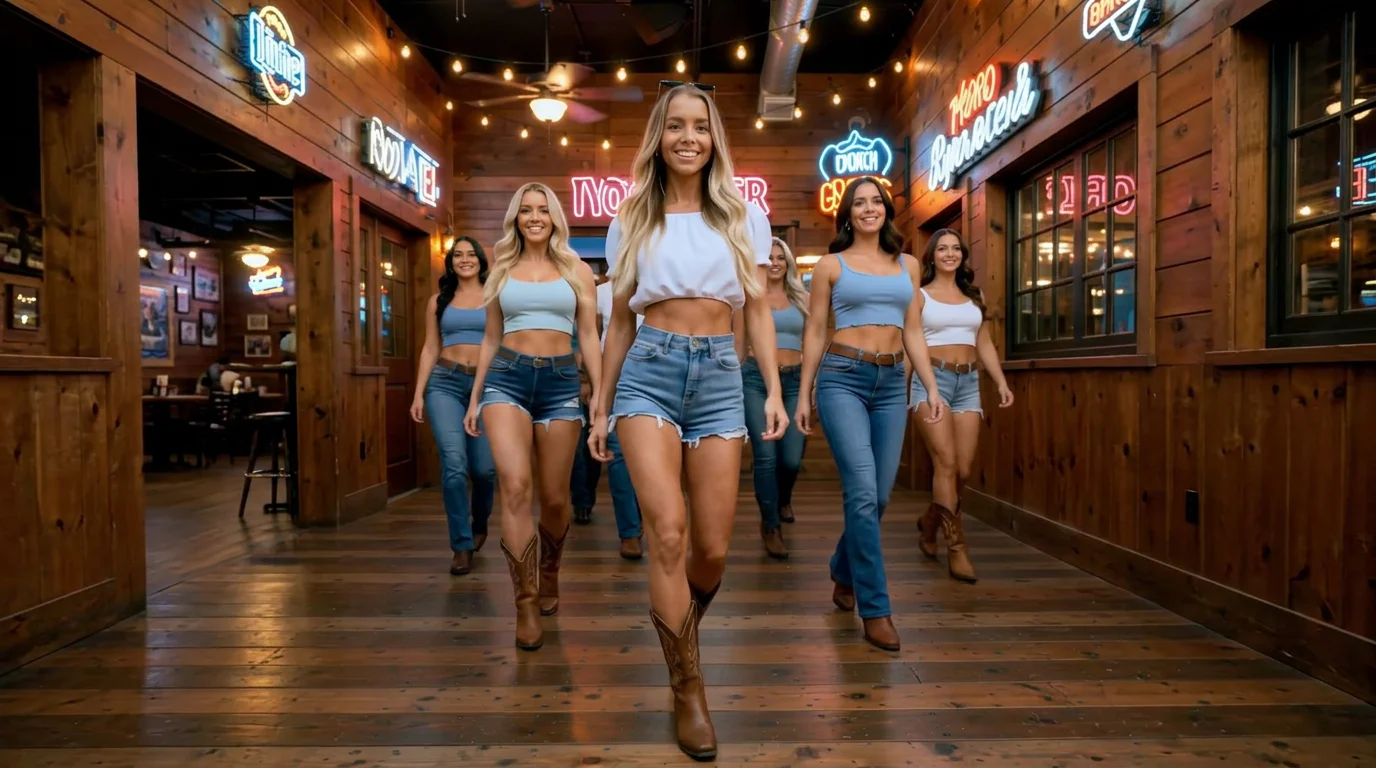
Line dance in a lively Texas roadhouse surrounded by a crowd in stylish summer western outfits. That is the official prompt for PixVerse’s newly launched TEXAS LINE DANCE template — a rhythmic V6 image-to-video effect that places your subject right on the wooden dance floor of an iconic rustic country tavern.
The official preview shows the subject dressed in stylish summer western wear, stepping in sync with a joyful crowd beneath warm tavern lights and neon roadhouse signs. The same one-click flow works effortlessly with portraits of you, friends, or country music fans.
See It In Action
What Is the TEXAS LINE DANCE Template?
TEXAS LINE DANCE is an authentic PixVerse image-to-video template powered by PixVerse V6. You upload one photo; PixVerse V6 generates a 10-second vertical country dance video. You do not write a prompt — the template prompt is locked, so the effect stays consistent.
Template name Video
| Field | Value |
|---|---|
| Template name | TEXAS LINE DANCE |
| Template ID | 414111638411741 |
| Output | Video |
| Model | PixVerse V6 |
| Input | 1 photo |
| Duration | 10 seconds |
| Quality | 360p / 540p / 720p / 1080p |
| Audio | Included |
| Custom prompt | Off |
| Launched | Jul 28 2026 |
How it works
- Upload one photo — a clear portrait or well-lit shot works best
- Select TEXAS LINE DANCE — search the name in PixVerse templates, or use Template ID
414111638411741 - Generate — PixVerse V6 applies the effect automatically
- Download and share — export the clip for TikTok, Reels, or Shorts
What’s in the Official Preview
- The subject executing classic synchronized line dance steps with flair
- A vibrant crowd in chic summer cowboy hats, denim, and western boots
- A rustic wooden roadhouse interior with glowing tavern chandeliers and neon signs
- An upbeat, foot-tapping country honky-tonk atmosphere
How to Create Your TEXAS LINE DANCE Video
Step 1: Choose a photo
Choose a clear portrait or full-body photo with good frontal lighting.
Step 2: Open PixVerse
Visit PixVerse on web or in the app, then open the template library.
Step 3: Find {name}
Search TEXAS LINE DANCE or look under newly launched templates. Confirm Template ID 414111638411741.
Step 4: Generate
Upload the photo and generate. The template does not accept a custom prompt, so you do not need to describe the scene.
Tips
- Portraits with confident, smiling expressions fit the country roadhouse vibe best
- High-resolution photos keep western clothing details and facial features sharp
- Full-body or three-quarter shots translate seamlessly into authentic dance postures
- The output is vertical 1080p, perfectly formatted for TikTok, Instagram Reels, and Shorts
Frequently Asked Questions (FAQ)
Q: Do I need to write a prompt? A: No. TEXAS LINE DANCE has custom prompts turned off. Upload one photo and generate.
Q: How long is the video? A: 10 seconds, generated with PixVerse V6.
Q: What quality is available? A: 360p, 540p, 720p, and 1080p.
Q: How many photos do I upload? A: One. This is a single-image template.
Q: Does it include country audio? A: Yes. The generated clip includes an authentic upbeat country line dance soundtrack.
Ready to line dance Texas-style? Open PixVerse, search TEXAS LINE DANCE, and generate from one photo.
Related templates:
- Festival Dance — groove under vibrant outdoor festival lights
- Summer Aura King — unleash an epic beachside legend aura
- Banana Boat Party — high-speed tropical ocean ride
- Little Gymnast — tiny gymnast on the rings