AI Music Video Generators Ranked: 7 Tools Tested for 2026
Picking an AI music video generator usually comes down to one question: what does your song actually need? A lyric video with clean captions is a different job than an audio-reactive visualizer, and a tool built for one rarely excels at the other. Most platforms in this space start the same way — you hand over an audio track — but what happens after that upload varies a lot.
We ranked 7 AI music video generators for 2026 using the criteria that matter once you move past the demo reel: how the tool reads audio, whether it can keep a performer looking consistent across scenes, how it handles lyric captions, what formats it exports, and what it actually costs once free credits run out. Along the way we show where PixVerse VibeMV AI fits for anyone who wants a captioned, styled music video straight from one audio file, without stitching multiple tools together.
Already decided you just need to convert one song into a finished video? Check our blog for a step-by-step walkthrough on turning a track into a finished AI music video. This article is for the earlier decision — choosing which generator to use in the first place.
The Criteria We Ranked On
Not every video tool tagged “music” is built for music. A general-purpose AI video generator can animate a clip, but it won’t read a waveform or land a cut on the drop. Here’s what separates a purpose-built music video tool from a generic one:
| What we checked | Why it matters |
|---|---|
| Audio formats accepted | MP3/WAV/M4A/AAC upload, and whether a Suno or Udio link works too |
| Beat and section awareness | Whether scene changes actually track the song’s structure |
| Caption/lyric handling | Auto-generated captions you can review and correct before rendering |
| Performer consistency | Keeping the same face/character recognizable scene to scene |
| Output formats | 16:9, 9:16, and square exports for different platforms |
| Max resolution | 720p vs 1080p+ for final delivery |
| Pricing transparency | Clear free tier, credit costs, and watermark policy |
Performer consistency matters most when a real person — a singer or a recurring character — needs to stay on screen. If that’s your focus, our guide on building consistent AI video characters goes deeper on technique. If you’re not starting from a song at all, the wider text-to-video generator comparison is the better starting point.
A Note on Methodology
Rankings below reflect published pricing pages, documented input/output support, and stated workflow behavior as of early June 2026 — not a side-by-side render of identical audio across every platform. Treat this as a shortlist to narrow your search, not a lab benchmark.
Two things move fast in this category: pricing tiers and commercial-use terms. Confirm both inside the app before you commit a full release to any tool, including PixVerse.
Ranked: 7 AI Music Video Generators for 2026
| Rank | Tool | Strongest use case | Audio in | Character/lip sync | Captions | Starting price |
|---|---|---|---|---|---|---|
| 1 | PixVerse VibeMV AI | One-file, captioned, styled MV | MP3/WAV/M4A/AAC upload | Yes, from a photo | Yes, reviewable | Free credits; paid plans from $19/mo |
| 2 | Freebeat | Multiple formats from one track | Upload or Suno/Udio/YouTube link | Yes, several modes | Yes (lyric mode) | Free tier; $4.99/week |
| 3 | VidMuse | Approve-before-render storyboards | Upload or Suno/Spotify link | Yes, character lock | Yes | Free 1,000 credits; $39/mo |
| 4 | Pexo | Fast vertical clips from a prompt | Upload or song link | Performance modes | Lyric mode | Free to start; paid from higher tiers |
| 5 | Revid | Short Suno-to-clip exports | Upload or Suno link | Limited | Yes, animated | $39/mo |
| 6 | Neural Frames | Abstract, audio-reactive visuals | Track upload | None | Limited | $26/mo (annual) |
| 7 | Kaiber | Stylized, artistic visuals | Audio upload | Limited | Limited | $10/mo |
1. PixVerse VibeMV AI — Best Overall for a Finished, Captioned MV
Ideal for: anyone who wants one audio file to become a shareable, subtitled music video without juggling separate caption and animation tools. Cost: free trial credits to start; published VibeMV tiers run Hobby at $19/month (600 credits), Pro at $49/month (1,700 credits), and Studio at $99/month (3,800 credits). Always check the in-app estimate first — cost shifts with track length, mode, and resolution.
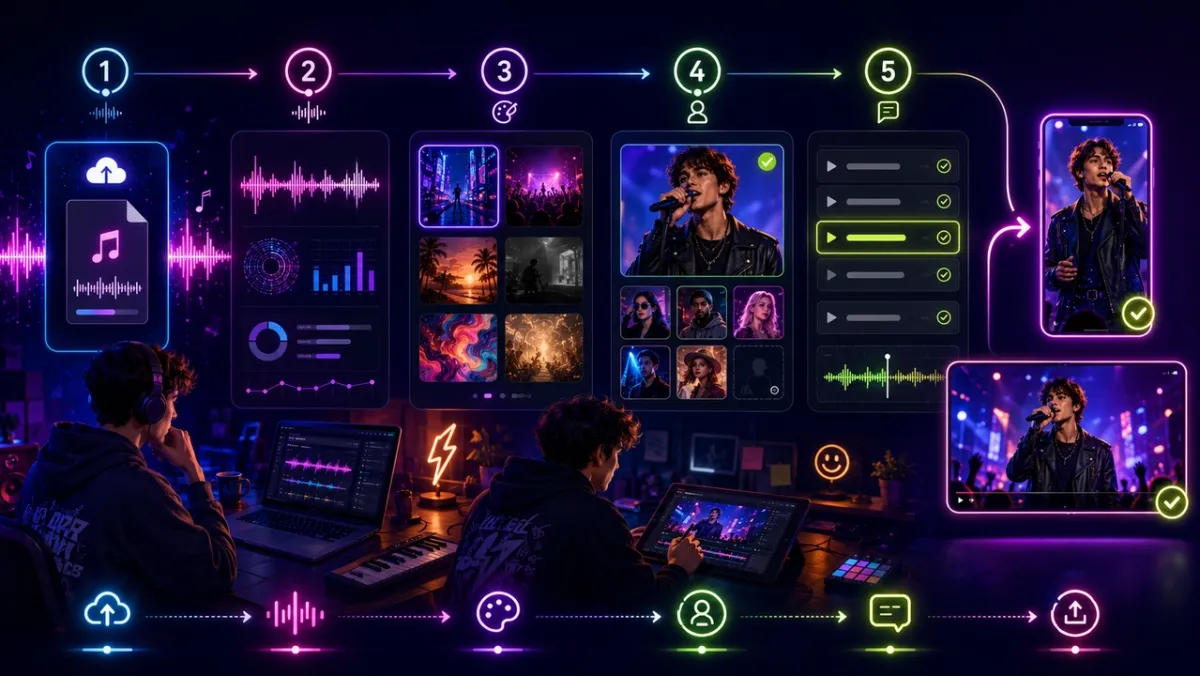
VibeMV AI is a Mini App inside PixVerse, purpose-built around music. Drop in an audio file between 10 seconds and 6 minutes — MP3, WAV, M4A, or AAC — and it analyzes the track before generating visuals synced to it, with optional lyric captions layered on top.
The strongest part of the workflow is how much control you get without a steep learning curve. Choose a Video Style and Music Style across genres like Pop, Rock, Hip Hop, R&B, Jazz, and Electronic, upload a single character photo to keep that performer recognizable throughout, and toggle on captions with a verification step — you can review, correct, and re-identify detected lyrics before the final render runs. Instrumental tracks skip the lyric step automatically.
Exports come in 16:9, 9:16, 1:1, 4:3, and 3:4 at 720p or 1080p, so one upload can produce both a landscape YouTube version and a vertical clip for Shorts or Reels. Since it lives inside PixVerse, VibeMV AI sits alongside the platform’s broader video model lineup. Teams planning automated, repeated MV generation should check PixVerse’s separate API pricing rather than assume Web credits apply.
2. Freebeat — Best for Getting Several Formats from One Song
Ideal for: creators who want story videos, lyric videos, dance videos, and short social clips all pulled from the same track. Cost: free plan available; Basic $4.99/week, Standard $9.99/month, Pro $24.99/month.
Freebeat markets itself as an automated director — it plans, shoots, and edits a music video without much manual input. It accepts direct audio uploads plus links from Suno, Udio, YouTube, TikTok, and SoundCloud, which makes it convenient if your song already lives somewhere else.
The appeal here is format range rather than depth in any single mode. If you need to spin one track into several deliverables for different platforms, Freebeat is worth testing — just verify how its section detection performs on your specific genre before relying on it for a release.
3. VidMuse — Best for Reviewing a Storyboard Before Rendering
Ideal for: creators who want to approve a script and shot plan before committing render credits. Cost: free tier with 1,000 one-time credits; Pro at $39/month ($33/month billed yearly, 4,000 monthly credits); Studio at $159/month ($133/month billed yearly, 18,000 monthly credits).
VidMuse drafts a script and storyboard from your track first, and you sign off on it before any video renders. It takes audio uploads or links from Suno, Udio, and YouTube, supports character references with lip sync, and exports 1080p for YouTube, TikTok, and Instagram.
That preview step is the differentiator — it gives you a checkpoint most one-pass tools skip. If you’d rather avoid wasted renders on a track you’re precious about, this workflow is worth the extra step. Compare its turnaround time against faster tools if release timing matters.
4. Pexo — Best for Quick Vertical Clips from a Vibe Description
Ideal for: fast, short-form social videos generated from a plain description rather than detailed settings. Cost: free to start; Pro, Elite, and Max paid tiers, with Max listed from $100/month. Confirm exact credit allowances at checkout since the pricing page can vary.
Pexo reads a track’s tempo and tone, then builds a video from a short text description of the mood you’re after. It covers narrative, performance, abstract, lyric, vertical, and Spotify Canvas styles — useful when you want variety without deep manual editing.
This is a solid pick when speed matters more than fine control. Double-check watermarking, credit expiration, and commercial-use terms for whichever tier you land on.
5. Revid — Best for Short Suno-to-Clip Exports
Ideal for: Suno users who want a fast, share-ready short clip rather than a full-length video. Cost: Hobby $39/month; Growth at a promotional $39/month (2,000 credits); Ultra $199/month (12,000 credits). Its FAQ also references Lite and Elite tiers, so verify current names before buying.
Revid is built around converting a Suno link or uploaded track into short vertical videos with synced captions and effects aimed squarely at TikTok, Reels, and Shorts. It syncs to either lyrics or beats and can add a waveform effect.
It’s a convenient companion tool for a release announcement rather than a full production pipeline. If you need a full-length landscape MV with a consistent on-screen performer, look higher on this list instead.
6. Neural Frames — Best for Abstract, Audio-Reactive Visuals
Ideal for: electronic, ambient, and visualizer-style output rather than performance footage. Cost: yearly billing at $26/month for Knight (2,400 credits), $66/month for Ninja (7,200 credits), $199/month for Nirvana (24,000 credits).
Neural Frames treats your track like an instrument panel — it separates stems (drums, bass, vocals, and more) and maps them to visual parameters, so imagery pulses and morphs with the music. Its Autopilot mode automates this while staying locked to the track’s energy.
Pick this when you want art that reacts to sound rather than a character telling a story. It has no lip sync focus, so vocal-led performance videos are better served elsewhere on this list.
7. Kaiber — Best for a Distinct Artistic Look
Ideal for: music visuals with a strong stylized or animated aesthetic. Cost: $5 five-day trial (500 credits); Starter $10/month (500 credits); Creator $29/month (1,500 credits); Pro $99/month (5,000 credits).
Kaiber turns audio and prompts into stylized, often dreamlike visuals, and it’s popular with artists chasing a specific look rather than literal footage of a performance.
Expect to iterate on prompts and style settings to land the aesthetic you want. Check resolution limits, credit rollover, and length caps on your plan before scoping a full video around it.
Matching the Tool to the Job
| You need to… | Reach for |
|---|---|
| Ship a captioned, styled MV from one file | PixVerse VibeMV AI |
| Get multiple formats out of a single track | Freebeat |
| Approve a plan before spending render credits | VidMuse |
| Post a fast vertical clip from a mood description | Pexo |
| Convert a Suno track into a short teaser | Revid |
| Produce abstract, audio-reactive art | Neural Frames |
| Chase a distinct stylized aesthetic | Kaiber |
If your track also needs a short-form cutdown after the main video is done, pair whichever tool you choose with our YouTube Shorts AI video generator ideas for the right hook and framing.
Pricing and Rights Checklist Before You Publish
Credits, tiers, and limits shift often across this category, so treat every price above as a snapshot rather than a locked-in quote. For PixVerse workflows specifically, check the in-app credit estimate before rendering — cost depends on song length, resolution, and mode — and remember that PixVerse API credits are billed separately from PixVerse Web credits.
Before publishing anything paid or monetized, confirm four things for whichever tool you pick:
- Watermarks: free tiers are fine for testing but often aren’t release-ready.
- Commercial rights: many platforms gate commercial use behind a paid plan.
- Real credit cost: retries, longer tracks, and higher resolution add up fast.
- Rights to your inputs: make sure you actually control the song, vocals, and any character photo you upload.
Final Take
There’s no single “best” AI music video generator — there’s a best fit for the song and platform in front of you. For a finished, subtitled MV built from one audio file, with an optional consistent performer and exports ready for both YouTube and vertical feeds, PixVerse VibeMV AI is the most direct route.
If format variety matters more than depth, try Freebeat. If you want to preview a storyboard before rendering, VidMuse is built for that. If abstract visuals are the goal, Neural Frames is worth a look. Whichever you choose, verify current pricing and terms before locking in a release.
FAQ
Q: What’s the best AI music video generator right now? A: It depends on the output you need. For a captioned, styled MV from a single audio file with an optional consistent character, PixVerse VibeMV AI is the strongest starting point. For multi-format social output, Freebeat is worth testing. For abstract, audio-reactive art, Neural Frames fits better.
Q: Can AI actually turn a song into a music video? A: Yes. Music-focused generators take an audio file or song link, analyze its structure, and generate visuals timed to the track. Many also add reviewable lyric captions and let you lock in a consistent on-screen character.
Q: Which of these tools works with Suno tracks? A: Freebeat, VidMuse, and Revid all accept Suno links directly. Any tool that supports plain audio upload — including PixVerse VibeMV AI — also works once you export the Suno track as an audio file.
Q: Is there a free AI music video generator? A: Several offer a free tier or starting credits, including PixVerse VibeMV AI, Freebeat, VidMuse, and Pexo. Free usage usually comes with watermarks or lower resolution, so check current terms before relying on it for a real release.
Q: How reliable are the prices listed here? A: They reflect public pricing pages at the time of writing. Credit packs, tier names, and commercial-use terms change often in this space, so confirm current numbers at checkout or inside the app before generating a full-length track or publishing commercially.
Q: Do any of these tools support lyric captions? A: Yes. PixVerse VibeMV AI detects lyrics from the audio track and lets you review and edit them before rendering; other tools on this list offer dedicated lyric-video modes. Instrumental tracks can skip captioning entirely.
Q: What export formats and resolutions are available? A: This varies by platform. PixVerse VibeMV AI supports 720p or 1080p across 16:9, 9:16, 1:1, 4:3, and 3:4 — enough to cover YouTube, TikTok, Reels, and Shorts. Check each tool’s current pricing page for its maximum resolution and supported ratios.